Introduction
Shopping should be simple.
Instead, someone walks into a store for toothpaste and somehow leaves with decorative candles, a seasonal mug, three snacks that were absolutely not on the list, and a mysterious kitchen gadget that promises to slice, dice, and possibly communicate with dolphins.
The shopping isn’t the problem. The lack of a system is.
Families juggle grocery budgets, holiday purchases, back-to-school lists, household supplies, birthdays, subscriptions, and bulk purchases that seemed like a Good Thing until they discovered they now own enough pasta to survive a minor apocalypse.
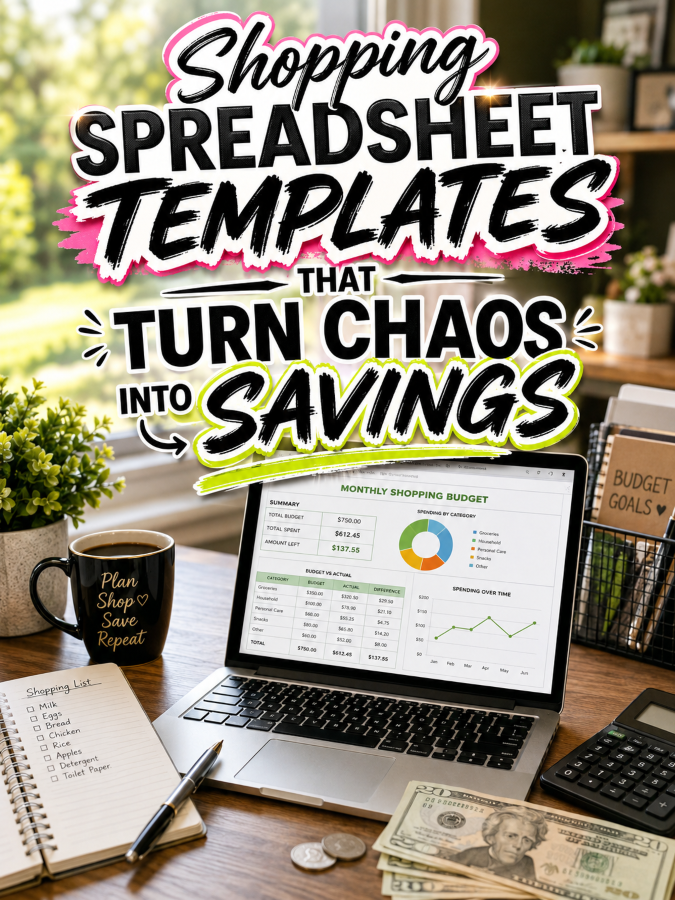
That’s exactly why Shopping Spreadsheet Templates continue selling year after year. They help people organize purchases, avoid overspending, and make smarter buying decisions while giving creators an evergreen digital product opportunity.
One thoughtfully designed spreadsheet can quietly save a family hundreds of dollars while removing a surprising amount of stress from everyday shopping.
Quick Answer
Shopping Spreadsheet Templates are downloadable tools that help customers organize grocery lists, price comparisons, wish lists, recurring purchases, holiday shopping, budget tracking, inventory management, and household expenses.
A starter spreadsheet can comfortably sell for around $7. Expand it into family budgeting systems, meal planning collections, holiday shopping planners, and premium household management bundles, and you’ve built a natural product ladder reaching $27, $47, and even $77.
People don’t want more spreadsheets. They want fewer surprises at checkout. That someone creating that solution could absolutely be you!
Why This Niche Works
Every household shops constantly. Groceries, clothing, gifts, school supplies, pet products, cleaning supplies, and seasonal purchases create never-ending opportunities for better organization.
Many shoppers rely on memory, screenshots, sticky notes, and receipts stuffed into handbags like archaeological artifacts waiting to be discovered centuries later.
Once customers discover a shopping system that genuinely saves money and reduces stress, they’ll often return for meal planners, budget trackers, inventory systems, and countless related thingees.
Unlike trendy gadgets that vanish after six months, buying necessities is one hobby humanity appears committed to keeping forever.
Prior to pouncing upon this opportunity, you should first know all about the:
Tools You’ll Need
You don’t need accounting software that requires its own instruction manual. These simple tools are more than enough.
- Canva for designing printable spreadsheet layouts and companion worksheets.
- Google Docs for creating instructions and user guides.
- AWeber for building your email list with shopping tips and printable updates.
- GetResponse for automating launches and customer follow-up.
- Gumroad for selling downloadable spreadsheet bundles.
- Teachable if you’d eventually like to teach budgeting or household management.
- Amazon Shopping Planner Research for discovering features buyers appreciate most.
Don’t spend six weeks selecting fonts while your future customers are standing in aisle seven trying to remember whether they already own paprika.
Next, move to:
Your 5-Step Action Plan
Follow these five steps unless you’d rather spend 22 hours comparing grocery prices while accidentally ordering socks online for reasons nobody fully understands.
Step 1. Identify One Shopping Problem
Spend about 89 minutes researching customer frustrations in budgeting groups, parenting communities, meal planning blogs, and shopping forums.
Create a list containing 28 to 35 shopping challenges people mention repeatedly. Focus on overspending, forgotten items, duplicate purchases, coupon tracking, inventory management, and seasonal budgeting.
Your research becomes an X-ray machine that reveals expensive habits buyers often don’t even notice.
Step 2. Build the Simplest Useful Template
Create a spreadsheet containing 12 to 18 tabs or pages that solve one shopping problem exceptionally well.
Include category tracking, price comparisons, purchase history, inventory levels, budget alerts, and savings summaries. Keep everything simple because simplicity is always a Good Thing.
Step 3. Add Practical Extras
Shopping decisions rarely happen in isolation.
Add grocery lists, pantry trackers, meal planning sheets, holiday budgeting pages, and subscription reminders that complement the main spreadsheet.
Step 4. Test It Like a Real Customer
Use your spreadsheet for at least 14 days before launching it.
If you find yourself confused by your own design, your customers probably will too. That’s valuable feedback, not failure.
Step 5. Build Your Product Ladder
Your first spreadsheet becomes the foundation for future products.
Expand into meal planning systems, family budgeting bundles, pantry inventories, price comparison tools, and complete household management systems.
Once you’ve figured out all of the above, the next step is implementing:
3 Ways to Stand Out From The Thundering Herd!
Let’s be honest. Shopping templates are everywhere. That’s about as surprising as finding at least three nearly identical bottles of ketchup in the average refrigerator.
The Good Thing is that most shopping spreadsheets feel like they were designed by someone who genuinely enjoys tax paperwork and alphabetizing spices for recreational purposes.
Your goal is to make shopping feel simpler, faster, and less stressful.
Way 1. Build Around Specific Shopping Situations
Don’t create a spreadsheet for “shopping.”
Create templates for weekly groceries, holiday gifts, Costco runs, back-to-school supplies, pet expenses, meal prep shopping, camping supplies, or baby essentials. A restaurant menu that simply says “food” rarely excites anyone, and generic spreadsheets create the same problem.
Specific templates immediately tell buyers, “This was made for someone exactly like me.”
Way 2. Make Savings Visible
People love saving money, but they absolutely adore seeing proof that they’re saving money.
Add monthly savings trackers, price history charts, coupon savings summaries, and spending trend pages. Watching savings grow feels surprisingly satisfying, a bit like finding cash in a jacket pocket you haven’t worn since winter.
Those extra thingees increase perceived value without adding much extra work.
Way 3. Keep Setup Ridiculously Simple
Many spreadsheet creators accidentally build aircraft control panels disguised as shopping tools.
Use clear labels, simple formulas, and obvious instructions. If a customer needs a 63-minute tutorial video before buying bananas, something has gone terribly wrong.
Next, here’s the thing. You’re probably NOT the only person offering this service. So you now require:
3 Nifty Ways to Find Customers
You don’t need paid ads because your buyers are already waving giant flags all over the internet asking for help with budgeting and shopping decisions.
Way 1. Pinterest
Pinterest users love planners, budgeting systems, meal prep ideas, and household organization tools.
Create attractive pins showing spending trackers, grocery planners, savings charts, and comparison tools. Helpful visuals can continue generating traffic for months or even years.
Way 2. Budgeting and Meal Planning Communities
Facebook groups and forums are filled with people looking for practical ways to reduce expenses.
Offer advice, answer questions, and become useful before mentioning your products. Helpful people become trusted people surprisingly quickly.
Way 3. Email Newsletters
Email subscribers often become your most reliable customers.
Share shopping tips, seasonal savings ideas, and printable updates that genuinely improve everyday life. Trust compounds over time like interest, only with fewer spreadsheets and fewer bank managers.
Speaking of completed projects, now let’s move to:
3 Takeaways You Won’t Find Elsewhere!
These aren’t feel-good reminders. They’re practical lessons that quietly separate successful creators from forgotten download folders.
Takeaway 1. You’re Selling Control
Customers aren’t buying formulas and columns.
They’re buying confidence that their money is going where they intended instead of mysteriously evaporating between aisle four and the checkout line.
Takeaway 2. Small Savings Become Big Savings
Saving $8 here and $12 there may not sound exciting.
Over a year, those little wins often become several hundred dollars. That’s enough to fund holidays, hobbies, emergency savings, or possibly an alarmingly large collection of gardening gloves.
Takeaway 3. One Spreadsheet Can Become an Entire System
A grocery planner can become a meal planning bundle, then a pantry tracker, then a budgeting system, then a household management library.
Those connected thingees make scaling far easier than constantly inventing new niches from scratch.
Now that you know the above, it’s time for:
3 Common Mistakes to Avoid
Many creators make spreadsheets too complicated.
That’s Not a Good Thing. Most customers want convenience, not an advanced mathematics qualification.
Some sellers ignore mobile users.
Many buyers check shopping lists on their phones while standing inside stores. Mobile-friendly layouts are always a Good Thing.
Others stop after building one spreadsheet.
The biggest opportunity often arrives when customers ask for companion templates and additional tools.
What else should you know? How about:
Scaling Your Results
Expand into household systems.
Create meal planners, pantry inventories, budget dashboards, subscription trackers, holiday planners, and family management systems that work together.
Create premium bundles.
Bundle spreadsheets, printables, trackers, planners, and templates into complete household management solutions buyers will happily purchase together.
Build an email list families genuinely appreciate.
A collection containing 34 shopping templates could realistically generate an additional $524 to $1,486 each month through bundles, repeat purchases, memberships, and seasonal promotions. Trust me, you’ll thank me later.
Let’s now wrap up everything via the:
Your Next Steps
Choose one shopping problem and solve it exceptionally well. Resist the temptation to build an all-in-one system that organizes groceries, birthdays, pets, taxes, vacations, and moon landings simultaneously.
Spend one weekend creating your first useful template. Test it in real life. Improve it based on actual use instead of theoretical perfection.
Then show it to five people who regularly shop in that category. Remember, 5 good messages beats 50 generic ones every single time.
One thoughtful spreadsheet can quietly become the beginning of an entire digital product catalog.
Next, let’s finish with:
Final Thoughts
The best shopping systems don’t make people buy less. They help people buy smarter.
Your Shopping Spreadsheet Templates can reduce stress, improve budgeting, and give families greater confidence in their financial decisions. That’s why this niche keeps attracting buyers year after year.
Start with one template that solves one everyday problem. Keep improving it. Keep listening to your customers. Keep building useful tools that make ordinary life a little easier. You don’t need bazillions of products to build meaningful income. You simply need one useful solution that people are happy to recommend.
That’s it. That’s your beginning!
If you were creating your first Shopping Spreadsheet Template tomorrow morning, what would it help people buy more wisely?
Enjoy!