Introduction
Digital product sellers have a wonderfully sneaky advantage: the calendar keeps handing them reasons to create something new. Back-to-school season arrives, then Halloween, Thanksgiving, Christmas, New Year’s, Valentine’s Day, spring cleaning, summer vacations, and approximately seventeen other occasions that suddenly make customers think, “I need a printable for that!” The challenge is not finding seasonal ideas; the challenge is organizing those ideas early enough that you are not designing Christmas products while wearing bunny ears and wondering why the holiday launch snuck up on you again.
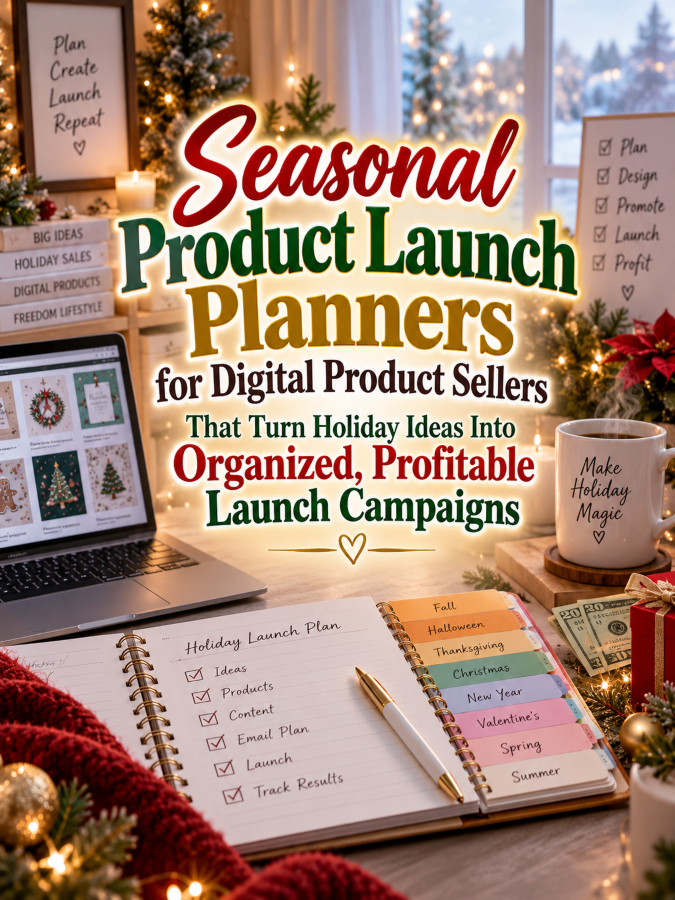
That is where seasonal product launch planners become such a useful digital product niche. A well-designed planner can help sellers choose seasonal opportunities, research customer demand, plan products, create launch timelines, prepare marketing content, schedule promotions, organize email campaigns, and review results afterward. Instead of treating every holiday as a last-minute creative emergency, sellers can build a repeatable system for turning seasonal opportunities into organized campaigns.
This niche is especially attractive because digital product sellers can create seasonal products repeatedly throughout the year. One planner can support Halloween, Christmas, Valentine’s Day, Mother’s Day, graduation season, summer travel, back-to-school, and countless other events without requiring the seller to reinvent the entire launch process. That creates a natural opportunity for a product ladder, recurring updates, specialized seasonal editions, and a growing collection of launch-planning thingees.
Quick Answer
Quick Answer
A seasonal product launch planner is a printable or digital planning system that helps digital product sellers prepare and organize products around holidays, seasons, events, and predictable buying periods. It can include seasonal idea pages, product development checklists, launch timelines, content calendars, email planning sheets, promotion trackers, inventory or listing checklists, and post-launch review pages. The goal is to help sellers move from “I should make something for that” to a clear, organized launch plan.
You can start with a $7 seasonal launch planner containing a yearly opportunity calendar, product idea sheets, launch checklists, and simple timelines. A $17 version could add marketing and content planning, a $27 workbook could teach sellers how to plan seasonal campaigns, and $47 and $77 products could become complete seasonal launch systems with campaign templates, quarterly planning pages, promotional trackers, and reusable launch workflows. This gives you multiple price points while serving customers at different stages of their digital-product business.
Why This Niche Works
Seasonal selling has one major characteristic that makes organization extremely important: timing matters. Customers often begin searching for holiday-related products before the holiday itself, which means sellers need time to research, create, test, list, market, and promote their products. A launch planner can help sellers think backward from an important date instead of discovering three days beforehand that they have forgotten approximately everything.
Digital products are particularly well suited to seasonal launches because sellers can create a product once and potentially sell it repeatedly during the relevant season. A Christmas planner can return every year, while a back-to-school organizer can become an annual product, and a Valentine’s Day printable can be refreshed rather than completely rebuilt. That makes seasonal planning useful not only for individual launches but also for building a repeatable annual business rhythm.
The niche also gives you several natural audiences. You can serve printable sellers, template creators, worksheet designers, digital educators, Etsy-style digital shops, affiliate marketers, course creators, and other online entrepreneurs who create seasonal offers. That’s a Good Thing because your core planning framework can remain consistent while your examples and specialized versions change.
Tools You’ll Need
You can create seasonal launch planners with relatively simple tools. Canva can help you design planning pages, calendars, campaign worksheets, checklists, launch timelines, social-media planning sheets, and product mockups. Google Docs can help you write instructions, organize campaign ideas, draft marketing copy, and create supporting worksheets.
For email marketing, AWeber and GetResponse can help digital sellers build subscriber lists and organize seasonal campaigns. You can sell your launch-planning products through Gumroad or create educational programs around seasonal product planning through Teachable. For market research, Amazon Seasonal Product Research can help you explore holiday planners, business books, calendars, and related organizational products.
You will also need a calendar and a willingness to think several months ahead. Look at major seasons and events, then identify the products customers might want before each one arrives. The calendar is not merely a schedule in this business; it is a map of potential product opportunities, and ignoring it is definitely Not a Good Thing.
Your 5-Step Action Plan
Step 1: Build a Seasonal Opportunity Calendar
Start by creating a yearly calendar that lists major holidays, seasons, events, school periods, gifting occasions, and other predictable buying moments. You do not need to include every obscure national day known to humankind because that can quickly turn your planner into a festival of tiny boxes. Focus first on events that are relevant to your customer’s audience and product category.
For each opportunity, create space for the event date, customer audience, product ideas, preparation deadline, launch date, and promotional period. This allows sellers to see the year as a series of opportunities instead of one giant blur. A seller can look ahead and decide which seasons deserve attention rather than reacting to whichever holiday is currently screaming from the calendar.
You can also create quarterly planning pages so sellers can choose their priority seasons. This is important because trying to launch something for every holiday can create burnout faster than you can say “free shipping.” A good planner should help customers choose strategically rather than encouraging them to chase every shiny seasonal thingee.
Step 2: Create a Product Development Workflow
Once the seller chooses a seasonal opportunity, the next step is turning the idea into an actual product. Create a product development worksheet with fields for the target customer, customer problem, product format, core features, product size, price point, and unique selling angle. This helps the seller think through the offer before spending hours designing something nobody particularly needs.
Add a development checklist covering research, outline, creation, editing, testing, file preparation, instructions, mockups, listing copy, and final quality control. The exact steps can vary depending on the seller’s platform and product type, so keep your planner flexible. The objective is to reduce forgotten steps without pretending there is one magical launch formula for every digital business.
You can also include a “Minimum Viable Seasonal Product” worksheet. This helps sellers identify the simplest useful version they could create first, which can be especially helpful when a seasonal deadline is approaching. Sometimes finishing a focused product on time is far more valuable than spending six weeks adding seventeen bonus thingees nobody asked for.
Step 3: Plan Backward From the Launch Date
One of the strongest features of a seasonal launch planner should be backward planning. Instead of starting with “I will launch sometime in October,” customers can enter the intended launch date and work backward through product creation, testing, listing preparation, marketing, email content, and promotional activities. This turns a vague intention into a sequence of manageable tasks.
Create a timeline with milestones such as product concept, research, first draft, final product, mockups, listing, email preparation, social content, early promotion, launch day, and follow-up. You can offer different planning windows for short, medium, and larger launches because not every digital product requires the same amount of preparation. A simple printable might need a short runway, while a major bundle or course could require much more planning.
Include a buffer for unexpected delays because life has a sense of humor. Files need fixing, designs need revisions, technology decides it has feelings, and sometimes the creator simply discovers that the product idea looked much better in their head. A realistic planner leaves room for these surprises rather than assuming every launch proceeds like a perfectly choreographed parade.
Step 4: Build the Marketing Campaign
A seasonal product launch needs more than a product listing. Create campaign planning pages where sellers can map out social posts, email messages, blog content, lead magnets, previews, promotions, reminders, and launch-day content. This helps the seller tell a story around the product rather than dropping one sales post onto the internet and hoping it develops legs.
You can include a content calendar with spaces for the date, platform, content type, topic, call to action, product connection, and status. Add an email sequence planner that allows sellers to outline early awareness, education, preview, launch, reminder, and follow-up messages. These pages can be reusable across different seasons, which increases the practical value of the planner.
Keep your marketing guidance focused on planning rather than guaranteeing results. A well-organized campaign can improve consistency and reduce forgotten tasks, but no planner can promise a particular number of sales. Your product should help sellers execute better while leaving room for them to test, learn, and adjust.
Step 5: Review the Launch and Save What Worked
The launch should not be considered finished when the promotional period ends. Create a post-launch review page where sellers can record what they created, when they launched, what marketing channels they used, which messages performed well, what customers asked, and what they would change next time. This turns one seasonal campaign into useful information for the following year.
Include sections for product performance, customer feedback, content ideas, promotional notes, lessons learned, and future improvements. A seller may discover that one type of bundle performed better than an individual product or that customers responded strongly to a particular benefit. Recording those observations makes the next launch more informed.
This creates a powerful annual cycle: plan, create, launch, review, improve, and repeat. The seller is no longer starting from zero every year, and your planner becomes the tool that helps preserve that knowledge. That’s it. That’s your beginning!
Once you’ve figured out all of the above, the next step is turning this planning workflow into a product that digital sellers can use repeatedly throughout the year.
3 Ways to Stand Out From The Thundering Herd!
Way 1: Make the Calendar Work Backward
One of the smartest features you can build into a seasonal launch planner is backward planning. Sellers often look at Halloween, Christmas, Valentine’s Day, or back-to-school season and think about the event itself, but they forget that customers usually need time to discover, consider, purchase, download, and use a product before the actual date arrives. Your planner can help sellers see that the real deadline is often much earlier than the holiday on the calendar.
Create planning pages that begin with the seasonal event and work backward through the important milestones. Include spaces for product research, creation, testing, listing preparation, mockups, email campaigns, social content, promotions, and launch-day tasks. This gives sellers a practical roadmap instead of simply handing them another calendar and wishing them good luck.
You can even create different planning timelines for quick products, medium-sized bundles, and larger launches. A simple checklist printable might have a short preparation window, while a comprehensive holiday bundle may need considerably more time. That flexibility makes your planner useful for different types of digital sellers and keeps it from becoming another rigid thingee that tells everyone to do everything exactly the same way.
Way 2: Build a Seasonal Product Idea Bank
Give sellers a dedicated place to capture product ideas before they disappear. A seasonal idea bank can include the event, target audience, customer problem, possible product, format, price range, related products, and notes about why the idea might work. This helps transform random inspiration into an organized collection of future product opportunities.
Consider creating separate pages for major seasons such as spring, summer, back-to-school, fall, Halloween, Thanksgiving, Christmas, New Year’s, Valentine’s Day, and other relevant occasions. You can also include blank seasonal pages so sellers can add events that matter to their specific audience. The more adaptable the system is, the more useful it becomes across different digital-product businesses.
Add a simple scoring system that lets customers rate ideas based on audience fit, ease of creation, potential usefulness, seasonal timing, and connection to existing products. This can help them choose which ideas deserve attention first. Otherwise, the idea bank can become a graveyard of 83 “brilliant” ideas that nobody ever actually makes, and that’s Not a Good Thing.
Way 3: Include a Reuse-and-Refresh System
Seasonal digital products often have the advantage of returning year after year. A Christmas planner created this year may still be useful next year, although the seller may want to refresh its design, update references, improve instructions, or add a new bonus. Build a section into your planner that helps sellers decide what to reuse, revise, bundle, retire, or recreate for the next season.
Create a “Last Year’s Launch” review page where sellers can record the original product, launch date, promotional approach, customer feedback, and improvements to make before the next season. Add a “Refresh Checklist” covering design updates, product testing, listing revisions, mockups, links, promotional content, and other details. This makes the planner useful as an annual business archive rather than a one-time launch worksheet.
You can also encourage customers to think about product families. One seasonal product can become a bundle, an upgraded version, a complementary checklist, or a related low-cost entry product the following year. That approach can save creation time while giving customers new reasons to buy, and saving creation time is always a Good Thing.
3 Nifty Ways to Find Customers
Way 1: Teach Sellers to Start Earlier
Your content marketing can focus on one of the biggest seasonal-selling problems: waiting too long. Create educational posts explaining why sellers should plan before a holiday becomes urgent and how working backward from a launch date can make the process easier. You can demonstrate the difference between a calm seasonal launch and a frantic “I need to make twelve products tonight” situation.
Use simple examples that show how the same holiday can be approached months, weeks, and days ahead of time. You might show what should happen during the research stage, product-creation stage, marketing stage, and launch stage. These examples give potential customers an immediate taste of what your planner helps them accomplish.
You can also create a free “Seasonal Launch Countdown” worksheet as a lead magnet. Someone who downloads it has already shown interest in planning seasonal products, making them an excellent potential customer for the complete planner. Give them enough value to experience your system while leaving the deeper workflow and specialized pages inside the paid product.
Way 2: Create Content Around Specific Holidays
Instead of always talking about seasonal launches in general, create content around individual selling opportunities. A post about planning Christmas digital products can attract Christmas-product sellers, while a post about preparing for back-to-school launches can attract a completely different group. The same planning framework can then introduce your larger seasonal launch system.
Create holiday-specific examples of product ideas, launch timelines, content plans, and promotional checklists without promising that any particular product will sell. The purpose is to demonstrate how your planning system works and help sellers think strategically about their own audiences. This also gives you a nearly endless content calendar because every season can generate several educational topics.
Remember that timing is part of your content strategy too. Publishing a “How to Plan Your Christmas Product Launch” article after Christmas is not exactly a marketing triumph, unless your goal is to prepare very enthusiastic elves for next year. Plan your own content calendar early so you can reach customers while they still have time to act.
Way 3: Build an Email List of Digital Sellers
Email marketing can be especially useful for this niche because seasonal opportunities naturally create reasons to communicate throughout the year. A subscriber who downloaded your spring launch checklist may later be interested in summer, back-to-school, Halloween, and holiday planning. Your email list can therefore become a year-round audience rather than a one-season campaign.
Send useful planning reminders, launch-preparation tips, seasonal product prompts, campaign checklists, and post-launch review ideas. As each season approaches, you can introduce the relevant pages or bundles in your shop. This creates a natural rhythm that follows the customer’s business calendar.
You can also segment your audience based on interests when your email system supports it. Someone interested in holiday products may appreciate different content from someone focused on educational printables or wedding products. The more relevant your messages become, the less they feel like generic marketing noise, and that is a Good Thing for both you and your subscribers.
3 Takeaways You Won’t Find Elsewhere!
Takeaway 1: Seasonal Products Should Connect to Evergreen Products
One of the smartest ways to make seasonal selling more sustainable is to connect temporary opportunities with products that customers can use all year. A holiday product could introduce a customer to a general planner, checklist system, template bundle, or business resource that remains relevant after the season ends. This gives your seasonal launch a longer business life.
For example, a Christmas planning product could lead naturally into a general content calendar or product-launch planner. A back-to-school bundle could introduce a broader classroom printable collection, while a Valentine’s Day product could connect to a year-round event-planning system. The seasonal product becomes the doorway rather than the entire building.
This strategy also reduces the pressure to constantly invent completely new products. You can create seasonal variations around a strong evergreen framework and use each launch to introduce customers to your broader catalog. That is always a Good Thing because one well-designed system can support many campaigns.
Takeaway 2: Product Launches Need a “Stop Creating” Point
Digital sellers can easily keep adding features because there is always another bonus page, another template, another color option, or another thingee that could supposedly make the product better. Unfortunately, endless improvement can turn into missed deadlines. Your planner should include a clear product-freeze or finalization stage where the seller stops adding major features and prepares the product for launch.
Create a “Final Product Checklist” that covers proofreading, file testing, download organization, instructions, mockups, product descriptions, pricing, links, and final customer experience. Once those items are complete, the seller moves into launch mode instead of continuing to redesign the product at midnight. That boundary can be incredibly helpful for creators who struggle with perfectionism.
You can even add a “Future Improvements” page where sellers write down ideas that are intentionally postponed. This gives those ideas somewhere to live without allowing them to derail the current launch. Sometimes the most productive thing you can do with a brilliant idea is tell it, “Not today, thingee.”
Takeaway 3: Every Launch Should Teach You Something
A launch planner should capture learning as well as tasks. After a campaign, sellers should be able to record which products attracted attention, which messages generated responses, which promotions worked well, and what customers asked for. These observations can become the foundation for smarter launches in the future.
Create a post-launch scorecard with sections for product performance, audience response, marketing channels, customer questions, promotional notes, and ideas for next year. Encourage sellers to record both positive and negative results without treating either as a personal judgment. A launch is a source of information, and information can become an advantage.
Over several seasons, the planner can become a valuable business history. Instead of guessing what happened last Halloween or trying to remember which Christmas bundle customers liked, the seller has actual notes to review. That turns your product from a planning tool into a long-term business reference system.
3 Common Mistakes to Avoid
Mistake 1: Treating Every Holiday as a Must-Launch Opportunity
More seasonal launches do not automatically mean more success. Trying to create something for every holiday can overwhelm a solo digital seller and leave little time for improving evergreen products. Your planner should help customers choose opportunities based on their audience, available time, product fit, and business goals.
Add a seasonal opportunity scoring page so customers can compare events before committing. They can consider audience interest, product relevance, preparation time, competition, and their own capacity. This encourages strategic decisions rather than turning the calendar into a giant list of obligations.
Sometimes the best decision is to skip a season. That’s Not a Good Thing if your business depends on it, but it can be a very Good Thing if skipping one low-fit event gives you enough time to create a stronger product for an opportunity that matters more.
Mistake 2: Forgetting the Marketing Timeline
Some sellers spend almost all their time creating the product and then leave marketing until launch day. Unfortunately, a wonderful product cannot sell to people who have not discovered it. Your planner should give marketing its own timeline rather than treating it as a tiny checkbox at the end.
Include spaces for teaser content, educational posts, previews, lead magnets, email messages, launch announcements, reminders, promotions, and follow-up content. The exact schedule will vary by product and audience, so the planner should encourage sellers to build a campaign appropriate for their situation. What matters is that marketing is planned rather than forgotten.
You can also include a content-repurposing page. One strong blog post might become several social posts, an email, a short video, and a product-related graphic. This helps sellers get more value from the content they already create and reduces the feeling that every platform needs a completely new idea.
Mistake 3: Not Reviewing the Results
Another common mistake is moving directly from one season into the next without stopping to review what happened. That means sellers may repeat the same mistakes, forget successful tactics, or miss patterns in customer behavior. Your planner should make the post-launch review just as visible as the launch checklist.
Ask customers to record what they would keep, change, remove, improve, and test next time. Include space for customer feedback because comments and questions can reveal product opportunities that were never considered during the original launch. A single customer question can sometimes inspire the next year’s best-selling bundle, although no particular outcome is guaranteed.
Make the review short enough that people will actually complete it. A two-page review that gets filled out is more valuable than a twenty-page analysis that remains blank. Keep it practical, useful, and easy to revisit when the same season comes around again.
Scaling Your Results
Once your seasonal launch planner is established, you can create specialized editions for different types of digital sellers. A printable seller may need product development and listing checklists, while a course creator may need lesson planning, promotional timelines, webinar preparation, and email sequences. A template seller might need a stronger focus on product variations, bundles, mockups, and customer testing.
You can also build seasonal companion packs that work with the main planner. Create a Christmas launch pack, back-to-school launch pack, Valentine’s Day launch pack, Halloween campaign kit, summer launch planner, or quarterly product-planning bundle. Customers can purchase the core system once and then add specialized seasonal modules as needed.
A collection containing 40 well-designed seasonal launch products could potentially generate an additional $700 to $2,200 per month through bundles, repeat customers, specialized seasonal editions, memberships, and complementary offers, although actual results will vary based on traffic, pricing, audience fit, product quality, and marketing. The real advantage is that seasonal selling repeats every year, giving you opportunities to refresh and resell useful planning systems while expanding your catalog. Trust me, you’ll thank me later when January-you is very grateful that September-you bothered to write everything down.
Your Next Steps
Start by creating a simple annual seasonal opportunity calendar and a backward-planning worksheet. Add a product idea page, development checklist, marketing calendar, launch countdown, and post-launch review so the customer can move through the entire process. Keep the first version focused because you can always add specialized modules later.
Next, create three versions of your product ladder. Your $7 starter planner can provide the basic annual calendar and launch checklist, while a $17 version can add marketing and content planning, and a $27 workbook can teach sellers how to build a complete seasonal launch campaign. Your $47 system can include quarterly planning, reusable campaign worksheets, and seasonal modules, while the $77 comprehensive library can bring the entire system together with extensive templates and specialized launch packs.
Then start creating content before the seasonal rush begins. Teach sellers how to choose opportunities, plan backward, create products efficiently, build marketing campaigns, and review their results. If your content consistently helps people launch with less panic and more organization, your planner becomes a natural next step rather than an interruption.
Final Thoughts
Seasonal product launch planners solve a very real problem for digital sellers because seasonal opportunities are exciting but deadlines are unforgiving. A good planner helps turn scattered ideas into organized campaigns by connecting product development, marketing, timing, promotion, and post-launch review. Instead of wondering what needs to happen next, the seller has a clear place to see the moving pieces.
The biggest opportunity is to build a system that gets smarter every year. Help customers record what they planned, what they launched, what they learned, and what they want to improve next season. That turns a simple printable into an ongoing business tool that becomes more valuable as the seller builds a history of launches.
You also have plenty of room to grow your own product business. Start with one launch planner, then create specialized editions, seasonal modules, marketing packs, product-development worksheets, and comprehensive bundles. The thundering herd may be chasing the next holiday, but you can be helping digital sellers prepare for the entire year.
If you were creating your first seasonal product launch planner tomorrow morning, would you build it around holidays, quarterly launches, back-to-school products, Christmas campaigns, or a year-round digital-product calendar? Which part of the launch process would you organize first so your customer could stop scrambling at the last minute and start launching with confidence?
Enjoy!