
So! Looking for AI money-making inspiration?
So! Looking for AI money-making inspiration?
Here’s a great story that really brings home just how…
… by simply *asking* AI (in my case, ChatGPT) how to do things….
You can receive 140% unadulterated gold.
Seriously!
So let me take you back, back, back to those halcyon days where… <insert dreamy music here>
“About a week back, a friend of mine asked if I could whip up a website and a shiny new sales page for her boyfriend’s gym, which – if all goes well – should be opening to the public by November.
Never one to back away from a wild challenge (or a chance to say OMG YES YES YES! before my brain catches up)…
I promised I’d have it done in a week.
Fun fact: I actually wrapped it up two days ago, but here’s the kicker – I didn’t know the first thing about building an eCommerce gym site! Not even close. Regular websites, yes, I’ve been building them for years, but those were mainly hobby sites.
So, what did I do? Well! I marched straight to ChatGPT and quickly typed in, “Help! How do I build a gym website that actually takes payments?” and everything was solved 2 seconds later!!!
Alas, nope. Too much information was returned. Ick. So I refined my question, and then refined it again, and then YES! I got *everything* I needed to successfully complete the project (hence me finishing it earlier than expected).
Yesterday, I headed over to show them what I’d built.
Watching their reactions was priceless – total surprise, some excitement, maybe a dash of disbelief. They started asking me how much they owed me, but I just laughed and said, “No way, this one’s on the house!” (I mean seriously – it was THEIR request that got me even *thinking* about eCommerce websites that sent me to ChatGPT that provided me with the *perfect* answer which now has provided me an additional way to earn money online – sweet!).
What then followed after I insisted on no payment was a real conversation about:
-
- The magic of helping people
- Genuine networking
- The way a simple ask can open up new doors.
Turns out, stepping outside my usual hobby zone is ‘waaay more fun than I thought!
So, here’s what I took away from all this:
-
-
Dive in, even if you have no idea what you’re doing… yet. Visit your fav AI chatbot to get real help, real fast.
-
Giving pure value up front (especially when it’s unexpected) builds a kind of trust you simply can’t buy.
-
You never know what opportunities are lurking on the other side of a wild experiment.
-
Funny twist: Later that night, my friend called again – turns out, she told some friends about our interaction, and now someone else is interested in my knack for creative tech projects (and this time I can charge!). I mean seriously… is that great or is that great?”
I think it’s great. How ’bout you?
PS – the actual prompt wasn’t shared, but…
I tried this experiment myself. Here’s my final prompt:
“I’m new at ecom website building (used to building hobby sites) and need to create a simple website that showcases a new gym called PowerLife and takes online payments. How can I go about this? What pages should I include? Please be extremely detailed in your response, tell me what website-building-app you would recommend (ideally free or lowcost) and then tell me how to take payments online.”
And I’ll copy/paste exactly what ChatGPT returned.
Here we go!
—— cut here ——-
You’re embarking on an exciting journey! Building an e-commerce-style website for a gym like PowerLife means combining clear branding, ease of use, and secure payment systems. Since you’re moving from hobby sites to more business-oriented functionality, I’ll walk you through a step-by-step guide, covering:
- Recommended Website Builder (Free/Low-Cost)
- Pages You Should Include
- How to Accept Online Payments
- Bonus Tips (SEO, Analytics, Contact Forms, etc.)
️ 1. Recommended Website Builder (Free or Low-Cost)
For a smooth experience without needing to manage hosting, databases, or custom code (yet powerful enough for e-commerce and membership), I recommend:
Wix – Best All-in-One for Beginners
- Free tier (with ads), or ~$14–$23/month for a custom domain & e-commerce features.
- Drag-and-drop builder.
- Built-in payment gateway.
- Membership and booking features.
- SEO and mobile responsive templates.
Alternative options:
- Squarespace – Beautiful design, easy to use, but slightly more expensive.
- WordPress.com (Business Plan) – More flexible, but steeper learning curve.
- Shopify – Great for e-commerce, but overkill/too expensive if you’re not selling many products.
For now, let’s assume you’re using Wix, as it’s beginner-friendly, scalable, and supports everything you need.
2. Essential Pages to Include
As a gym, your site should convert visitors into members. Here are the pages you’ll want:
1. Home Page
- Hero section with a strong message: “Build Strength. Build Life. Join PowerLife Gym Today.”
- Call-to-action (CTA) button: “Join Now” or “Book a Tour”.
- Highlight unique selling points (24/7 access, modern equipment, classes, etc.).
- Testimonials or reviews.
2. About Us
- Gym’s mission and story.
- Meet the team (trainers, founders).
- Photos or a short video tour.
3. Membership Plans / Pricing
- Monthly, Annual, or Drop-in rates.
- Include what’s included in each plan: access, classes, personal training, etc.
- Button to “Join Now” that links to a payment form or checkout.
4. Classes & Schedule
- Timetable of group classes.
- Ability to book a spot (use Wix’s Bookings app for free).
- Optionally, allow online or virtual class booking.
5. Store (Optional)
- Sell merchandise: t-shirts, protein bars, etc.
- Integrate with Wix Store (e-commerce module).
6. Contact Page
- Contact form.
- Map with your gym location.
- Phone number, email, and social links.
7. Join Now / Sign Up Page
- Membership signup form.
- Integrated online payment.
- Terms and conditions agreement.
8. Blog (Optional but Recommended)
- Share fitness tips, nutrition advice, member stories.
- Helps with SEO and community building.
3. How to Take Payments Online
✅ Wix Payments or PayPal Integration
Wix makes this extremely easy.
Step-by-step using Wix:
- Go to your Wix Dashboard
- Click “Settings” > “Accept Payments”
- Choose a payment method:
- Wix Payments (recommended): Accept credit/debit cards, Apple Pay, etc.
- PayPal: Connect your business PayPal account.
- Stripe: Available in most countries.
- Create a Membership Product:
- Go to “Wix Pricing Plans” app.
- Create a “Monthly Gym Membership”, “Annual Membership”, etc.
- Choose whether these are recurring or one-time payments.
- Embed Membership Checkout Buttons on your “Pricing” or “Join” page.
With this method, members can:
- Sign up online
- Pay securely
- Get access to content, classes, or bookings if you set that up
Wix Business Plan Required
To accept payments, you’ll need a Wix Business & eCommerce Plan (starts ~$23/month). This removes Wix ads, allows a custom domain, and enables payment functionality.
4. Bonus Tips – Making Your Site Effective
Mobile Optimization
- Most Wix templates are responsive.
- Always preview your site on mobile before publishing.
SEO & Google Listing
- Use Wix SEO Wiz to set up:
- Keywords: “Gym in [City]”, “24/7 Fitness”, etc.
- Meta titles and descriptions.
- Submit your site to Google Search Console.
Analytics
- Connect Google Analytics and Facebook Pixel.
- Helps track signups, ad performance, etc.
Contact Forms & Newsletter
- Use Wix’s built-in form builder.
- Add a Mailchimp or Wix Email Marketing integration for newsletters.
Security
- Wix automatically uses HTTPS (SSL).
- Make sure you include Terms of Service and Privacy Policy pages (many templates have them).
Summary Checklist
| Task | Status |
|---|---|
| Choose platform (Wix) ✅ | ✅ |
| Create pages: Home, About, Pricing, Classes, Contact | ⬜ |
| Create membership plans | ⬜ |
| Set up payments (Wix Payments or PayPal) | ⬜ |
| Connect custom domain | ⬜ |
| Mobile optimization | ⬜ |
| SEO & Google submission | ⬜ |
| Add analytics | ⬜ |
| Add privacy/legal pages | ⬜ |
Final Thoughts
You can build a solid gym website like PowerLife in just a few days using Wix, even with no coding. As your gym grows, you can scale up with booking, member portals, online classes, and more.
If you’d like, I can help you:
- Choose a color scheme and logo design
- Write your homepage copy
- Create a basic layout in HTML or React (if you go custom later)
- Set up email automation for new members
Just let me know how you’d like to proceed next!
I responded:
Please do everything you suggested above. Thank you!
and got back:
Absolutely! Let’s build a full digital foundation for your gym, PowerLife, step-by-step. This will include everything I suggested earlier, from branding, layout, copywriting, and a plan for implementation using Wix or similar tools. You’ll be able to copy and paste most of this directly into your website builder.
️♂️ PowerLife Gym – Website Plan & Content
1. Branding – Colors, Fonts, and Logo Ideas
Name: PowerLife Gym
Tagline: “Build Strength. Build Life.”
Suggested Color Scheme (High Energy + Trust)
| Use | Color | Tailwind Hex | Description |
|---|---|---|---|
| Primary | #EF4444 |
red-500 |
Energetic red |
| Secondary | #111827 |
gray-900 |
Dark, professional background |
| Accent | #FACC15 |
yellow-400 |
Optimistic, action-oriented |
| Neutral | #F3F4F6 |
gray-100 |
Clean backgrounds |
Suggested Fonts
- Headings: Bebas Neue or Montserrat Bold
- Body: Open Sans or Inter
Logo Ideas
Make a temporary logo using Canva or Looka. Use:
- A kettlebell or dumbbell icon
- Bold sans-serif font
- Red and black theme
2. Home Page Copy
Hero Section
Headline: Build Strength. Build Life.
Subheadline: Join the most energetic gym in town with 24/7 access, expert trainers, and motivating group classes.
[Join Now] [Book a Free Tour]
Features Section
| Feature | Icon | Description |
|---|---|---|
| 24/7 Access | Workout on your time, day or night | |
| Expert Trainers | Certified professionals to guide your journey | |
| ️♀️ Group Classes | Stay accountable with fun, high-energy classes | |
| Prime Location | Easy access with plenty of parking |
Testimonials
“PowerLife changed my life. The trainers are amazing and the community is so motivating.”
– Alex R.
“I love the flexibility of working out at 2am if I want!”
– Jamie T.
3. About Us Page
Story
PowerLife was founded with one goal: empower everyday people to live stronger, healthier lives.
We believe fitness should be accessible, motivating, and community-driven.
Meet the Team
- Coach Sarah – Strength & Conditioning
- Coach Marcus – HIIT & Bootcamp
- Coach Nina – Nutrition & Lifestyle
Include staff photos and bios.
4. Membership Pricing Page
Headline: Choose Your Plan
Pricing Cards
| Plan | Price | Features |
|---|---|---|
| Basic | $39/month | 24/7 Gym Access |
| Plus | $59/month | Gym + All Group Classes |
| Elite | $89/month | All Access + Personal Trainer (2 sessions/month) |
[Join Now] button links to the payment page or checkout.
5. Classes & Schedule Page
Weekly Timetable
Use the Wix Bookings App to create a schedule like:
| Time | Monday | Tuesday | Wednesday | Thursday | Friday | Saturday |
|---|---|---|---|---|---|---|
| 6am | HIIT | Cardio Kickboxing | HIIT | Bootcamp | Open Gym | Spin |
| 5pm | Yoga | Spin | Zumba | Strength | Yoga | Bootcamp |
Each class links to a “Book Now” button using Wix Bookings.
6. Online Payment Setup (Wix)
Step-by-Step:
- Go to Wix Dashboard
- Install Wix Pricing Plans App
- Add 3 Plans: Basic, Plus, Elite
- Enable Recurring Payments
- Set Stripe or Wix Payments as your processor
- On the Pricing Page, use buttons like:
- Basic Plan → Link to:
https://yourdomain.com/plans/basic - Elite Plan → Link to:
https://yourdomain.com/plans/elite
- Basic Plan → Link to:
️ 7. Optional Store Page (Merch)
Products to Start With:
| Product | Price | Description |
|---|---|---|
| PowerLife T-Shirt | $25 | Soft tri-blend tee with logo |
| Shaker Bottle | $15 | BPA-free |
| Resistance Bands Set | $30 | 5-band system for home use |
Install Wix Stores App and drag in a product gallery.
8. Contact Page
Contact Form
Include:
- Name
- Message
Contact Info
 123 Fit Street, YourGymCity, ST
 (555) 555-5555
✉️ info@powerlifegym.com
Map
Use Wix’s built-in Google Maps widget.
9. Blog Page (Optional)
Create a few example posts:
- “5 Tips to Start Your Fitness Journey”
- “What to Eat Before and After a Workout”
- “PowerLife Member Spotlight: Jamie’s Story”
Wix has a Blog App you can activate.
⚙️ 10. Legal Pages (Footer Links)
- Privacy Policy
- Terms of Use
- Refund Policy
You can use free templates like from Termly or FreePrivacyPolicy.com.
SEO & Analytics Setup
- Use Wix SEO Wiz
- Add keywords like “24/7 Gym in [Your City]”, “Fitness Classes”, “PowerLife Gym”
- Set meta descriptions for each page
- Google Search Console
- Submit sitemap
- Google Analytics
- Add tracking code under Marketing Tools > Marketing Integrations
Summary of Tools You’ll Use
| Feature | Tool | Free? |
|---|---|---|
| Website Builder | Wix | ✅ (Free tier, but upgrade for payments) |
| Online Payments | Wix Payments / PayPal / Stripe | ✅ |
| Scheduling | Wix Bookings App | ✅ |
| Blog | Wix Blog App | ✅ |
| Analytics | Google Analytics | ✅ |
| Logo Design | Canva or Looka | ✅ |
| Privacy Policy | FreePrivacyPolicy.com | ✅ |
✅ Your Launch Checklist
| Task | Status |
|---|---|
| Set up Wix site | ⬜ |
| Customize template | ⬜ |
| Add all pages & content above | ⬜ |
| Set up pricing plans & payments | ⬜ |
| Test mobile responsiveness | ⬜ |
| Connect a domain | ⬜ |
| Add legal pages | ⬜ |
| Submit to Google | ⬜ |
Want Me to Build This as a Static HTML or React Prototype?
If you’d like, I can generate:
- A complete HTML preview site
- Or a React version of the homepage
Let me know which format you’d like next, and I’ll build it for you!
My response:
A complete HTML preview site please
And here’s what came back:
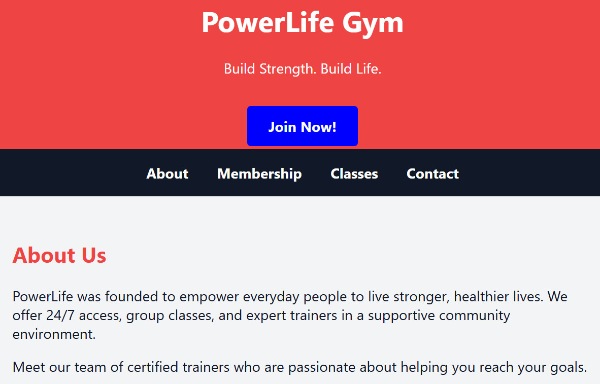
Notice the payment button (Join Now!) and the 4 pages already sketched out?
Your takeaway?
Yep. AI can REALLY help you find your way to making money online. If your first question doesn’t seem to provide enough information, don’t be afraid to refine it! Ask for detailed explanations and step-by-step, errrr, steps.
It truly can become THE game-changer you are currently searching for.
Enjoy!