Introduction
Pottery projects have a funny way of multiplying.
You start with one little idea for a mug.
Then you think, “Maybe I’ll make a matching bowl.”
Then somebody mentions a serving set.
Then you remember that holiday market coming up.
Suddenly your studio has clay pieces in various stages, glaze ideas scribbled on paper, measurements floating around your brain, and at least one project that you vaguely remember starting three weeks ago.
That’s Not a Good Thing.
Pottery is creative, but the actual process involves plenty of decisions. Artists need to think about the project idea, clay body, dimensions, construction method, drying stages, trimming, handles, texture, decoration, glazing, firing, finishing, photography, and sometimes selling the finished work.
That’s where Pottery Project Planners become surprisingly useful.
A good planner helps ceramic artists turn an idea into a sequence of manageable steps. Instead of simply recording what they’re making, it helps them think through what needs to happen before the finished piece is ready.
And that makes this a strong printable product-ladder opportunity.
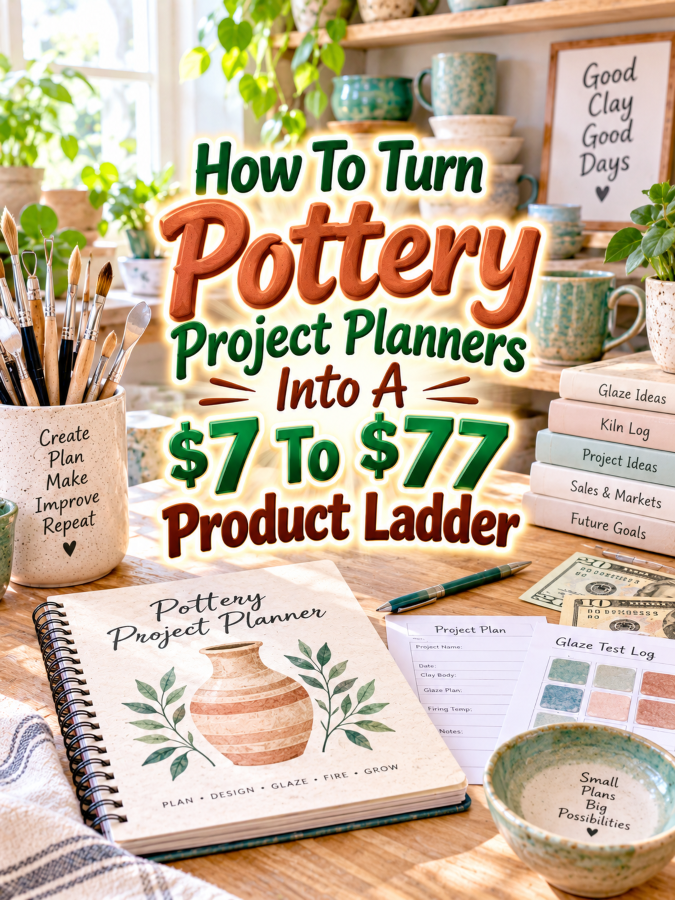
You can begin with a simple $7 project planner for artists who want to organize individual pottery projects. Then expand it into a $17 to $27 pottery planning kit, a $37 to $47 complete ceramics project management bundle, and finally a $67 to $77 editable studio command center.
The trick is not to make every version bigger.
Make every version more useful.
Quick Answer
Pottery Project Planners are printable or digital planning tools that help ceramic artists organize pottery ideas from the first sketch through construction, drying, trimming, glazing, firing, finishing, and review.
A focused $7 planner can help artists organize one project at a time. A $17 to $27 kit can add project worksheets, clay and glaze planning, production schedules, and reference pages. A $37 to $47 bundle can become a complete ceramics project-management system, while a $67 to $77 premium version can add editable templates, digital formats, specialized editions, customization tools, and promotional resources.
The key is to increase the usefulness of each level rather than simply increasing the number of pages.
Why Pottery Project Planners Work As A Product Ladder
Before designing the first worksheet, it helps to understand why pottery projects create so many opportunities for useful planning products.
A ceramic project often involves much more than shaping clay. Artists may need to decide what they’re making, determine dimensions, choose a clay body, estimate materials, plan construction steps, track drying, schedule trimming, record decoration, select glazes, prepare for firing, and document the finished piece.
For a beginner, that can feel like a lot.
For an experienced potter working on several pieces at once, it can feel like a small circus with clay on the floor.
A planner gives the process somewhere to live.
Instead of relying on memory, the artist can record the original idea, measurements, construction notes, glaze choices, firing information, and final observations. If the project works beautifully, those notes can help the artist repeat the result.
That’s always a Good Thing.
There is also a natural repeat-purchase opportunity here.
Potters don’t make one project and retire from ceramics.
They make another mug.
Then another bowl.
Then a vase.
Then a collection.
Then something completely different because apparently the original plan has wandered off for lunch.
That means a project planner can become the foundation for a larger product family covering pottery collections, glaze planning, kiln firing, inventory, studio organization, craft fairs, product photography, and ceramics business management.
The Reasonable Pricing Rule
Pricing this type of printable becomes much easier when you stop counting pages and start measuring usefulness.
The $7 version should solve one small problem. It could help a potter take one project from idea to finished piece without forgetting important steps.
The $17 to $27 level should provide a broader planning system. Add more templates, examples, project types, checklists, and reference pages so the customer can use the system repeatedly.
The $37 to $47 level should feel like a complete working bundle. It can connect project planning with materials, scheduling, glazing, firing, documentation, and review.
The $67 to $77 level needs another meaningful advantage. Editable Canva templates, fillable files, digital versions, specialty editions, customization resources, promotional assets, or clearly defined commercial-use options can justify the higher price when they genuinely help the buyer.
Don’t charge $77 for a thin PDF wearing a fancy cover.
That’s Not a Good Thing.
Charge more when the product gives the customer more flexibility, convenience, organization, or practical support.
The $7 Starter Pottery Project Planner
The starter product should be extremely easy to understand.
Call it something like Pottery Project Planner: From Idea To Finished Piece.
The $7 version could include:
- Project idea page
- Project goals worksheet
- Sketch and inspiration page
- Materials checklist
- Clay body selection page
- Project measurements
- Construction steps
- Drying and trimming notes
- Glaze planning page
- Firing record
- Finished-project review
This is enough to create a useful quick win.
The customer can print the planner, start a project, and keep the important details together.
You don’t need to include inventory management, business pricing, craft fair planning, social media content, customer orders, and seventeen pages about studio goals.
Not yet.
The $7 product has one job: help someone organize a pottery project.
Make it clean.
Make it practical.
Give artists room to sketch and write.
And make the process feel easier than starting with a blank sheet of paper.
The $17 To $27 Expanded Pottery Planning Kit
Once the starter planner works, expand it into a system that supports different types of pottery projects.
A $17 to $27 Pottery Project Planning Kit could include the starter planner plus:
- Mug project planner
- Bowl project planner
- Vase project planner
- Plate and platter planner
- Sculptural pottery planner
- Set or collection planner
- Clay supply checklist
- Glaze planning worksheets
- Drying and production schedule
- Kiln preparation checklist
- Project troubleshooting page
- Finished-piece evaluation sheet
This version becomes much more valuable because the customer isn’t starting with the same generic worksheet every time.
A mug project has different planning needs from a large sculptural piece.
A matching dinnerware collection requires different thinking from one decorative vase.
Specificity makes a printable feel intentional.
You can also include a few completed examples showing how a potter might move from an idea to a finished project.
The buyer isn’t just receiving pages.
They’re seeing how the pages are supposed to work.
That’s always a Good Thing.
The $37 To $47 Complete Ceramics Project Management Bundle
Now you’re moving beyond individual projects and into managing multiple projects.
The $37 to $47 version could be called a Complete Ceramics Project Management Bundle.
This product could include:
- Individual project planners
- Multi-project dashboard
- Monthly pottery project calendar
- Production scheduling pages
- Clay inventory tracker
- Glaze planning system
- Kiln firing log
- Project numbering system
- Test-piece tracker
- Project cost worksheet
- Finished-piece review
- Collection planning pages
- Photography planning sheet
- Craft fair project checklist
Now the buyer has a system for managing a collection of pottery work.
That’s a significant jump in usefulness.
A potter preparing twelve pieces for a holiday market can see what needs to be made, what stage each piece is in, which pieces still need trimming, which pieces are waiting for glaze, and which pieces are ready for firing.
You can also add a simple project status system such as:
- Idea
- Planning
- Building
- Drying
- Trimming
- Bisque Fired
- Glazing
- Final Firing
- Finished
- Ready To Sell
That’s where the planner starts behaving like a studio assistant.
A paper studio assistant, admittedly.
But a useful one.
The $67 To $77 Editable Pottery Studio Command Center
The premium product needs to feel different.
Instead of simply adding another 50 worksheets, build a flexible system that the customer can adapt.
The $67 to $77 Editable Pottery Studio Command Center could include:
- Editable Canva project planners
- Printable PDF versions
- Fillable digital versions
- Tablet-friendly planning pages
- Individual project templates
- Collection planning dashboards
- Production calendars
- Glaze planning templates
- Kiln logs
- Inventory trackers
- Project costing worksheets
- Photography planning pages
- Craft fair preparation templates
- Customization instructions
- Product description templates
- Promotional caption templates
- Mockup suggestions
You could also offer specialty editions for pottery teachers, studio owners, ceramic artists selling collections, craft fair vendors, or makers creating made-to-order pottery.
If you offer commercial-use, reseller, or PLR rights, the license needs to be extremely clear.
What can the buyer edit?
What can they sell?
Can they share the files?
Can they use them with students?
Can they include them in a paid course?
Don’t leave those questions floating around like a clay tool somebody forgot to clean.
If you don’t want to offer rights, that’s perfectly fine.
Premium value can come from editable formats, customization, specialization, convenience, and implementation help.
Example $7 To $77 Pottery Project Planner Ladder
Here’s one clean way to structure the complete ladder:
- $7 Starter: Pottery Project Planner with idea pages, sketches, materials, construction steps, glaze planning, firing notes, and project review.
- $17 to $27 Kit: Expanded Pottery Project Planning Kit with project-specific templates, production schedules, clay and glaze planning, troubleshooting, and examples.
- $37 to $47 Bundle: Complete Ceramics Project Management Bundle with multi-project tracking, studio organization, inventory, firing, costing, photography, and collection planning.
- $67 to $77 Premium: Editable Pottery Studio Command Center with Canva templates, digital formats, customization resources, specialty editions, promotional assets, and implementation tools.
The progression is important.
The $7 product helps them plan one project.
The $27 product helps them plan different kinds of projects.
The $47 product helps them manage multiple projects and studio tasks.
The $77 product helps them customize the entire system.
That is a genuine ladder instead of four products wearing different price tags.
Tools You Can Use To Create This Ladder
You don’t need complicated software to create Pottery Project Planners.
Canva is an obvious starting point for designing project planners, calendars, worksheets, covers, charts, dashboards, and editable premium templates.
Use Google Docs to organize your research, draft instructions, create project examples, and develop the written portions of your products.
Google Sheets can help you create digital project trackers, inventory systems, production schedules, and simple cost calculators.
ChatGPT can help brainstorm pottery project categories, worksheet ideas, customer questions, troubleshooting prompts, product descriptions, and promotional angles.
For selling, Payhip or Gumroad can handle digital product delivery.
You don’t need every tool.
Start with the few that help you research, design, package, and sell the product efficiently.
How To Know If Your Price Is Fair
A fair price depends on what the buyer can actually accomplish with the product.
Ask whether the planner saves time.
Ask whether it reduces confusion.
Ask whether it prevents important project details from being forgotten.
Ask whether it can be reused.
Ask whether the buyer can manage several projects more easily.
Ask whether the premium version provides genuine convenience.
Ask whether the editable files allow meaningful customization.
Ask whether the product would still feel useful after the novelty wears off.
That’s an important question.
A planner that gets used once isn’t necessarily a terrible product, but a planner that becomes part of someone’s regular studio routine has much stronger perceived value.
Don’t let page count become your pricing calculator.
A 15-page system that helps someone manage an entire pottery collection can be more valuable than a 100-page workbook full of decorative pottery illustrations and wide empty boxes.
Your 5-Step Action Plan
Step 1. Research Real Pottery Project Problems
Spend time studying pottery communities, ceramics groups, project discussions, reviews, videos, and marketplace listings.
Look for recurring problems.
Are artists struggling to track multiple pieces?
Do beginners forget drying steps?
Do makers lose glaze information?
Do market vendors struggle to organize production?
Those problems should shape your planner.
Step 2. Create The $7 Quick Win
Build the simplest useful project planner you can.
Include the idea, sketch, materials, measurements, construction, drying, glaze, firing, and review stages.
Don’t overcomplicate it.
The goal is to make starting a pottery project easier.
Step 3. Expand It Into A Kit
Create specialty project pages for mugs, bowls, vases, plates, sculptures, and collections.
Add examples, project checklists, production planning, glaze planning, and troubleshooting resources.
That gives you a strong $17 to $27 offer.
Step 4. Build The Premium Version
Move from individual project planning into studio-level management.
Add editable Canva files, digital versions, project dashboards, inventory, firing, costing, photography, collection planning, and promotional resources.
Make the premium version flexible rather than merely enormous.
Step 5. Test The Ladder
Pay attention to which version gets attention, which product customers actually use, which pages they ask about, and which products lead to repeat purchases.
You can adjust pricing and packaging as you learn.
Your first price isn’t carved into a clay tablet.
You can test.
3 Ways To Stand Out From The Thundering Herd
There are plenty of pottery journals and notebooks around.
The Good Thing is that many focus primarily on recording.
Your opportunity is to focus on planning and decision-making.
Way 1. Build Around The Entire Project Lifecycle
Don’t stop at the idea page.
Help artists think through construction, drying, trimming, glazing, firing, finishing, and review.
The more naturally your planner follows the real pottery workflow, the more useful it becomes.
Way 2. Create Project-Specific Templates
A mug isn’t a vase.
A slab-built tray isn’t a wheel-thrown bowl.
A ceramic sculpture doesn’t follow exactly the same process as a dinnerware set.
Create templates that acknowledge those differences.
Specificity helps your planner feel like it was designed by someone who understands the work.
Way 3. Connect Projects To Collections
Many ceramic artists eventually create related pieces.
A planner can help them decide which projects belong together, track matching forms, record shared glaze choices, plan quantities, and prepare collections for markets or online shops.
Now you’re not simply organizing one pot.
You’re helping organize a body of work.
3 Nifty Ways To Find Customers
Your ideal buyers are already hanging out in places where pottery projects are being discussed.
You don’t need to shout into the entire internet.
You need to find the right conversations.
Way 1. Pottery Communities
Look for ceramics communities, pottery groups, studio communities, beginner pottery groups, and handmade-business communities.
Offer a free single-page project planning sheet or project checklist.
The free resource gives potential customers a useful sample of how your system works.
Way 2. Pinterest
Create pins around practical searches such as:
- Pottery Project Planner Printable
- Ceramics Project Planning Sheets
- Pottery Studio Organization
- Pottery Production Planner
- Ceramic Art Project Planner
- Pottery Collection Planner
Show the actual planner pages.
A finished pottery piece may attract attention, but showing the planning system beside the piece helps viewers understand why your product exists.
Way 3. Pottery Teachers And Studio Owners
Reach out to pottery instructors, ceramics teachers, community studios, and educational creators.
A beginner class could use project-planning worksheets.
A studio could recommend project trackers.
A ceramics educator could use selected pages as part of a planning lesson.
You’re introducing your product to people who already have relationships with your ideal customers.
That’s a very useful shortcut.
3 Takeaways You Won’t Find Elsewhere!
The strongest pottery planner isn’t necessarily the prettiest one.
It is the one that helps artists think more clearly before they start throwing clay around.
Takeaway 1. You’re Selling Fewer Forgotten Details
A pottery project contains dozens of small decisions.
Clay body.
Dimensions.
Wall thickness.
Construction method.
Glaze.
Firing.
Decoration.
Finish.
If those details aren’t recorded, reproducing a successful project becomes harder.
Your planner gives those details a home.
Takeaway 2. The Finished Piece Isn’t The Whole Story
The final pottery piece may look simple.
The process behind it wasn’t.
Your planner should capture enough of that process that the artist can learn from both successful and unsuccessful projects.
A piece that cracked during drying can teach something.
A glaze combination that looked completely different after firing can teach something.
A handle that didn’t survive the kiln can definitely teach something.
Sometimes the failed thingee is the teacher.
Takeaway 3. Project Planning Can Lead Into A Much Bigger Ceramics Brand
Pottery Project Planners can naturally lead into glaze journals, kiln logs, ceramics inventory trackers, pottery pricing worksheets, craft fair planners, ceramics business planners, product photography planners, and studio management systems.
That’s where the product ladder becomes more interesting.
You’re not trying to invent unrelated printables every Tuesday morning.
You’re building products around the same customer’s real workflow.
3 Common Mistakes To Avoid
Many creators make pottery planners too generic.
That’s Not a Good Thing.
A planner that could be used for pottery, gardening, accounting, or planning a vacation isn’t necessarily solving the pottery problem deeply enough.
Use pottery-specific language and decisions throughout the product.
Another mistake is creating too many decorative pages.
Ceramic artists already have beautiful objects surrounding them. Their planner doesn’t need every page covered in pottery illustrations.
Give them useful writing space.
The third mistake is stopping with one project planner.
That’s like opening a pottery studio and owning exactly one sponge.
Once you’ve built the project planner, expand into collections, production, glazing, firing, inventory, pricing, photography, markets, and business management.
That’s where your catalog gets interesting.
Scaling Your Results
Once your first Pottery Project Planner is working, create specialized editions.
You could build planners for wheel throwing, handbuilding, slab construction, pottery sculpture, dinnerware collections, decorative ceramics, beginner projects, studio businesses, craft fair vendors, or ceramics teachers.
You can also create complementary products around different stages of the pottery workflow.
Think glaze journals.
Kiln firing logs.
Clay inventory trackers.
Ceramic collection planners.
Pottery pricing worksheets.
Craft fair preparation planners.
Product photography planning sheets.
Ceramics business planners.
Each product solves another problem for the same general audience.
You can also bundle products around seasons.
A holiday pottery collection could include project planning, production scheduling, glaze planning, inventory, pricing, photography, and craft fair preparation.
That creates a much stronger offer than simply saying, “Here are 80 more pottery pages.”
And if your audience responds well to the system, you can eventually create a membership or seasonal printable club with new project resources, specialty planners, collection worksheets, and studio tools.
Simple Promo Angles
Keep your promotional language practical.
- “Plan Your Next Pottery Project Before You Touch The Clay”
- “Turn Your Pottery Ideas Into A Clear Project Plan”
- “Stop Losing Track Of Your Pottery Projects”
- “From Sketch To Finished Piece”
- “Keep Your Pottery Projects Organized From Start To Finish”
- “A Simple Planning System For Your Next Ceramic Creation”
- “Make Room For Creativity By Organizing The Process”
You can also show the transformation visually.
Show a blank project idea becoming a completed pottery piece.
Show a messy collection of notes beside the organized planner.
Show several projects at different stages using a project dashboard.
Show how a single project moves from idea to construction, drying, glazing, firing, and completion.
The customer should be able to see the usefulness without needing a 14-paragraph sales pitch.
Affiliate Opportunities
There are natural affiliate categories around pottery and ceramics.
You could recommend pottery tools, clay supplies, pottery wheels, trimming tools, studio storage, glaze supplies, test tiles, kiln equipment, labeling products, photography equipment, craft fair supplies, and digital business tools.
The key is relevance.
If you’re discussing a pottery project planner, recommend products that genuinely support pottery project planning or execution.
Don’t turn the article into a catalog with a clay-covered shopping cart.
Useful recommendations build trust.
Internal Link Ideas
If you’re building a larger ceramics content cluster, connect this article with related topics such as:
- Ceramics Studio Planners
- Pottery Glaze Recipe Journals
- Kiln Firing Log Printables
- Pottery Inventory Trackers
- Ceramic Collection Planners
- Pottery Pricing Worksheets
- Ceramics Business Planners
- Craft Fair Booth Planning Printables
- Product Photography Planning Sheets
This creates a natural journey for readers.
Someone searching for pottery projects may discover glaze organization.
Someone searching for glaze organization may discover studio planning.
Someone preparing to sell pottery may discover pricing and craft fair resources.
That is how individual blog posts start supporting an entire product catalog.
Pinterest Ideas
Pinterest gives you plenty of practical angles for this niche.
Try pins such as:
- The Pottery Project Planner Every Ceramic Artist Needs
- How To Plan A Pottery Project From Start To Finish
- Printable Pottery Project Planning Sheets
- Organize Your Ceramic Projects Without The Studio Chaos
- Pottery Collection Planning Printable
- Pottery Production Planner For Makers
- From Pottery Idea To Finished Piece
- Simple Ceramics Studio Organization Ideas
Use photographs of pottery pieces alongside screenshots or mockups of the planner.
Show the planning pages being used.
Show a project dashboard.
Show several pottery pieces with their corresponding project records.
Visual proof of usefulness is powerful.
Frequently Asked Questions
Who buys Pottery Project Planners?
Potential buyers include beginner potters, experienced ceramic artists, pottery students, studio artists, hobby makers, craft fair vendors, ceramics teachers, and small pottery businesses.
What should a pottery project planner include?
A useful starter planner can include project goals, sketches, materials, measurements, construction steps, drying notes, trimming, glaze planning, firing information, and finished-project reviews.
Can I really sell a pottery project planner for $7?
Yes. A focused starter product can be a reasonable $7 offer when it solves a clear problem and is easy to understand and use.
What should I add for a $27 version?
Add project-specific templates, examples, production schedules, glaze planning, troubleshooting, collection planning, and additional reference tools.
What makes the $47 version different?
The $47 version should move from individual project planning into broader studio management. Add multi-project tracking, production scheduling, inventory, firing, costing, photography, and collection planning.
What makes the $77 version worth considering?
The premium version should provide meaningful convenience or flexibility through editable files, digital formats, customization, specialty editions, implementation resources, and carefully defined business-use options when appropriate.
Should I offer resale or commercial-use rights?
Only if you understand exactly what rights you’re granting and can explain them clearly. You don’t need resale rights to create a premium product. Editable templates, specialization, digital formats, and convenience can provide plenty of value.
Your Next Steps
Start by listing every decision a ceramic artist makes while completing a pottery project.
Think about the initial idea.
The sketch.
The clay.
The dimensions.
The construction process.
Drying.
Trimming.
Decoration.
Glazing.
Firing.
Finishing.
Photography.
Selling.
Those decisions become your raw material.
Then build your $7 planner around one simple promise: help the artist keep one pottery project organized from beginning to end.
Once that works, add project-specific templates and examples.
Then create the multi-project studio system.
Finally, add editable files and customization tools to create the premium version.
Don’t build the $77 thingee first.
Build the useful $7 product first.
Then let the customer workflow tell you what should come next.
Final Product Ladder Summary
| Price | Product | Primary Value |
|---|---|---|
| $7 | Pottery Project Planner | Plan and document one pottery project |
| $17-$27 | Expanded Pottery Project Planning Kit | Plan different pottery projects with more templates and guidance |
| $37-$47 | Complete Ceramics Project Management Bundle | Manage multiple projects, studio tasks, materials, firing, costing, and collections |
| $67-$77 | Editable Pottery Studio Command Center | Customize and manage the complete planning system with editable and digital resources |
Conclusion
Pottery Project Planners solve a very ordinary problem.
Ceramic artists have ideas.
Lots of them.
The challenge is turning those ideas into finished pieces without losing track of all the little decisions along the way.
A good planner gives those decisions somewhere to live.
The $7 version can help someone organize one project.
The $27 version can help them plan several types of projects.
The $47 version can help them manage an entire collection of work.
The $77 version can give them a flexible system they can customize around their own studio.
That’s the product ladder.
You’re not selling four copies of the same planner at four different prices.
You’re creating four different levels of usefulness.
And that distinction matters.
Start small.
Make the first product genuinely useful.
Watch how customers use it.
Then build the next thingee around the next problem.
Before long, that little pottery project planner can become the front door to an entire ceramics printable business.
So here’s what you’ve discovered today – if anything excites you, why not start working towards that goal today?
Enjoy!