
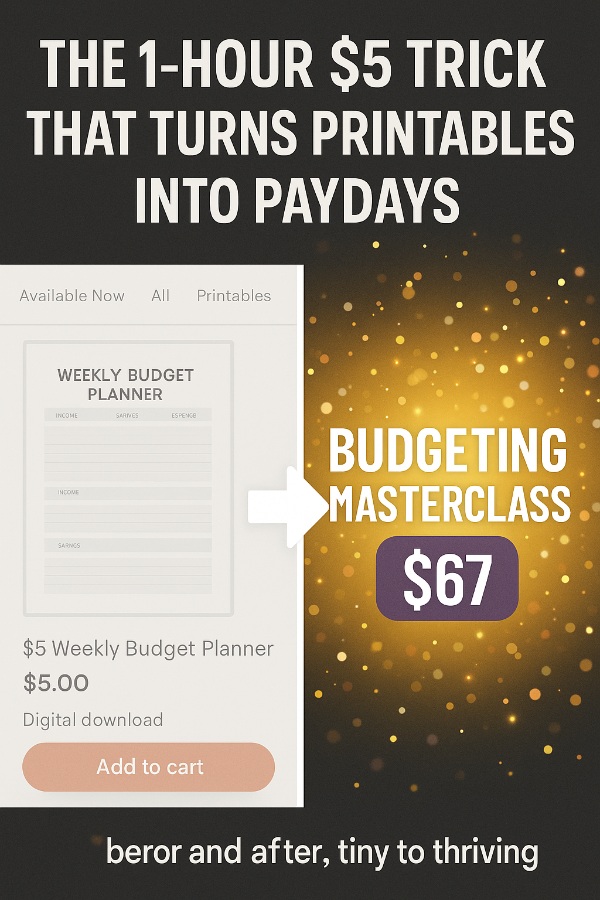
You spend five bucks. Just five. Then – like coffee and creativity had twins – you turn that tiny purchase into a $67 digital masterclass that makes people go, “Wait, you did what with five dollars?”
And keep in mind… This isn’t fluff!
Instead, this is the art of curiosity-to-cash. You take one Etsy file, decode it like a treasure map, rebuild it ethically, and film the process with humor and heart. You don’t copy – you translate success into steps others can follow. That’s why people pay you. You make it doable. You make it fun. You make it feel like magic, even when it’s just Canva and caffeine.
This strategy works because it’s teaching wrapped in storytelling. People crave guidance from someone who’s been in the trenches, clicking, testing, and learning. They don’t want theory. They want you – the guide who actually turned $5 into a result worth cheering for. That’s the emotional pull. You’re living proof that small beginnings create big outcomes. Ready to turn five dollars into your next signature product? Coffee up.
Let’s shine!
Tools You Need
- USB Microphone on Amazon – Audio matters more than lighting. Muffled sound kills trust. A crisp mic instantly makes your voice sound like a professional teacher instead of a wind tunnel survivor.
- Webcam for Online Teaching – Nobody connects with a pixelated blob. A good webcam makes you look friendly, bright, and trustworthy, even if your workspace is chaos behind the scenes.
- LED Video Light Kit – Proper lighting takes you from “mystery dungeon chic” to “clear, confident instructor.” A well-lit face sells credibility.
- External Hard Drive – Back up your recordings and project files. You’ll thank yourself when your computer crashes mid-edit and you still have your gold saved.
- Laptop Stand – Keeps your camera at eye level, saves your posture, and stops viewers from staring up your nose while you explain Canva.
- And of course, you’ll need Canva, OBS Studio, Loom, Notion, and good ol’ Etsy. Together, they form your creative command center.
Before You Begin
Before you become the internet’s favorite $67 teacher, spend one evening mastering the basics. That single prep night saves you endless editing, awkward recordings, and “oops, my mic was off” moments later.
- Etsy Seller Handbook – Learn what buyers actually look for, how listings are structured, and what drives conversions. You’ll be teaching this soon, so know it cold.
- Canva Design School – Their free tutorials are gold for understanding layouts, typography, and color psychology. Practice one full project so you can teach smoothly.
- OBS Studio Quickstart Guide – Learn how to record your screen and face together. Run two tests – one silent, one talking – so you don’t end up teaching a masterclass in interpretive silence.
Your 10 Step Action Plan
Step 1: Hunt Down the $5 Goldmine
Etsy is your playground. Search for digital printables that already sell – planners, affirmation cards, business trackers, teacher templates, pet journals.
Then sort by “Best Seller” and “Top Reviews.” You want something that’s proven, polished, and popular. That’s your seed. Look for listings that have clean previews, great thumbnails, and clear value propositions. That’s your model of success.
Next, grab screenshots, study the reviews, and note what customers praise or complain about. Those details are gold for your training. People want shortcuts, so you’ll teach them how to skip those mistakes. Your $5 is not a purchase – it’s tuition for a creative MBA in product psychology.
Then save everything in a Notion page labeled “$5 to $67.” Add sections for design layout, color palette, pricing, and SEO tags. You’re creating a behind-the-scenes case file – one you’ll later show your students. It’s not spying. It’s smart studying.
Step 2: Buy It, Break It Down, and Document the Journey
Buy the product. Download all the files – PDFs, Canva links, instructions, fonts, even the little “Thank You” note. Study how it’s organized. Notice what feels easy and what feels clunky. You’ll use those moments to teach better workflow later.
Fire up Loom or OBS and record your first impressions as you explore. Speak your thoughts out loud: “Notice how this seller bundles similar items. See how their color scheme creates unity.” That recording becomes a goldmine for your teaching script.
Finally, write down your “aha” moments. Did they name files smartly? Use templates cleverly? Add surprise bonuses? Those are teachable points. You’re turning observation into insight – and insight into income.
Step 3: Rebuild It Ethically (and Add Personality)
Open Canva. Create your own version from scratch. Different fonts. Different layout. Different niche spin. If theirs was a “Wedding Seating Chart,” yours might be “Bridal Shower Seating Plan.” Similar purpose – unique execution. You’re inspired, not imitating.
Record yourself building. Narrate your reasoning. Explain why you pick one layout over another, why spacing matters, and why “simple sells.” Add humor: “And here’s where Canva decides to test my patience.” Your students will love your humanity.
By the time you finish, you’ve built a product that’s yours and a story worth telling. You’re showing the process, not perfection. That’s what sells.
Step 4: Create a Teaching Framework That Flows
Structure your masterclass like Netflix – short, bingeable, satisfying. Break it into 6–8 modules with clear names: “Finding Your $5 Spark,” “Reverse-Engineering Success,” “Building from Scratch,” “Polishing & Packaging,” and “Launch Day Strategy.” Each one should end with a micro-win.
Map this in Notion or Google Docs. For each module, list what you’ll show, what you’ll say, and what the viewer should do. Teaching is easier when you plan your rhythm: demo, explain, joke, recap, motivate. It’s not a lecture – it’s a coffee chat with structure.
Add one sentence at the end of every module outline: “What will they accomplish here?” That keeps you grounded in transformation, not information overload.
Step 5: Record the Full Masterclass (With Energy)
Now comes the magic. Set up your mic, lights, and webcam. Open OBS, hit record, and walk through your process naturally. Keep your energy warm, conversational, and slightly caffeinated. Smile. Laugh at your mistakes. Students love real teachers, not robots.
Record one module per session to keep your energy fresh. Start each lesson with “Here’s what we’ll do today” and end with “Now go make it happen!” These anchors keep momentum rolling.
If your cat jumps on your keyboard mid-recording, don’t panic – clip it into a blooper reel. It humanizes you and gives your course personality. Authentic > polished every time.
Step 6: Package It Like a Pro
When done recording, organize everything beautifully. Label videos clearly: “Module1_FindYourIdea.mp4,” “Module2_BuildYourVersion.mp4,” etc. Export PDFs, slides, and cheatsheets with matching design. Create a master zip folder with all resources.
In Canva, design your course thumbnail and mockups – screenshots inside laptop frames, your smiling face in the corner, maybe a coffee cup for good luck. Use bright, modern backgrounds. You want scroll-stopping visuals that say “fun + credibility.”
Finally, create a short “Watch This First” video welcoming students, setting expectations, and giving them a success roadmap. It instantly upgrades your perceived professionalism.
Step 7: Build Your Sales Page and Funnel
Use Gumroad, ThriveCart, WarriorPlus, or Podia. Write a punchy headline: “How I Turned a $5 Etsy Product into a $67 Masterclass (and You Can Too).” Follow with three bold promises: clarity, creativity, confidence. Add a short origin story about how you discovered the idea.
Embed your best visuals. Add testimonial quotes if you’ve beta-tested. Then finish with one clear call-to-action button – no fluff. If you want urgency, offer a “Launch Week Live Q&A” for the first 25 buyers. Scarcity done right feels exciting, not manipulative.
And please – use your own voice. That’s what converts. Nobody wants another templated “Enroll Now” robot page. Write it like you’re texting your best friend.
Step 8: Launch Loudly and Authentically
Announce your journey on every channel: “I bought a $5 Etsy file… and turned it into my next digital business.” Include screenshots of your workspace, your Canva rebuild, your bloopers. Show your human side. People don’t buy information – they buy transformation stories.
Make a 60-second video trailer: upbeat music, fun text overlays, and one sentence hook: “If you’ve ever thought one small purchase couldn’t change your life, think again.” Post that everywhere – Reels, Shorts, Pinterest Idea Pins.
Then host a free live mini-session. Show one step, teach something valuable, and invite attendees to grab the full class. You’ll build trust fast and turn watchers into buyers.
Step 9: Add Bonuses That Feel Generous
Bonuses make your course feel like a full kit, not just lessons. Create extras that complement the main content – like “10 Etsy Niches You Can Teach Next,” “Canva Troubleshooting Cheatsheet,” or “Fast Track Planner for Masterclass Builders.”
Design one bright mockup showing all bonuses together – PDF covers, mock screens, icons. Bundle perception = instant value boost. Then mention those bonuses mid-launch: “You’ll get everything I wish I had when I started.”
Keep them tight and relevant. Bonus bloat hurts conversion. Quality extras make buyers rave about how “over-delivered” you were.
Step 10: Scale It to a Series
You’ve built the first. Don’t stop there. Repeat the formula for other $5 finds – pet trackers, habit journals, content planners. Each new masterclass becomes another income stream.
Bundle three for $147, or sell all ten as a “Creative Classroom Pass.” Offer resell or teaching licenses if you want to multiply income even further. You’re no longer guessing – you’ve built a repeatable system that grows itself.
Now you’re not just selling a class. You’re teaching possibility. You’ve turned curiosity into currency – and your audience feels that spark in every word.
5 Super Creative Tips
1) Show the “Before & After”
Start your class by showing the $5 product beside your finished one. Visual contrast hits the emotional core. It says, “Look how far this idea can go.” Use it as your marketing thumbnail too – it’s instant proof that transformation is real.
2) Add “Pause & Play” Markers
Include little text overlays in your videos that say “Pause here and try it.” It’s simple but powerful. Students feel guided, not lectured. Bonus: create a PDF checklist of all pause points so they can track progress offline.
3) Record a “What I’d Do Differently” Epilogue
End your class with a candid 10-minute reflection. Talk about what you learned while making it, what you’d tweak, and what you plan next. Vulnerability sells. It shows growth in real time – and that keeps people following you for more.
4) Turn Student Questions Into Bonus Clips
Every question you get becomes a 3-minute video. “Why did my Canva export blurry?” “How do I name my files?” Upload them as free updates to your masterclass portal. That turns your class into a living course that evolves – and makes students feel valued.
5) Add a Low-Cost Audit Upsell
Offer a $29 “Listing Audit” for early buyers. Promise personal feedback on their rebuilt product. You can batch-record these responses and reuse the examples as anonymous case studies. You add value, build trust, and create content simultaneously.
5 Excellent Ways to Get in Front of Customers
Before promoting, engage. Always. Be the helper first, the seller second. Join groups, answer questions, celebrate others’ wins. Build relationships before links. That’s what makes your promotions welcome instead of annoying.
1) Facebook Groups for Etsy Sellers
Join communities like “Etsy Seller Success” or “Digital Product Creators Hub.” Comment daily for a week before posting. Offer help, share screenshots of your builds, and become familiar. Then tell your story: “I bought a $5 product, rebuilt it from scratch, and filmed how – it changed everything.” Let genuine curiosity pull people to you.
2) r/Etsy
Perfect for transparency posts. Write something like, “I bought a $5 Etsy file and learned so much that I turned it into a course.” Include what worked, what didn’t, and a small screenshot. End with, “If anyone wants to see how I documented it, message me.” Then, in replies, mention your course naturally.
3) r/EntrepreneurRideAlong
This subreddit loves experiments. Frame your story like a case study: “My challenge: turn $5 into $67 by teaching what I learned.” Detail your timeline and what surprised you. Transparency gets upvotes – and private messages asking for your link.
4) r/SmallBusiness
Here, focus on mindset. Post your experience as a mini-lesson: “What a $5 investment taught me about product creation.” Talk about systems, creativity, and momentum. When people comment asking for details, that’s your invite to share your course.
5) Pinterest & YouTube Combo
Create a tall Pinterest pin showing the $5 product on the left and your masterclass cover on the right with text like “From 5 Bucks to 67.” Link it to your YouTube video titled “How One $5 Etsy File Became My Next Product.” In that video, share your process and naturally invite viewers to your course. Cross-promote both platforms for continuous traffic.
Your Next Steps
Find your $5 inspiration tonight. Don’t overthink it. Buy one digital product that sparks your curiosity – something you’d actually enjoy recreating. Open a folder called “From 5 to 67,” and drop everything in there: screenshots, notes, thoughts. That’s your treasure chest.
Tomorrow, block two hours and record your rebuild. Don’t wait for perfection. Record while you’re figuring it out. The authenticity is the magic. Then write down your talking points for the masterclass version – what worked, what confused you, and how you fixed it. That’s your real gold.
By this weekend, design your first thumbnail, write your class title, and post your early mockups on social media with a behind-the-scenes caption. People love to watch creation unfold. When you finally hit publish on your $67 masterclass, you’ll already have fans waiting to buy it.
You’ve just built the bridge from curiosity to cash. And you did it with five bucks, a laptop, and a dream fueled by caffeine and cleverness.
Conclusion
What started as a $5 experiment becomes a business model that never stops giving. You learn to see opportunity everywhere – every product, every mistake, every “huh, that’s clever” moment becomes potential content. You’re not just selling tutorials; you’re selling courage – the courage to start small, mess up, and still ship something valuable.
That’s the heart of this method. You’re not chasing perfection. You’re building proof. You’re teaching people that a $5 purchase can lead to freedom, creativity, and confidence. That’s transformation disguised as entrepreneurship.
So yes – buy the file. Break it down. Teach it. Laugh through it. Launch it. Because this isn’t about a single $67 product. It’s about the ripple effect you start when you realize one small spark can ignite your entire business.
Enjoy!



