Pinterest is not just where people go to swoon over kitchen remodels and collect recipes they’ll never cook. It’s also a goldmine for digital products – especially ready-to-post pin packs for busy bloggers and small business owners.
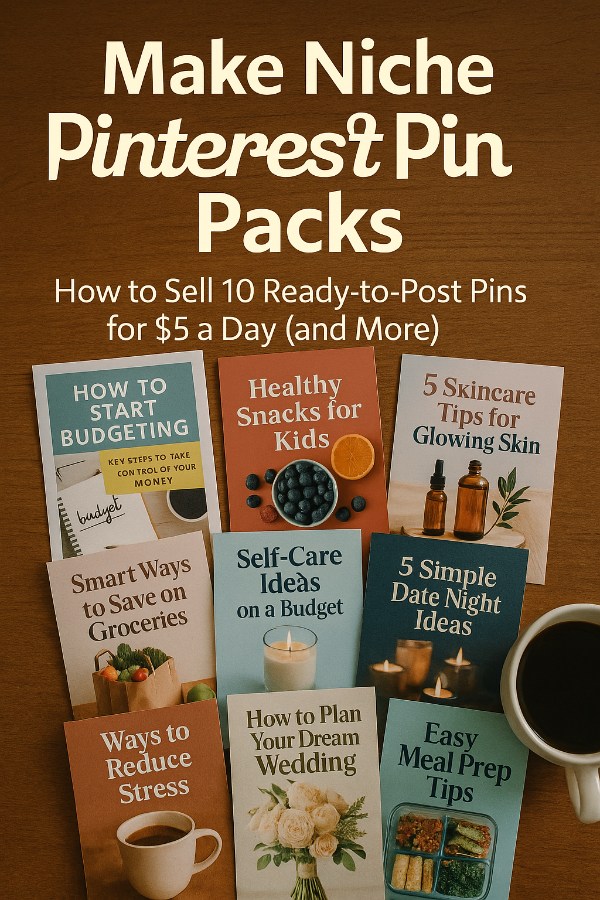
Your mission? Pick a niche, create 10 gorgeous, attention-grabbing pins, and sell them as an instant-download bundle. Buyers get quick content. You get quick cash.
If you’ve never touched Pinterest before, do not worry. We’re going to break this down so you know exactly what tools to use, where to find design inspiration, how to make pins that actually get clicks, and how to price and list them on Etsy so they sell even while you’re binging Netflix.
Tools You Need
-
Canva Pro – Lets you create professional pin designs fast. Free version works, Pro is even better.
-
Etsy Seller Account – Where you’ll list your pin packs for sale.
-
Pinterest – To research trending pin styles and topics.
-
Creative Fabrica Fonts Pack – Stock up on fonts that make your pins pop.
-
Stock Photo Pack – Or grab free high-quality images from Pexels or Unsplash.
-
Keyword Tool – Helps you find words people are actually searching on Pinterest.
-
Google Drive – Store and organize your pin files for easy customer delivery.
Your 10 Step Action Plan
Step 1: Pick a Profitable Niche
You cannot just make “pretty pins.” You need a focused niche so customers see instant value. Look for niches with evergreen appeal like meal planning, fitness, budgeting, wedding planning, or small business marketing. Use Pinterest search to see what’s trending and note how many results each topic has. The sweet spot is something popular but not overcrowded.
Once you pick a niche, think about what your buyer actually needs. Are they a busy blogger needing pins for recipes? An Etsy seller wanting pins for their own shop? A coach promoting services? The clearer you are, the easier the rest becomes.
Step 2: Research Popular Pin Styles
Search Pinterest for your chosen niche and save 10 – 15 pins that grab your attention. Look for layout styles, text overlays, and color schemes that get lots of saves. This is not copying – it’s studying what works so you can make your own unique versions.
Pay attention to ratios, too. Pinterest recommends 1000×1500 pixels for vertical pins. That tall shape commands space in the feed and boosts clicks.
Step 3: Collect Your Design Assets
Before you start designing, gather your images, fonts, and color palette. For example, if you’re doing a “Budgeting Tips” pin pack, you might grab clean, minimal backgrounds, bold fonts, and green accent colors.
Store all your design assets in a folder so you can quickly drag them into Canva. Trust me – nothing kills momentum faster than stopping mid-design to hunt for “that one picture of a latte.”
Step 4: Create Templates in Canva
Start with a single design layout in Canva. Duplicate it and tweak elements like text placement, background images, and accent colors to make multiple variations. This way, your pins look like a cohesive set while still offering variety.
For efficiency, lock in your brand fonts and colors. That way, you can create future packs even faster.
Step 5: Write Clickable Pin Text
Pinterest is a visual platform, but text overlays can make or break your pin performance. Keep text short, clear, and curiosity-driven. Instead of “Healthy Meals,” try “7 Healthy Meals in 20 Minutes.” Action + benefit beats generic every time.
Make sure your text is easy to read on mobile screens – most people are scrolling Pinterest on their phones.
Step 6: Build the Full Pack of 10 Pins
Aim for a mix of layouts – some with big bold titles, others with more image focus. A variety pack appeals to more buyers. Ensure all pins are saved at high resolution (PNG format works best).
When your set is done, zip the files into one downloadable folder so customers get everything in one click.
Step 7: Price Your Pin Pack
Start at $5 for your first few packs to get sales momentum and reviews. As demand grows, you can raise prices to $7 – $12 per pack. Remember, these are reusable digital products, so the work is done once but sells forever.
Offer bundle discounts – for example, “3 Pin Packs for $12” – to encourage larger purchases.
Step 8: Create an Eye-Catching Etsy Listing
Use mockups to show your pins in action – you can use Canva or Placeit to make these quickly. Write a title packed with keywords (“10 Pinterest Pins for Fitness Bloggers – Canva Templates – Ready-to-Post”).
In your description, highlight that these pins are editable in Canva, mobile-friendly, and designed for maximum Pinterest reach.
Step 9: Deliver Instantly After Purchase
Upload your zip file to Etsy so buyers can download it immediately. Include a PDF with tips on how to use or customize the pins – this adds perceived value.
Make sure your delivery file is well-organized with clear labeling (“Pin1.png,” “Pin2.png,” etc.).
Step 10: Promote Your Pack
Post your own pins on Pinterest that link to your Etsy listing. This creates a feedback loop – people see your pins, click, and buy your pin pack.
You can also join Facebook groups for bloggers and Etsy sellers and share your products there (following group rules, of course).
5 Super Creative Tips
-
Theme Your Packs by Season: Offer packs for holidays or seasonal events. Buyers love timely content they can post right away.
-
Create Matching Instagram Stories: Add bonus story-size graphics to make your pack more appealing.
-
Offer Editable and Non-Editable Versions: Some buyers want to tweak pins, others just want to post them as-is.
-
Add SEO Keywords to File Names: Pinterest can pick up keywords from your file names. This tiny step boosts discoverability.
-
Run a “First Buyer” Special: Give the first 10 buyers a bonus freebie pack to kickstart reviews and ranking.
5 Super Creative Ways of Getting in Front of the RIGHT Buyer Audiences
-
Sell Direct in Blogger Resource Groups: Join Facebook groups and online forums where bloggers trade tips and resources. Offer a “first set free” or a discount code for members – these are your power buyers because they constantly need fresh pins.
-
Guest Post on Niche Blogs About Pinterest Growth: Pitch a short tutorial article on “How to Save Time with Pre-Made Pins” to blogs in your target niche. At the end, link directly to your Etsy listing as the easy solution.
-
Bundle with a Related Digital Product Seller: Partner with someone who sells Canva templates, Instagram story packs, or eBooks in your niche. Include your pin pack as a bonus with their product, splitting profits or doing a cross-promo.
-
Run a Tiny $5 Pinterest Ad Targeted to Your Niche: Set up a promoted pin that showcases your pin pack in use. Target by interest (like “Budgeting” or “Wedding Planning”) so your offer appears only to the most likely buyers.
-
Offer a Custom Pack for Influencers in Exchange for Shoutouts: DM micro-influencers in your niche and offer them a free, branded pin pack in exchange for tagging you and linking your Etsy shop in their posts. This gets you in front of a loyal audience instantly.
Your Next Steps
Now that you know the process, it is time to pick your niche and dive in. Spend one day researching, one day creating, and one day setting up your Etsy shop. From there, it is rinse-and-repeat – each new pack you make increases your earning potential without adding much extra work. Start small with one or two packs, then aim to build a library of 10+ over the next month.
You are not just making Pinterest pins – you are building an asset library that can keep selling while you sleep. And yes… you’ve got this!
Enjoy.