Introduction
Ah, Halloween is fast approaching! Really fast. So fast it might have already passed you by!
But if there are still some days left, do you realize that humanity’s tendency for procrastination quite often goes into overdrive…
… and there will be both teachers and parents who are *desperate* to buy quick easy printables to keep kids busy (and quiet), stationary (and quiet) and all those sorts of good stuff?
Enter your latest profit-maker you are now considering…
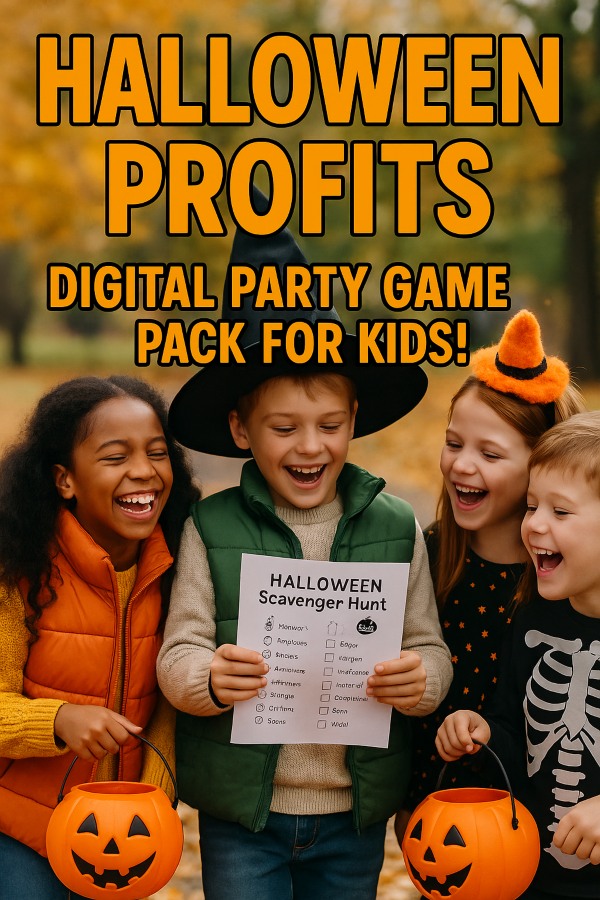
The Halloween Party Game Pack for Kids!
Want to know what it is? ‘Course you do! Move now to:
What You’re Creating
You’re creating a printable PDF pack containing:
- Halloween Scavenger Hunt with 10 rhymed clue cards + instructions
- Mini Escape Room with 5 puzzles that take ~15 minutes to complete
- Full solution keys for everything
- Printing and setup instructions
️ Tools You’ll Need (All Free Options Available!)
Design Tools:
- Canva (Free) – Best for beginners, templates included
- Google Slides (Free) – Simple and familiar
- Adobe Express (Free) – Professional look
Font Resources:
- Google Fonts (Free) – Try “Creepster” or “Eater” for Halloween vibes
- DaFont (Free) – Search “Halloween” for spooky fonts
Halloween Graphics (Free):
- Freepik (Free with attribution, or paid)
- Pixabay (Free, no attribution needed)
- Flaticon (Free icons with attribution)
PDF Conversion:
- Canva’s PDF Export (Built-in)
- Google Slides Download as PDF (Built-in)
- PDF Compressor (Free) – If file is too large
Step-by-Step Creation Process
PART 1: Halloween Scavenger Hunt
Step 1: Plan Your Clue Locations
Choose 10 common household/classroom locations:
- Mailbox, refrigerator, bookshelf, couch, door, window, bathtub, mirror, kitchen sink, front porch
Step 2: Write Rhymed Clues
Use this AI prompt in ChatGPT or Claude:
Example clue format:
Behind a door that’s always there.
Look for your next clue, don’t delay—
Where jack-o’-lantern juice is kept all day!” (Refrigerator)
Step 3: Design Clue Cards in Canva
- Open Canva and create custom dimensions: 5 x 7 inches
- Search for “Halloween card” templates or start blank
- Design elements to include on each card:
- Halloween border (bats, pumpkins, spiderwebs)
- Card number (Clue #1, Clue #2, etc.)
- Your rhymed clue in readable font (18-24pt)
- Small Halloween icon at bottom
- Use consistent colors: orange, black, purple, green
- Create 10 cards (one per clue)
Step 4: Create Setup Instructions Page
Make a one-page guide with:
- Title: “Halloween Scavenger Hunt Setup Instructions”
- What You Need: List of 10 locations
- How to Set Up (numbered steps):
- Print all 10 clue cards
- Cut out each card
- Place Clue #2 at the location where Clue #1 leads
- Continue until Clue #10 leads to the final prize
- Give Clue #1 to players to start!
- Tips: Suggested for ages 5-10, 15-20 minute activity, prize ideas (Halloween candy, small toy)
PART 2: Mini Escape Room
Step 1: Plan Your 5 Puzzles
Here’s a simple structure for 15-minute completion:
Puzzle 1: Caesar Cipher (3 minutes)
– Shift alphabet by 3: A→D, B→E, C→F
– Coded message: “ILJQG WKH VSRRQ” = “FIND THE SPOON”
Puzzle 2: Picture Order (2 minutes)
– 4 Halloween images to arrange (pumpkin carving stages)
– Arrange 1-4, numbers reveal a code: 3-1-4-2
Puzzle 3: Shadow Matching (3 minutes)
– 6 Halloween items, 6 shadows – match them
– Matched pairs spell word: B-O-O-K
Puzzle 4: Number Code (4 minutes)
– A=1, B=2, C=3… Z=26
– Decode: 3-1-14-4-25 = “CANDY”
Puzzle 5: Halloween Riddle (3 minutes)
– “I have a face but no body, I light up the night but I’m not the moon. What am I?”
– Answer: JACK-O’-LANTERN → Final location!
Step 2: Get AI Help with Puzzle Creation
Use this prompt in ChatGPT:
1. A simple Caesar cipher message (shift by 3) with Halloween theme
2. A 4-step picture sequence idea using pumpkin carving
3. 6 Halloween items and their descriptions for a shadow matching game
4. A 5-letter Halloween word that can be decoded with A=1, B=2, etc.
5. A kid-friendly Halloween riddle with a clear answerMake everything age-appropriate and not too scary!
Step 3: Design Puzzle Pages in Canva
For Each Puzzle, Create a Separate Page:
1. Cipher Page:
- Title: “Puzzle #1: Secret Message”
- Include alphabet key (A B C D E F…)
- Show shifted alphabet below (D E F G H I…)
- Coded message in spooky font
- Blank lines for answer
2. Picture Order Page:
- Title: “Puzzle #2: Put Them in Order!”
- 4 images of pumpkin carving stages (scrambled)
- Empty boxes numbered 1-4 below
3. Shadow Matching Page:
- Title: “Puzzle #3: Match the Shadows!”
- Left column: 6 colored Halloween items with letters
- Right column: 6 black shadows (scrambled)
- Lines to draw matches
4. Number Code Page:
- Title: “Puzzle #4: Crack the Code!”
- Show A=1, B=2, C=3… up to Z=26
- Give number sequence
- Blank boxes for letters
5. Riddle Page:
- Title: “Puzzle #5: Final Riddle!”
- Display riddle in large text
- Blank line for answer
- “This answer tells you where the treasure is hidden!”
Step 4: Create Solution Key
Make 1-2 pages with:
- Title: “Solution Key – For Adults Only!”
- List each puzzle with clear answer:
- Puzzle #1: FIND THE SPOON
- Puzzle #2: 3-1-4-2
- Puzzle #3: Matches reveal: B-O-O-K
- Puzzle #4: CANDY
- Puzzle #5: JACK-O’-LANTERN
- Final Instructions: “Hide the prize near your jack-o’-lantern decoration!”
Step 5: Create Escape Room Instructions
Make a setup page with:
- Title: “Halloween Mini Escape Room – Host Guide”
- Age Range: 6-10 years old
- Time: 15 minutes
- Players: 2-5 kids work best as a team
- What You Need: Printed puzzle pages, pencils, small prize, timer
- Setup Steps:
- Print all puzzle pages
- Print solution key (keep hidden!)
- Hide prize at final location
- Give kids Puzzle #1 to start
- Each solved puzzle leads to the next
- Tips: Offer hints if kids are stuck for 5+ minutes
PART 3: Create Cover & Printing Notes
Cover Page Design:
- Bold Title: “HALLOWEEN PARTY GAME PACK”
- Subtitle: “Spooky Scavenger Hunt + Mini Escape Room”
- Age Range: “Perfect for Ages 5-10”
- Include: “Includes: 10 Clue Cards • 5 Puzzles • Full Solutions • Setup Instructions”
- Halloween-themed graphics (haunted house, cute ghosts, pumpkins)
- Your shop name/logo
Printing Notes Page:
PRINTING INSTRUCTIONS
Paper: Standard 8.5″ x 11″ white paper
Settings: Color recommended (or black & white works!)
Scale: 100% (no scaling)
Pages to Print:
– Scavenger Hunt: Pages 3-13
– Escape Room: Pages 14-19
– Solution Keys: Pages 20-21
✂️ What to Cut:
– Cut out scavenger hunt clue cards only
– Keep puzzle pages whole
TIP: Laminate clue cards for reusability!
Recommended: Print one set per party
Suggested Price Points
Standard Pack: $5.97 – $7.97
- What’s included above
- Sweet spot for impulse purchases
- Competitive for digital printables
With Bonus “Hard Mode” Variant: $9.97 – $12.97
- Everything in standard pack
- Advanced puzzle variants for older kids (ages 8-12)
- More complex riddles, harder ciphers
- Additional challenge cards
Bundle Option: $14.97
- Halloween pack (both modes)
- Christmas Party Game Pack
- Creates higher perceived value
⭐ Adding Value: “Hard Mode” Variant
What to Create:
Add 5-8 additional pages with challenging versions:
- Hard Mode Cipher: Shift by 5 instead of 3
- Hard Mode Riddles: Multi-step logic puzzles
- Hard Mode Matching: 10 items instead of 6
- Extra Puzzles: Add a sudoku or crossword element
- Timed Challenges: Include “Beat the clock” bonus cards
AI Prompt for Hard Mode:
1. A Caesar cipher with shift by 5
2. A multi-step logic riddle about Halloween characters
3. A more complex shadow matching game with 10 items
4. A number-letter code using two-digit numbers
5. A Halloween-themed mini crossword with 8 wordsMake them challenging but still solvable in 20-25 minutes.
Price Increase: This addition easily justifies $4-5 more in price because:
- Appeals to wider age range
- Increases reusability
- Provides “premium” option
- More content = more value
How to Package Your Product
File Organization:
- Combine all pages into ONE PDF file
- Page order:
- Cover page (page 1)
- Printing instructions (page 2)
- Scavenger Hunt instructions (page 3)
- 10 clue cards (pages 4-13)
- Escape Room instructions (page 14)
- 5 puzzle pages (pages 15-19)
- Solution keys (pages 20-21)
- [OPTIONAL] Hard Mode pages (22+)
File Naming:
MegaCoolHallowenKidsParyGames.pdf
Create a Product Mockup:
- Use Canva mockup templates
- Show your cover page on a tablet/printed paper
- Add Halloween decorations in background
- Use Placeit (paid) or Smartmockups (free trials)
Write Product Description:
HALLOWEEN PARTY GAME PACK – Instant Download
Make your Halloween party SPOOKTACULAR with this complete printable game pack!
✅ INCLUDES:
• Scavenger Hunt with 10 rhyming clue cards
• 15-Minute Mini Escape Room with 5 puzzles
• Complete solution keys for everything
• Easy setup instructions for busy parents & teachers
PERFECT FOR:
• Ages 5-10 (Hard Mode available for ages 8-12)
• Classroom parties
• Home celebrations
• Small groups or individuals
⚡ INSTANT DOWNLOAD – Print & play in minutes!
US Letter Size (8.5″ x 11″)
️ 21 pages total
NO PREP REQUIRED – Just print, cut the clue cards, and follow the simple setup!
Where to Sell Your Product
Top Platforms:
1. Etsy ⭐ BEST FOR BEGINNERS
- $0.20 per listing
- 6.5% transaction fee
- Huge built-in audience
- Easy to start
- How: Create seller account → List as “Digital Download” → Upload PDF
2. Teachers Pay Teachers
- Free basic account
- Up to 35% commission (more for premium sellers)
- Teachers actively searching
- Great for classroom resources
- How: Sign up as seller → Create resource → Tag “Halloween, games, parties”
3. Gumroad
- 10% fee
- Very simple setup
- Good for beginners
- Direct sales link
- How: Create account → Upload file → Set price → Share link
4. Creative Market
- 70% commission
- Professional marketplace
- Higher price points accepted
- How: Apply as seller → Upload product → Set pricing
5. Your Own Website + Stan Store or Shopify
- Keep 95-100% of profit
- Build your own brand
- Requires marketing
- Stan Store: $29/month, very simple
- Shopify: Starts at $29/month, more features
Social Media Marketing (Free!):
- Pinterest: Create pins with your product images → Link to shop
- Instagram: Share mockups, link in bio
- Facebook Groups: Join parent/teacher groups (check rules before posting!)
- TikTok: Show the games in action (huge viral potential!)
Quick Execution Checklist
Content Creation
- ✅ Write scavenger hunt clues (use AI prompt)
- ✅ Create 5 puzzle concepts (use AI prompt)
- ✅ Design everything in Canva
Polish & Launch
- ✅ Create solution keys and instructions
- ✅ Design cover and printing notes
- ✅ Export as PDF, test print at home
- ✅ Create product mockups
- ✅ Write descriptions, set up shop listings
- ✅ Launch and share on social media!
Pro Tips for Success
- Test Everything: Print and play through both games yourself
- Get Feedback: Have a friend with kids try it
- Create Samples: Show 1-2 puzzle examples in your listing photos
- Seasonal Timing: Launch mid-September for best Halloween sales
- Bundle Later: Create Thanksgiving, Christmas versions → sell as bundle
- Use Keywords: “Halloween party games printable classroom kids escape room”
- Show Value: Emphasize “instant download, no prep, reusable”
Additional Visual Assets to Create
Before listing, create:
1. 5 listing photos showing:
- Cover page
- Sample clue card
- Sample puzzle page
- All cards laid out
- Kids playing (use stock photos from Unsplash)
2. Preview PDF (2-3 pages):
- Show cover + 1 sample clue + 1 sample puzzle
- Watermark “PREVIEW” across pages
- Use to promote on social media
Your Success Formula
Great Product (what you’re making) + Easy to Use (clear instructions) + Professional Presentation (nice design) + Smart Pricing ($5.97-12.97) + Right Platform (Etsy or TPT) = Sales!
You’ve got this! Start with the scavenger hunt clues today, and you’ll have a complete product ready to sell in 1-2 weeks. Parents and teachers are actively searching for Halloween activities RIGHT NOW, so this is the perfect time to launch.
Happy creating!
Questions? Start with Canva’s free templates, use the AI prompts provided, and don’t overthink it. Your first version doesn’t have to be perfect – you can always update and improve after launch!