
You can get the new Siri AI right now on your iPhone, iPad, Mac, Apple Watch and Vision Pro. All you have to do is update to the iOS 27 developer beta release.
You’ll get access to the smarter, conversational and agentic Siri. It really does seem to be everything Apple promised.
You’ll also get the other Apple Intelligence features: generating Shortcuts and Safari extensions, extensive photo editing tools, realistic generation in Image Playground, systemwide proofreading and much more.
Be warned — to get the hottest feature, Siri AI, there’s another waitlist. You should hop on as early as you can if you want to try out the new features. Here’s how.
How to get the new Siri AI and Apple Intelligence features
Apple Intelligence is how Apple brands its AI features. It focuses on models that run on-device as much as possible. For heavier tasks, the secure Private Cloud Compute maintains user data privacy.
The first Apple Intelligence features rolled out in 2024. But the powerful, advanced Siri was nowhere to be found — until now. After many delays, the next round of Apple Intelligence features coming in the OS 27 updates include the Siri originally promised.
The broad feature set is compatible with the iPhone 15 Pro, the new iPhone 16 and later. The iPhone Air and iPhone 17 Pro enjoy a more advanced and customizable Siri voice, as well as larger on-device models. Unfortunately, the requirements for the Apple Watch are quite strict — the Series 9, Ultra 2, SE 3 and later.
Table of Contents: Get the new Siri AI
- Compatible devices
- Switch region, if necessary
- Switch language, if necessary
- Install the developer beta software update
- Opt into the Siri AI waitlist after installation
- More new Apple Intelligence features
Devices compatible with Apple Intelligence and OS 27 updates
Because Apple Intelligence runs using an on-device Foundation model that requires a lot of memory and neural processing power, the features are only available on the latest devices. Apple’s OS 27 releases with Apple Intelligence run on:
- iPhone
- iPhone 17
- iPhone Air
- iPhone 17 Pro
- iPhone 17 Pro Max
- iPhone 17e
- iPhone 16
- iPhone 16 Plus
- iPhone 16 Pro
- iPhone 16 Pro Max
- iPhone 16e
- iPhone 15 Pro
- iPhone 15 Pro Max
- iPad
- iPad Air (M4)
- iPad Air (M3)
- iPad Air (M2)
- iPad Air (5th generation)
- iPad Pro (M5)
- iPad Pro (M4)
- iPad Pro 12.9-inch (6th generation)
- iPad Pro 11-inch (4th generation)
- iPad mini (A17 Pro)
- Apple Watch
- Series 10
- Series 9
- Ultra 3
- Ultra 2
- SE (3rd generation)
- MacBook Neo
- MacBook Air
- MacBook Air (M5, 2026)
- MacBook Air (M4, 2025)
- MacBook Air (M3, 2024)
- MacBook Air (M2, 2022)
- MacBook Air (M1, 2020)
- MacBook Pro
- MacBook Pro (14-inch and 16-inch, M5, 2026)
- MacBook Pro (M5, 2025)
- MacBook Pro (14-inch and 16-inch, M4, 2024)
- MacBook Pro (M4, 2024)
- MacBook Pro (14-inch and 16-inch, M3, 2024)
- MacBook Pro (M3, 2023)
- MacBook Pro (14- and 16-inch, M2, 2023)
- MacBook Pro (M2, 2022)
- MacBook Pro (14- and 16-inch, M1, 2021)
- MacBook Pro (M1, 2020)
- iMac
- iMac (M4, 2024)
- iMac (M3, 2023)
- iMac (M1, 2021)
- Mac mini
- Mac mini (M4, 2024)
- Mac mini (M2, 2023)
- Mac mini (M1, 2020)
- Mac Studio (all models)
- Mac Pro (2023)
- Vision Pro (all models)
Switch region, if necessary
Due to the Digital Markets Act (DMA) in the European Union, Siri AI isn’t officially launching in EU member countries. The DMA would require users to be able to choose which AI assistant powers Apple Intelligence, beyond Apple’s built-in Foundation model. Apple claims that allowing third-party AI tools would introduce significant security risks.
However, as a user, this can be easily circumvented. In Settings > General, scroll down and tap Language & Region. Tap Region and set it to United States.
Bear in mind that switching your region will also remove some features that are only available in the EU, like alternative app marketplaces. You have a thirty-day grace period to keep using third-party apps you’ve downloaded from AltStore PAL, but you’ll have to decide whether you want Siri AI or Fortnite.
Switch language, if necessary
While Apple Intelligence supports a wide array of languages, the new Siri AI only supports English.
If you need to add a language, go to Settings > General > Language & Region, tap Add Language… to add a variant of English, then set it as your primary language. It should work with any of the regional variations of English, should you prefer Australian, Indian, Philippine or the King’s English.
If you still want to type in a different native language, go back to Settings > General > Keyboard > Keyboards and make sure your preferred keyboard is on the top of the list.
Install the developer beta software update
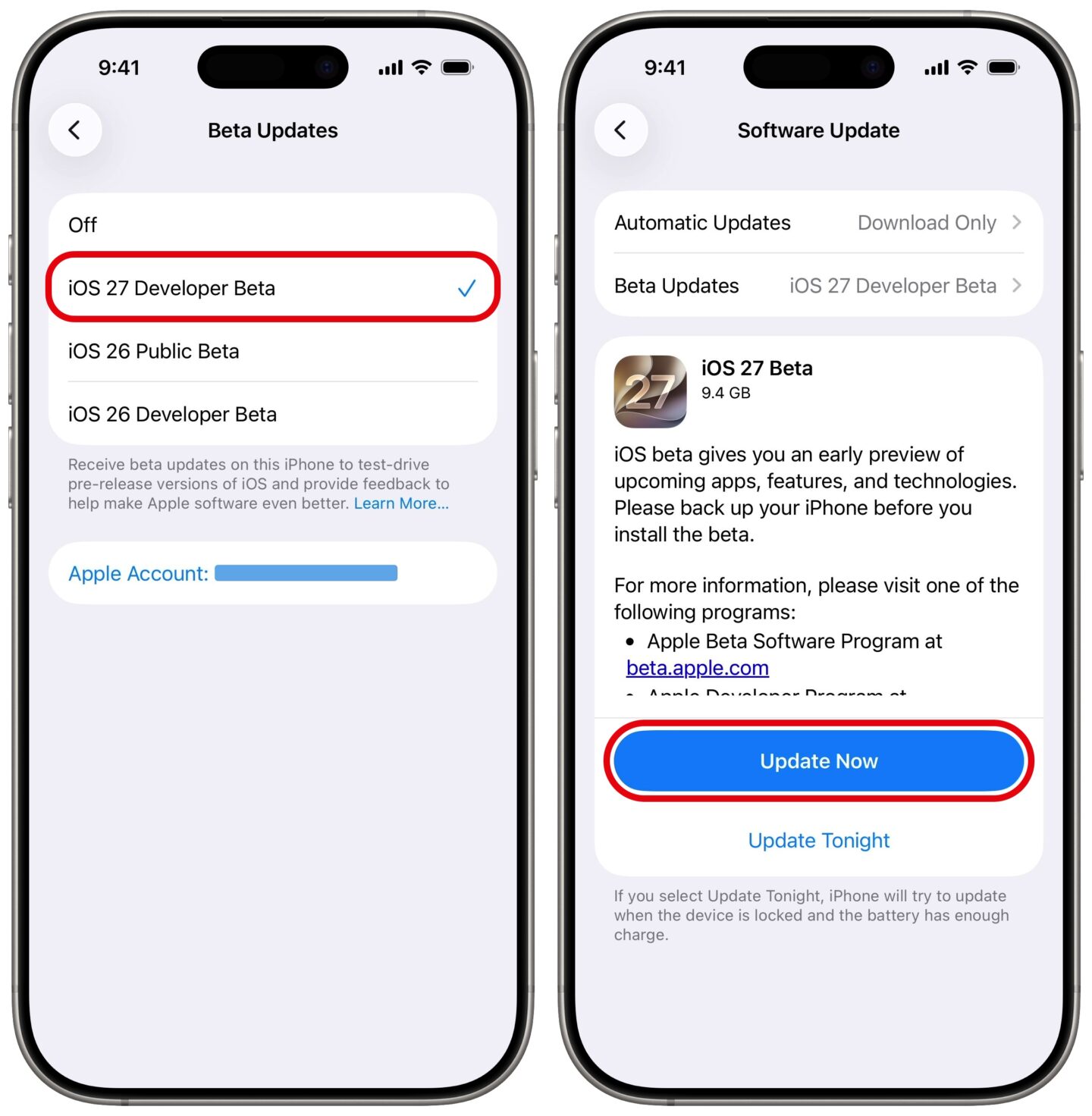 Get the iOS 27 Developer Beta right now! (If you’re into that sort of thing.)
Screenshot: D. Griffin Jones/Cult of Mac
On an iPhone and iPad, go to Settings > General > Software Update > Beta Updates and tap iOS 27 Developer Beta. After it checks for updates, tap Update Now to download iOS 27 and Install Now when it’s ready.
After you update your iPhone, you can update your Apple Watch. Open the Watch app, then tap General > Software Update > Beta Updates, and pick watchOS 27 Developer Beta. Swipe back and tap Update Now. Make sure your watch’s battery is charged over 50% and put it on a charger before you tap Install Now.
On a Mac, you can install macOS Golden Gate 27 from System Settings. Open System Settings > General > Software Update. Click the ⓘ next to Beta Updates, choose macOS Golden Gate 27 Developer Beta from the dropdown menu and click Done. Then, click Update Now download and install the update.
On a Vision Pro, the process is very similar. Open Settings > General > Software Update > Beta Updates and tap visionOS 27 Developer Beta. Go back and tap Update Now.
Opt into the Siri AI waitlist after installation
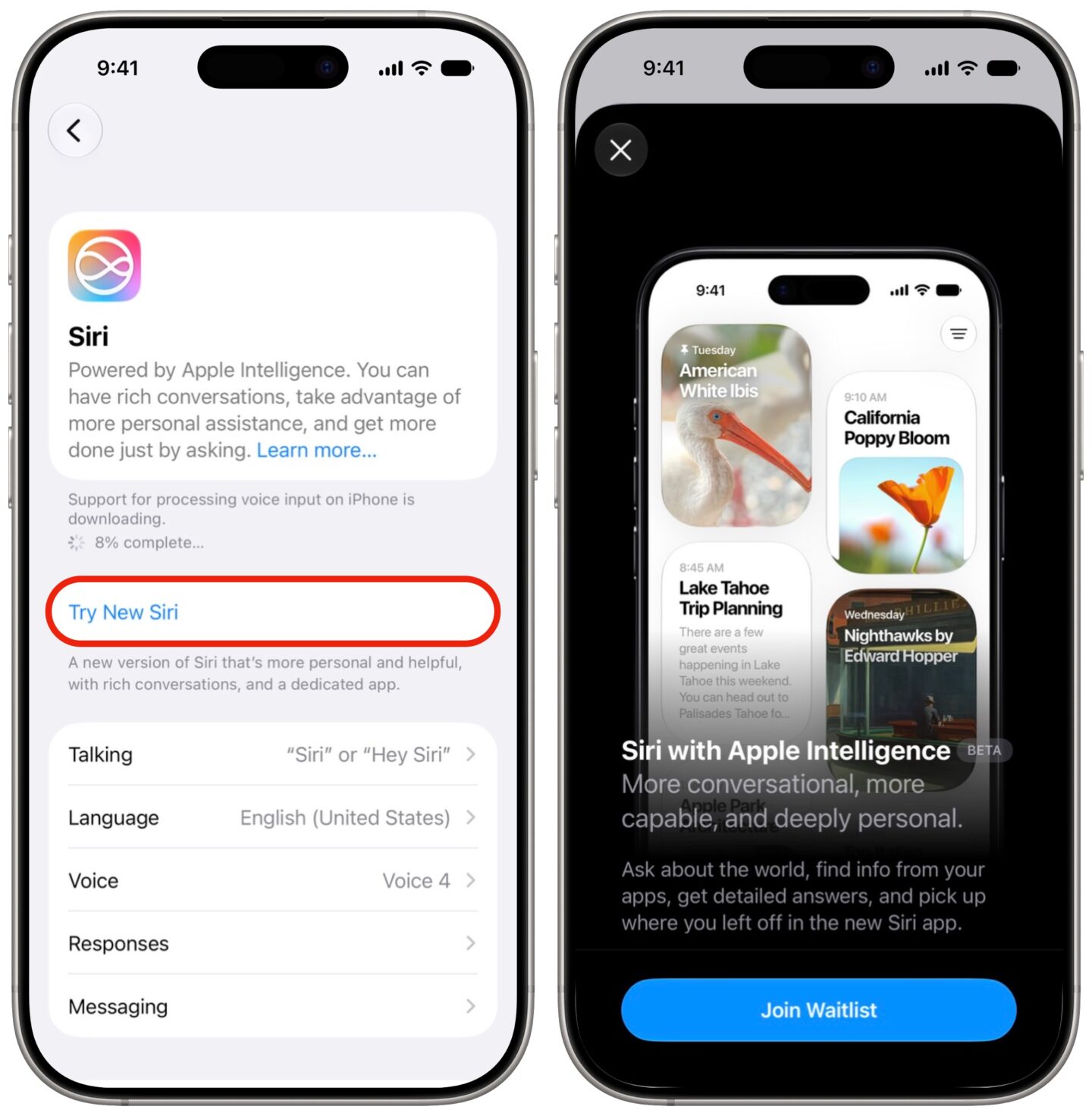 Join the waitlist here.
Screenshot: D. Griffin Jones/Cult of Mac
After the update is installed and your device reboots, you’ll want to join the Siri AI waitlist. Open Settings > Siri and tap Try New Siri. You’ll see a splash screen explaining the new features; tap Join Waitlist, then Continue.
It took me an hour or two to be accepted on the waitlist — but I was also pretty quick on the draw after the developer betas were released. The longer you wait to update, the longer you may need to wait to test out the new Siri.
More new Apple Intelligence features
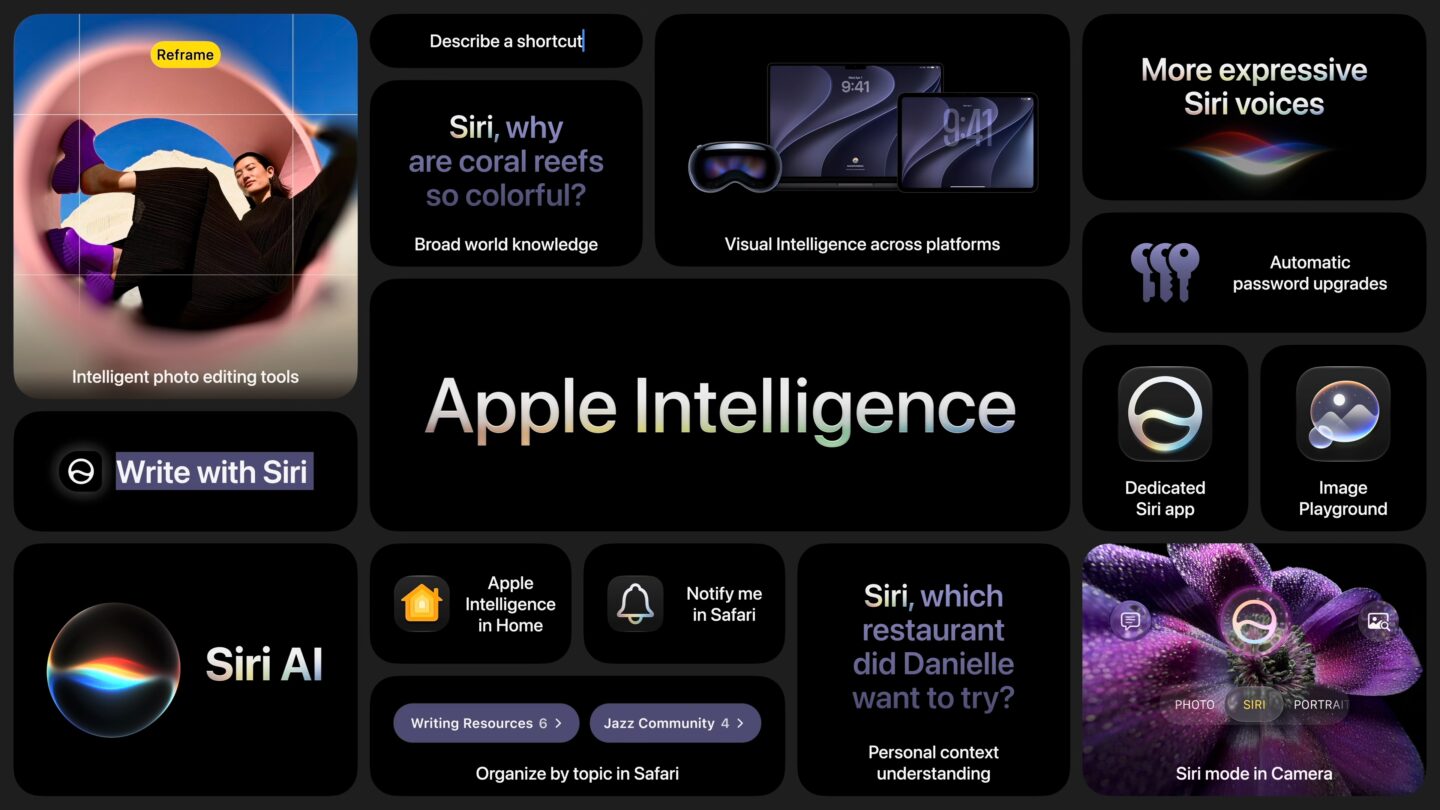 New Apple Intelligence features coming in the latest releases.
Image: Apple
There’s much more to Apple Intelligence in the OS 27 releases than the new Siri AI. Many build upon previously released features:
- Photos gets a serious AI editing suite, allowing you to remove objects, un-crop a photo or reframe it with a different perspective.
- Passwords can fix weak credentials automatically, using a Safari agent to update and save your passwords for you.
- Safari auto-organizes your tabs, sorting them into groups by topic.
- Visual Intelligence moves into the camera — and gains new tricks like reading nutrition labels, business cards and splitting restaurant bills.
- Messages and Mail surface smarter action suggestions, letting you add a calendar event or reminder with a single tap.
- Call Context surfaces relevant info before you say a word, like pulling up your flight information when you call an airline.
- Calendar accepts plain-language event creation, so you can enter in complex schedules and rules, and it’ll set it up automatically.
- VoiceOver delivers more detailed descriptions of images and on-screen content.
- The Home app combines a series of notifications into one that continuously updates, and can describe what happens in a video.
- Describe a Shortcut lets you type a description of what you want to automate, and Apple Intelligence assembles the required steps.
- Image Playground now generates photorealistic images, Lock Screen backgrounds and Messages backgrounds.
- System-wide proofreading catches grammar, not just spelling.
- Genmoji learns your habits and generates emoji proactively.
- File and folder names get AI suggestions, for keeping your files organized.
We published this article on how to get Apple Intelligence on August 15, 2024. We updated it with the latest information on February 21, 2025; March 11, 2025 and June 9, 2026.

D. Griffin Jones is a writer, podcaster and video producer for Cult of Mac. Griffin has been a passionate computer enthusiast since 2002, when he got his first PC — but since getting a Mac in 2008, he hasn’t turned back. His skills in graphic and web design, along with video and podcast editing, are self-taught over 20+ years. Griffin has a bachelor’s degree in computer science and has written several (unpublished) apps for Mac and iOS. His collection of old computers is made up of 40+ desktops, laptops, PDAs and devices, dating back to the early ’80s. He brings all of these creative and technical skills, along with a deep knowledge of Apple history, into his work for Cult of Mac.