Introduction
Buying a Cricut machine feels like opening the door to endless creative possibilities.
Then the ideas start arriving faster than anyone can keep up with them. One day it’s custom mugs. The next it’s birthday shirts, greeting cards, vinyl decals, gift tags, pantry labels, and holiday decorations. Before long, project notes are scattered across sticky notes, screenshots, notebooks, and the occasional grocery receipt that somehow became a design planner.
The creativity isn’t the problem. Keeping track of it all is.
Every crafter reaches a point where remembering material sizes, color combinations, cut settings, and project ideas starts feeling like trying to untangle a basket of ribbon that somehow tied itself into 63 tiny knots overnight.
That’s exactly why Cricut Project Planner Printables continue attracting buyers. They help crafters organize ideas, materials, measurements, and completed projects while giving digital creators an evergreen printable business with loyal customers.
One thoughtfully designed planner can save hours of frustration while helping makers spend more time creating and less time searching for yesterday’s brilliant idea.
Quick Answer
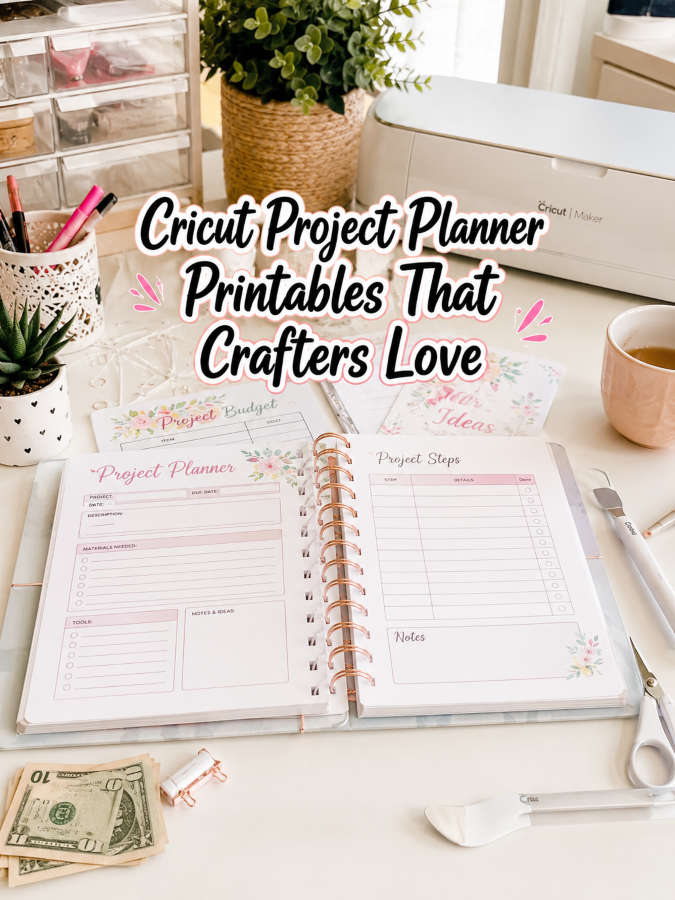
Cricut Project Planner Printables are downloadable planning pages that help crafters organize project ideas, material inventories, vinyl colors, SVG files, cut settings, shopping lists, project costs, customer orders, and finished creations.
A starter planner can comfortably sell for around $7. Expand it into business planners, seasonal project collections, editable craft journals, and complete Cricut business systems, and you’ve built a natural product ladder reaching $27, $47, and even $77.
Crafters don’t need more project ideas. They need a better way to organize the wonderful ideas they already have. That someone creating that solution could absolutely be you!
Why This Niche Works
Cricut owners rarely stop after making one project. What begins with a personalized coffee mug often grows into gifts, home décor, party decorations, small businesses, holiday crafts, classroom supplies, and custom orders.
Many planners focus only on project lists. Meanwhile, crafters need somewhere to track materials, measurements, SVG files, pricing, customer requests, and finished products. That’s like opening a craft store where every shelf is beautifully labeled except the one holding the scissors.
Once someone discovers a planner that genuinely helps organize their creative process, they’ll happily return for inventory trackers, business planners, craft fair organizers, order forms, and countless related thingees.
Unlike trendy craft projects that disappear after one holiday season, organization never goes out of style.
Prior to pouncing upon this opportunity, you should first know all about the:
Tools You’ll Need
You don’t need a room filled with crafting supplies to build this printable business. These dependable tools will help you create planners your customers will use every week.
- Canva for designing attractive planner layouts.
- Google Docs for organizing instructions, planner sections, and planning guides.
- AWeber for building your email list with crafting tips and printable updates.
- GetResponse for automated launches, newsletters, and customer follow-up.
- Gumroad for selling downloadable planner bundles.
- Teachable if you’d eventually like to teach Cricut organization or printable design.
- Amazon Cricut Planner Research for studying layouts, customer reviews, and popular planner features.
Don’t spend weeks collecting shiny software thingees. Spend that time creating planners that help makers stay organized from their first project to their five-hundredth.
Next, move to:
Your 5-Step Action Plan
Follow these five steps unless you’d rather spend 22 hours looking for the SVG file you downloaded yesterday and somehow saved in a folder that appears to exist only during leap years.
Step 1. Learn How Cricut Makers Work
Spend about 94 minutes researching Cricut planners, crafting journals, project notebooks, Etsy reviews, Facebook crafting groups, and YouTube project tutorials. Pay close attention to the organizational struggles people mention most often.
Create a master list containing 28 to 35 planner pages. Include project planners, material inventories, vinyl color trackers, blade replacement logs, SVG libraries, order forms, pricing worksheets, supply shopping lists, project schedules, and finished project galleries.
Your research becomes an X-ray machine that reveals frustrations many crafters quietly accept as “just part of crafting.”
Step 2. Design Your Core Planner
Create a printable collection containing 36 to 48 pages that naturally guide crafters through planning, creating, and organizing every project.
Include generous planning space, supply trackers, design sketches, cost calculations, customer order pages, project checklists, and inspiration logs. Keep everything simple enough that someone can begin using it immediately because simplicity is always a Good Thing.
Step 3. Build Specialty Editions
Create separate planners for Cricut business owners, holiday crafting, wedding projects, classroom projects, home décor, personalized gifts, vinyl storage, and craft fair preparation.
Specific planners always feel more valuable than one giant planner trying to organize every possible project.
Your customers will appreciate having choices.
Step 4. Add High-Value Bonuses
This is where your planner begins standing out from the thundering herd.
Include printable material inventories, color swatch pages, project budget trackers, pricing calculators, maintenance logs, customer thank-you planners, packaging checklists, and seasonal project calendars.
Those bonus thingees don’t require much additional work, yet they dramatically increase the value of your bundle.
People love practical surprises that make crafting easier.
Step 5. Build Your Product Ladder
Launch your starter planner for $7. Expand into Cricut business systems around $27, then introduce premium crafting management libraries approaching $77.
Before long, your business won’t simply be selling planners. You’ll be helping creative people organize their ideas, grow their hobbies, and even build handmade businesses of their own.
Once you’ve figured out all of the above, the next step is implementing:
3 Ways to Stand Out From The Thundering Herd!
Let’s face it. There are plenty of Cricut planners available online. That’s about as surprising as finding vinyl rolls in a craft room.
The Good Thing is that many of them only help people list projects. Your planner can become the creative headquarters that keeps every idea, material, order, and finished masterpiece in one organized place.
Way 1. Design for Different Types of Cricut Makers
Not every Cricut owner creates the same projects. Build separate planners for hobby crafters, Etsy sellers, teachers, party decorators, small business owners, scrapbook enthusiasts, home organizers, and holiday makers.
When someone immediately finds a planner that fits the way they create, they’re much more likely to buy it. That’s far better than handing everyone the same notebook and hoping it somehow works for every project imaginable.
Way 2. Organize the Entire Creative Process
Don’t stop with project planning pages.
Add material inventories, vinyl color swatches, blade maintenance logs, supplier lists, pricing worksheets, customer order trackers, shipping checklists, and craft fair planners. Those extra thingees transform your printable into a complete Cricut management system instead of another planner that ends up collecting dust.
Way 3. Make Planning Feel Creative
Crafters love organization, but they also love inspiration.
Include mood boards, color palettes, seasonal inspiration pages, project sketch sheets, and creative goal trackers. A planner should encourage new ideas instead of feeling like another chore waiting on the craft table.
Next, here’s the thing. You’re probably NOT the only person offering this service. So you now require:
3 Nifty Ways to Find Customers
You don’t need paid ads because Cricut owners practically shine the Bat Signal every time they ask where everyone keeps their SVG files or how they organize hundreds of vinyl rolls.
Way 1. Facebook Cricut Communities
Thousands of Cricut users gather in Facebook groups every day to share projects, ask questions, and recommend useful tools.
Become the helpful person who offers practical organization tips before introducing your planner. Trust always grows faster than constant promotion.
Way 2. Pinterest
Crafters spend countless hours on Pinterest searching for project inspiration, organization ideas, and creative planning systems.
Create beautiful pins showing planner pages, craft room organization, supply inventories, and completed project layouts. Attractive visuals naturally encourage clicks and saves.
Way 3. YouTube Craft Creators
Many Cricut creators regularly recommend planning tools, organization systems, and printable resources to their audiences.
Offer your planner for reviews, collaborations, or affiliate partnerships. It’s a wonderful way to introduce your printable to highly engaged crafters.
Speaking of completed projects, now let’s move to:
3 Takeaways You Won’t Find Elsewhere!
These aren’t feel-good reminders. They’re practical lessons that quietly transform one planner into a growing digital product business.
Takeaway 1. You’re Selling More Creative Time
Crafters don’t buy planners because they enjoy filling out paperwork.
They buy planners because they want to spend less time searching for supplies and more time creating beautiful projects. That’s the real value you’re providing.
Takeaway 2. Organization Builds Confidence
Knowing exactly where supplies, project notes, customer orders, and SVG files are stored makes every crafting session feel less stressful.
Your planner quietly removes frustration before it has a chance to interrupt someone’s creativity.
Takeaway 3. One Planner Can Grow Into an Entire Product Line
Your Cricut planner can naturally expand into craft fair planners, laser engraving organizers, sewing journals, sublimation planners, vinyl inventories, small business planners, and handmade product trackers.
Those connected thingees create a complete crafting library that customers will happily continue collecting.
Now that you know the above, it’s time for:
3 Common Mistakes to Avoid
Many creators only include project planning pages.
That’s Not a Good Thing. Crafters also need supply trackers, pricing pages, customer orders, maintenance logs, and inventory sheets to keep everything running smoothly.
Some sellers forget business owners.
Many Cricut users eventually begin selling their creations. Including business-friendly pages is always a Good Thing because it gives your planner a much longer lifespan.
Others build one planner and never expand.
The biggest opportunity comes from creating a complete collection that grows right alongside your customers’ creative businesses.
What else should you know? How about:
Scaling Your Results
Expand beyond Cricut.
Create planners for sublimation, laser engraving, sewing, quilting, embroidery, woodworking, resin art, candle making, and countless other creative hobbies. Once you’ve built one successful planning system, you’ll already have a proven framework for many more.
Create premium crafting bundles.
Bundle project planners, inventory systems, craft fair organizers, pricing calculators, customer order trackers, packaging checklists, and business planners into complete handmade business collections.
Build an email list that crafters genuinely enjoy.
Share project ideas, organization tips, seasonal planning pages, and exclusive printable updates throughout the year. A collection containing 31 crafting planners could realistically generate an additional $492 to $1,426 each month through repeat buyers, bundle sales, memberships, and seasonal launches. Trust me, you’ll thank me later.
Let’s now wrap up everything via the:
Your Next Steps
Start by writing down 35 planner pages that would genuinely help a Cricut owner stay organized from the first design idea to the finished project. Don’t try to create the world’s biggest planner because that’s usually a Not a Good Thing.
Design your first planner in Canva using clean layouts that encourage creativity without overwhelming the user. If someone can begin organizing projects within five minutes, you’ve built something truly useful.
Then introduce your planner to five Cricut communities, crafting groups, Pinterest boards, or handmade business owners. Remember, 5 good messages beats 50 generic ones every single time.
One thoughtfully designed planner can quietly become the beginning of an entire crafting organization business.
Next, let’s finish with:
Final Thoughts
The best Cricut projects don’t begin with cutting vinyl. They begin with a great idea that’s organized well enough to become a finished creation instead of another forgotten file buried somewhere on a hard drive.
Your Cricut Project Planner helps make that happen. It gives makers one organized place to capture ideas, track supplies, manage projects, and celebrate finished creations. That’s exactly the kind of printable people continue using long after they’ve downloaded it.
Start with one planner that genuinely solves everyday crafting frustrations. Keep listening to your customers, keep improving your pages, and keep expanding your collection one creative niche at a time. You don’t need bazillions of printables to build a successful digital business. You simply need one planner that helps makers spend more time creating and less time searching.
That’s it. That’s your beginning!
If you were designing your very first Cricut Project Planner today, what section would you build first – project ideas, vinyl inventory, SVG library, customer orders, or something completely unique?
Enjoy!