Introduction
Laser engraving has a funny way of starting with one simple project and turning into a full creative operation. One design becomes several versions, then there are different wood types, acrylic sheets, blanks, finishes, settings, test pieces, packaging supplies, customer requests, and enough project ideas to keep the laser busy for a very long time.
That creative complexity creates an excellent opportunity for practical printable products.
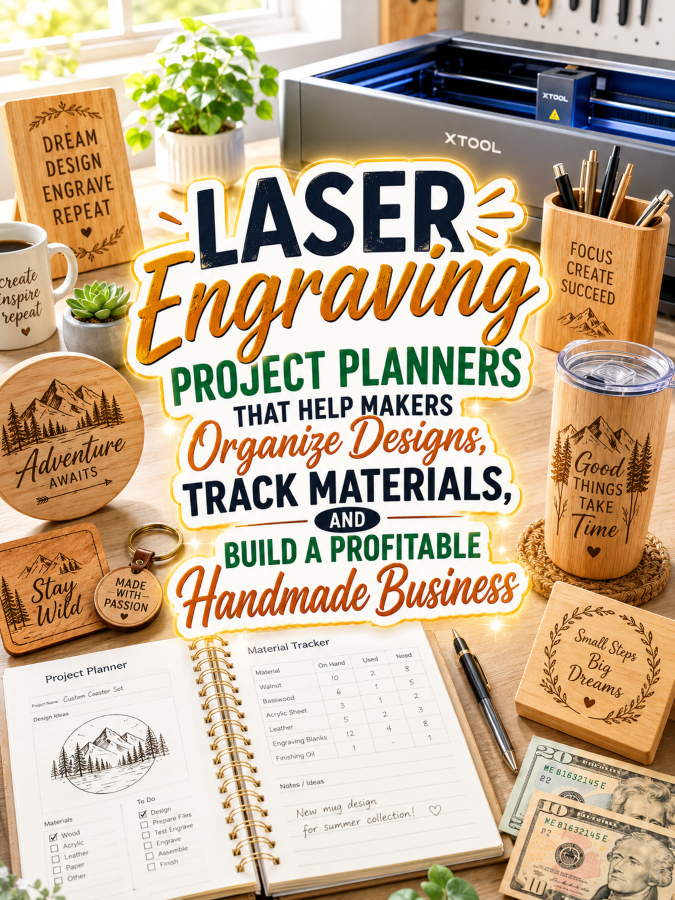
Laser engraving makers need ways to organize design ideas, record machine settings, track materials, document test cuts, manage blanks, calculate project costs, organize custom orders, and keep finished products ready for sale.
A Laser Engraving Project Planner can solve those problems while creating a natural $7 to $77 product ladder. Start with one focused project planner, then build upward into a complete laser studio and handmade business management system.
Quick Answer
A Laser Engraving Project Planner can start as a $7 project journal, expand into a $17-$27 laser studio toolkit, grow into a $37-$47 complete laser engraving business planner, and reach $67-$77 as a premium customizable business command center.
The secret is to make every price level solve a larger problem. Do not simply add pages. Add useful systems that help makers plan, test, reproduce, price, organize, and sell their engraved products more efficiently.
Quick Win
Create a laser engraving project worksheet that records the project idea, material, thickness, design file, machine, lens or accessory used, power and speed settings, number of passes, test results, finished dimensions, production time, material cost, and lessons learned.
Why This Niche Works
Laser engraving attracts hobbyists, woodworkers, crafters, personalized-gift makers, small-business owners, Etsy sellers, craft-fair vendors, sign makers, and creators who turn digital designs into physical products.
And laser engraving is naturally experimental.
A design can behave differently depending on the material, thickness, finish, machine, settings, focus, engraving depth, cutting speed, and other production variables. A setting that works beautifully on one material may need adjustment on another.
That makes good documentation incredibly valuable.
Without a reliable record, a maker may have to repeat the same trial-and-error process the next time a customer orders a similar product. A planner can turn successful experiments into a personal reference library.
For makers who sell their work, the organizational challenge becomes even bigger. They need to track blanks, materials, production time, customer specifications, pricing, inventory, packaging, orders, marketing, and seasonal collections.
That gives you plenty of room to build a product ladder that grows alongside the customer.
The Reasonable Pricing Rule
Do not create a $77 product by taking your $7 planner and filling it with dozens of nearly identical worksheets.
More pages do not automatically mean more value.
The $7 product should solve one focused problem: organizing individual laser engraving projects.
The $17-$27 product should organize the laser studio.
The $37-$47 product should organize the handmade business.
The $67-$77 product should provide customization, specialization, and a complete system for serious laser engraving entrepreneurs.
Every upgrade should save time, reduce confusion, or help the customer make better creative and business decisions.
Your $7 Starter Product
Create a printable called the Laser Engraving Project Planner.
Include:
- Project Idea Sheet
- Design Concept Planner
- Customer Personalization Notes
- Material Information Page
- Material Thickness Record
- Design File Tracker
- Machine Information Record
- Engraving Settings Log
- Cutting Settings Log
- Test Piece Tracker
- Project Measurements Worksheet
- Project Time Tracker
- Material Cost Worksheet
- Finishing Notes
- Finished Project Review
The goal is to help makers document exactly how a successful project came together so they can reference, reproduce, modify, or improve it later.
Grow It Into a $17 to $27 Laser Studio Toolkit
Once a laser maker has accumulated plywood, hardwood, acrylic, leather blanks, slate, tumblers, signs, ornaments, tags, accessories, and other materials, organization becomes a serious productivity advantage.
Your studio toolkit could include:
- Material Inventory
- Wood Inventory
- Acrylic Inventory
- Blank Product Inventory
- Leather & Specialty Material Tracker
- Material Thickness Library
- Material Supplier Directory
- Design File Library Index
- Machine & Equipment Inventory
- Lens & Accessory Inventory
- Settings Reference Library
- Test Piece Library
- Works-in-Progress Tracker
- Finished Product Inventory
- Project Queue Planner
- Seasonal Product Planner
- Gift Product Planner
- Craft Fair Inventory Planner
- Packaging Supply Tracker
- Weekly Laser Studio Planner
Now you’re selling a practical laser studio management system instead of another generic craft planner.
Build a $37 to $47 Complete Laser Engraving Business Planner
When laser engraving becomes a source of income, the maker needs systems that go far beyond project organization.
Build a complete business planner with:
- Annual Business Planner
- 90-Day Business Goal Planner
- Product Collection Planner
- Seasonal Collection Calendar
- New Product Development Planner
- Custom Product Planner
- Production Batch Log
- Customer Database
- Custom Order Tracker
- Personalization Approval Tracker
- Wholesale Order Planner
- Sales Tracker
- Expense Tracker
- Material Cost Calculator
- Production Time Tracker
- Profit Margin Worksheets
- Pricing Calculator
- Craft Fair Planner
- Marketing Calendar
- Social Media Content Planner
- Product Photography Checklist
- Customer Feedback Log
- Quarterly Business Review
- Year-End Business Review
This is where the product shifts from hobby organization to business management.
The customer is no longer asking only, “What should I engrave next?” They’re asking, “Which products should I sell, what should I charge, how much does each item really cost, and which designs deserve more production time?”
Create a $67 to $77 Premium Bundle
Premium buyers want flexibility and specialization. Give them a complete system that can adapt to the type of laser engraving business they actually run.
Your premium bundle could include:
- Editable Canva Templates
- Fillable PDF Planner
- Tablet-Friendly Digital Planner
- Wood Engraving Business Edition
- Acrylic Product Edition
- Personalized Gift Business Edition
- Wedding & Event Product Planner
- Laser Engraved Sign Business Edition
- Ornament & Holiday Product Planner
- Engraved Tumbler & Drinkware Planner
- Custom Order Client Workbook
- Wholesale Laser Product Planner
- Craft Fair Seller Edition
- Seasonal Collection Launch Kit
- Product Launch Planner
- Pricing & Profitability Workbook
- Commercial Use Rights for Handmade Business Coaches
The premium bundle should feel like a complete operating system for a serious laser engraving brand.
Example Product Ladder
$7 Starter: Laser Engraving Project Planner
$17-$27 Toolkit: Laser Studio Organization Toolkit
$37-$47 Bundle: Complete Laser Engraving Business Planner
$67-$77 Premium: Editable Laser Engraving Business Command Center
Recommended Tools
- Canva for planner layouts, editable templates, product sheets, and promotional graphics
- ChatGPT for product ideas, collection names, descriptions, marketing content, and planning prompts
- Creative Fabrica for commercial-use graphics, fonts, and design resources
- remove.bg for clean product mockups
- Google Trends for researching seasonal engraving and personalized-gift interests
- Etsy for product research and selling printable planners
- Payhip or Gumroad for digital product delivery
- Systeme.io for email marketing, lead magnets, and automated sales funnels
Your 5-Step Action Plan
Step 1: Organize Individual Laser Projects
Start with a project planner that captures the important details behind every engraved or cut piece.
Record the design, material, thickness, machine information, settings, test results, dimensions, project time, cost, finishing process, and final results.
Include a reminder that makers should always follow the manufacturer’s instructions and appropriate safety practices for the specific machine, material, ventilation setup, and accessories they use.
Step 2: Solve the Material-Stash Problem
Expand the product with material inventories, thickness libraries, blank-product trackers, supplier records, design-file indexes, machine inventories, accessory records, and settings references.
This gives customers a reason to use the planner even when they are between projects.
Step 3: Add Business Management
Introduce pricing calculators, production logs, customer order trackers, personalization approvals, sales records, expense logs, craft-fair planners, product launches, and marketing calendars.
Now you’re helping laser makers operate a business rather than simply organize a hobby.
Step 4: Develop Specialized Editions
Create focused versions for different laser engraving audiences.
A personalized gift edition could emphasize customer names, dates, artwork approvals, personalization details, deadlines, and packaging. A wedding and event edition could focus on quantities, event dates, proofing, production schedules, and delivery. A sign-making edition could emphasize dimensions, materials, mounting options, design revisions, and installation details.
Step 5: Build a Maker Product Ecosystem
Once your laser engraving planner family is established, branch into woodworking, Cricut projects, sublimation, resin art, jewelry making, leathercraft, paper crafts, and other maker niches.
One strong product ladder can become the foundation for an entire creative-business printable collection.
Common Pricing Mistakes to Avoid
One of the biggest mistakes is creating a planner that looks beautiful but does not actually help the customer make better decisions.
Pretty pages are nice. Useful pages are what make a product valuable.
A laser maker should be able to use your planner to answer practical questions:
- Which design file did I use?
- Which material and thickness worked?
- Which machine was used?
- Which settings produced the best result?
- What did my test piece show?
- How long did production take?
- How much did the material cost?
- Can I reproduce this project?
- What should I charge for the finished product?
Another mistake is putting everything into the $7 product.
If the starter planner already includes inventory, customer management, marketing, wholesale planning, and financial tracking, there is little reason for customers to purchase the higher-priced versions.
Create a clear value staircase instead. The starter solves one problem. The toolkit solves several. The business planner connects the operation. The premium bundle delivers customization and specialization.
Important Safety Consideration
Laser engraving and cutting can involve heat, fumes, smoke, fire hazards, moving machinery, and materials that may be unsuitable for certain machines or processes. Your planner should support organization without presenting itself as a substitute for proper machine training or manufacturer instructions.
For example, a settings worksheet can provide space for recording power, speed, passes, focus information, material thickness, and test results. It should not imply that one set of settings is universally safe or appropriate for every machine and material.
Encourage users to follow the manufacturer’s instructions, use appropriate ventilation and protective measures, and verify that materials are suitable for their particular machine and process.
If the planner is marketed to sellers, avoid promising that the product guarantees legal or regulatory compliance. Requirements can vary depending on the products, materials, claims, equipment, and location.
Where to Find Buyers
- Laser engraving Facebook groups
- Laser cutting communities
- Woodworking communities
- Personalized gift maker groups
- Etsy seller groups
- Handmade business communities
- Craft fair vendor groups
- Pinterest laser engraving audiences
- Small-business maker communities
- Local craft and maker groups
Don’t market every version to everyone. A beginner project planner and a wholesale production planner solve very different problems.
Affiliate Opportunities
Laser engraving planners also create natural opportunities for related affiliate content. The planner becomes the organizational product while complementary supplies and equipment become useful recommendations.
- Laser engraving machines
- Laser cutting accessories
- Wood blanks
- Acrylic sheets and blanks
- Engraving blanks
- Rotary attachments
- Air-assist accessories
- Ventilation equipment
- Material storage systems
- Measuring tools
- Finishing supplies
- Packaging supplies
Internal Link Suggestions
- Resin Art Project Planners
- Woodworking Project Planners
- Cricut Project Planners
- Sublimation Project Planners
- Leathercraft Project Planners
- Jewelry Making Project Planners
- Paper Craft Project Planners
- Candle Making Recipe Journals
Pinterest Pin Ideas
- The Laser Engraving Project Planner Every Maker Needs
- Organize Your Laser Projects, Materials, and Settings
- Turn Your Laser Engraving Hobby Into a More Organized Business
- From Test Piece to Product Collection: The Laser Planner System
- Build a $7 to $77 Laser Engraving Product Ladder
Frequently Asked Questions
Who buys Laser Engraving Project Planners?
Laser engraving hobbyists, woodworkers, personalized-gift makers, sign makers, Etsy sellers, craft-fair vendors, custom-order businesses, and growing handmade brands can all benefit from these planners.
Can this niche generate repeat customers?
Yes. Laser makers frequently create seasonal products, personalized gifts, wedding décor, signs, ornaments, home décor, business products, and custom orders. Each activity creates opportunities for additional specialized planners.
Should I create different versions for different laser engraving niches?
Absolutely. Wood engraving, acrylic products, signs, personalized gifts, wedding products, ornaments, drinkware, and custom orders all have different workflows. Specialty editions let you market directly to those audiences.
Can the starter product work for hobbyists?
Yes. The $7 planner can focus entirely on organizing personal laser projects. Higher tiers can gradually introduce inventory management, selling, customer orders, marketing, production planning, and business management.
Can I include machine-setting worksheets?
Yes. Settings worksheets are one of the most useful parts of the product because they help makers document their own experiments. However, the planner should clearly state that users remain responsible for verifying settings, material compatibility, machine instructions, and safety procedures for their specific equipment.
Call to Action
A great laser engraving project starts with a design, a suitable material, the right equipment, and an idea. A successful laser engraving business needs something else: a system that keeps all those moving pieces organized.
Start with a $7 Laser Engraving Project Planner that helps makers document their designs, materials, settings, and test results. Then expand it into a $17-$27 studio toolkit, a $37-$47 complete business planner, and finally a $67-$77 premium command center.
Don’t build the entire ladder at once. Start with one useful solution, pay attention to what customers need next, and build each upgrade around a real problem.
That’s how a simple laser engraving printable can become the foundation for a much bigger digital product business.
Conclusion
Laser engraving makers already have creativity, patience, and enough test pieces to prove that “just one more setting experiment” can become an afternoon project.
What they need is a practical system for organizing designs, materials, machine settings, test results, projects, customers, and business decisions.
A Laser Engraving Project Planner turns scattered experiments into a repeatable workflow. Start with a focused $7 project planner, expand it into a comprehensive $77 business command center, and you have a product ladder that can grow alongside the customer’s handmade business.
And once the model works for laser engraving, you have a natural path into woodworking, Cricut projects, sublimation, leathercraft, resin art, jewelry making, paper crafts, and other maker niches. One well-designed planner can become an entire creative product ecosystem.
That wraps up today’s discoveries. If anything caught your attention or made you feel excited, why not take the first step today and see where it leads?
Enjoy!