As always with covering AI news, love it or hate it, these updates and announcements aren’t going to slow down anytime soon. Higgsfield, one of the larger and more established, but still quite controversial, “all-in-one” AI platforms, has introduced new plugins for both Adobe Premiere and After Effects.
These new AI toolset plugins are set to offer a host of AI-powered features which can bring AI even more directly into your everyday video editing workflows. Some of the tools are more assistive, like removing backgrounds and adjusting aspect ratios without cropping.
However, as you might have feared, the plugin will also introduce new ways for users to generate AI-generated video or images directly in these Adobe apps. So, do with this information as you will, but here’s what’s been announced.
Higgsfield AI Plugins for Adobe Premiere and After Effects
Announced on the company’s social channels the other day, this is a pretty major move, as Higgsfield is one of the first of the larger AI platform companies to move directly into video editing apps like Premiere and After Effects.
The new Higgsfield Adobe plugins will add several new features, of which we mentioned a few above. Here’s the full list of Higgsfield Adobe AI plugin features:
- Generate AI Video: Create any clip with natural language. Create scenes, characters, B-roll, or camera moves – just describe what you want, and Higgsfield drops the result straight into your Adobe timeline.
- Generate AI Image: Create any visual with natural language. Build backgrounds, overlays, title cards, or scene elements – just describe what you want, and Higgsfield drops the result straight into your Adobe timeline.
- Reframe: Crop any clip to 9:16, 16:9, 4:3, 3:4, 21:9, or 1:1 with one click. Smart subject tracking keeps the focal point perfectly centered as the aspect ratio changes – no manual reframing, no awkward crops.
- Remove Background: Pull a clean key from any footage without a green screen. AI detects subjects with pixel-level precision – sharp edges, soft hair detail, and a pure alpha channel ready to drop into any composite.
- Upscale: Boost any clip up to 4K or 8K with real detail recovery, not just pixel stretching. Restore archive footage, salvage low-res sources, and deliver crisp modern quality from yesterday’s masters.
- Draw to edit: Sketch directly on the frame to tell Higgsfield what to change. Remove unwanted objects, add new elements, or replace entire areas with a single brush stroke – inpainting that just works inside Adobe.
As you can see, these features run the gamut from slight workflow speed-ups to more generative options. The former, which is generally more accepted by video editors, and the latter, which is more disruptive and existentially annoying.
Price and Availability
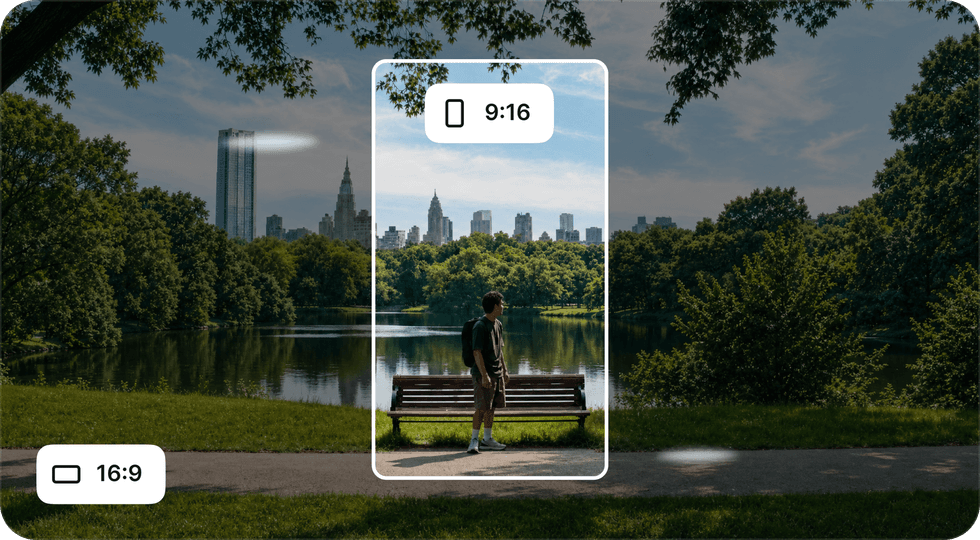
Credit: higgsfield.ai
As with Higgsfield and many of these AI platforms, to access these plugins you’ll need a subscription account.
You’ll also have to pay for many of these generations with credits. Higgsfield, again, isn’t its own generator either, so you will have access to top models like Seedance, Nano Banana, and Kling when using the platform.
For more info on pricing and plan options, you can head to the company’s website here.
From Your Site Articles
Related Articles Around the Web