Introduction
A $7 PDF can look tiny at first, right? I mean, almost TOO tiny. Like you made a helpful little product, put it on a sales page, gave it a cheerful button, and then wondered if it needed a snack and a larger destiny.
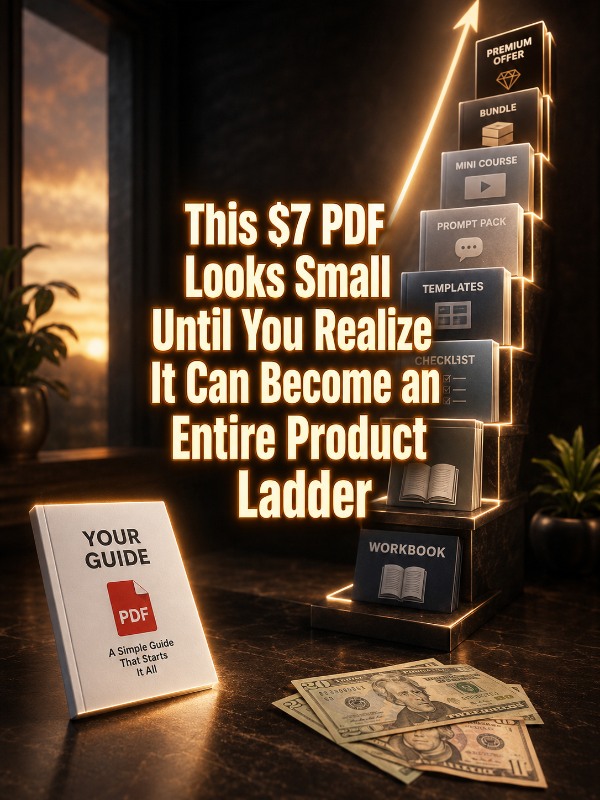
But that small PDF might be the front door to a much bigger product path! The trick is not to keep making random new products every time you want more income, no. The smarter move is to take the simple result inside that $7 PDF and build a ladder around it.
That means your buyer can start small, get a quick win, and then see the next helpful step. You are not forcing them into a giant offer right away. You are guiding them from “I can use this today” to “Ohhh, I want the full kit!”
Now let’s look at why this tiny little offer can do heavier lifting than it first appears.
Why This Works
A $7 PDF works because it feels easy to buy, right? It’s low risk. It’s simple. The buyer does not need a committee, a spreadsheet, or a dramatic stare out the window to decide. They can glance at the promise and think, “Yes, that would help me today.”
That little yes matters! A buyer who purchases your $7 PDF has already shown interest in the topic, the result, and your way of explaining it. That gives you something much more valuable than a one-time sale. It gives you a starting point.
The mistake many sellers make is treating the $7 PDF like the whole business. They create it, sell it, and then start over from scratch. New topic. New product. New sales page! New caffeine emergency. But …
What if the first PDF was only step one?
Your job is not to stuff everything into the first product. Your job is to ask one better question: “What would this buyer naturally want next?” That question is where the product ladder begins.
Quick Answer
A $7 PDF can become a $77 product ladder when you turn the original quick win into a bigger result. Start with one simple PDF, then add supporting pieces like templates, checklists, examples, swipe files, walkthroughs, prompts, planners, and a complete implementation guide.
The buyer starts with a small helpful product, then sees a clear next step that saves them more time, gives them more confidence, or helps them get the result faster.
Once you understand the reason this works, the next step is turning that tiny offer into a real ladder without making the whole thing feel like a runaway closet explosion. Move now to:
How To Do It
Step 1: Start With One Clear $7 Result
Your $7 PDF needs to solve one clear problem. Not ten problems. Not an entire life transformation wrapped in a downloadable file. One useful result is enough.
For example, your $7 PDF might help someone plan a week of social posts, organize a small launch, clean up an Etsy listing, write better product descriptions, or create a simple printable. The tighter the result, the easier it is for buyers to say yes.
A small product sells better when the buyer instantly understands what it helps them do. That means your title should focus on the outcome, not just the format. “30 Social Post Ideas for Dog Groomers” is clearer than “Marketing PDF.” See the difference? One sounds useful.
The other sounds like it was left behind in a folder called “misc.” Not good!
And how to do this?
You can create the first version in tools like Canva, Google Docs, or Microsoft Word. Keep it simple, clean, and easy to use.
Step 2: Turn the PDF Into a Starter Kit
Once the small PDF is clear, ask what would make it easier to use. This is where your first upgrade appears. You are not adding fluff. You are adding support.
If the PDF teaches people how to plan social posts, the starter kit could include a planning worksheet, caption examples, a weekly tracker, and a list of post prompts. If the PDF teaches Etsy listing cleanup, the starter kit could include a listing audit checklist, title examples, tag worksheet, and product description template.
A few easy starter kit pieces include:
- Printable checklist
- Fill-in worksheet
- Example pack
- Mini planner
- Swipe file
- Resource list
- Quick-start guide
This is where the product starts feeling more complete! The buyer is no longer getting only information. They are getting help using the information. That is the difference between “interesting” and “I can actually do this today.”
Step 3: Add Templates That Save Time
Templates are one of the easiest ways to raise the value of a printable product. Why? Because templates save thinking time. And for busy buyers, thinking time is often the part that makes them wander off and reorganize their coffee mugs instead.
If your $7 PDF explains what to do, your templates help the buyer do it faster. That is a real upgrade. You can create editable versions in Canva, Google Docs, Notion, or plain PDF format.
Let’s say your original PDF is about creating a simple content calendar. Your template upgrade could include a weekly calendar, monthly calendar, post idea bank, caption worksheet, promo tracker, and repurposing planner. Nothing has to be fancy. It has to be useful.
The strongest selling point here is time saved! Buyers pay more when they can see that your bundle helps them skip blank-page panic and move straight into action.
Step 4: Add Examples So Buyers Can See the Finished Result
Examples make a product easier to understand. They show the buyer what “good” looks like before they try to create their own version. That matters because beginners often freeze when they only get instructions.
You can add sample pages, sample filled-in worksheets, sample captions, sample designs, sample product listings, sample emails, or sample sales blurbs. These do not need to be perfect museum pieces guarded by velvet ropes, mind you. Instead, they need to be clear enough that the buyer thinks, “Oh, I get it now.”
Examples are especially powerful in niches like:
- Printables
- Social media content
- Email writing
- Etsy product setup
- Lead magnets
- Lesson plans
- Client onboarding
Examples reduce buyer confusion. And when confusion drops, value rises. Your bundle starts feeling less like a pile of files and more like a guided path.
Step 5: Add Prompts or Scripts for Faster Action
If your buyers use AI tools, prompts can make your bundle feel more useful fast. But the prompts should not be random. They should help the buyer create, customize, or improve the exact thing your product teaches.
For example, if your $7 PDF is about creating pet holiday printables, your upgraded bundle could include prompts for product ideas, printable titles, Etsy descriptions, social captions, bundle names, and buyer avatar research. That turns the product into a tiny action machine, minus the dramatic blinking lights. Isn’t that far more desirable?
You can include prompts for tools like ChatGPT, Claude, or Gemini. Keep each prompt specific, copy-and-paste ready, and tied to the buyer’s next step.
The prompts should help the buyer get unstuck. That is what makes them valuable. They are not there because prompts are trendy. They are there because they help the buyer move.
Step 6: Add a Simple Implementation Plan
A bigger bundle needs a path. Without a path, buyers open the folder, see twelve files, and immediately decide they need a sandwich before dealing with this tiny digital mountain.
Your implementation plan tells them what to open first, what to do next, and how to finish. This can be a 3-day plan, 5-day plan, 7-day plan, or 30-minute quick-start plan. The length depends on the promise of your bundle.
A simple plan might look like this:
- Day 1: Read the quick-start guide and choose your product idea.
- Day 2: Fill in the worksheet and customize the templates.
- Day 3: Use the prompts to write your listing, captions, or sales copy.
- Day 4: Package the final files and create your product image.
- Day 5: Publish, promote, and track your first results.
This makes the bundle feel guided instead of overwhelming! Buyers love having a path because it removes guessing. And when your product removes guessing, it becomes easier to sell.
Step 7: Price the Ladder So Each Step Feels Natural
Your ladder should make sense from the buyer’s point of view. The $7 PDF gives them a quick win. The next offer gives them more support. The $77 bundle gives them the full system.
You could structure it like this:
- $7: Quick PDF guide
- $17: Starter kit with checklist and worksheet
- $27: Template pack with examples
- $47: Expanded toolkit with prompts and swipe files
- $77: Complete bundle with implementation plan and editable assets
You do not need every step on day one. You can start with the $7 PDF and the $77 bundle, then add middle offers later. The key is that each level should feel like a logical upgrade, not a random stack of files wearing a price tag.
The buyer should feel the difference between each offer. More help. More speed. More examples. More templates. More confidence. That is what makes the ladder work.
Now that the structure is clear, let’s talk about what this can look like in real life.
Simple Product Ladder Example
Let’s say your first product is a $7 PDF called “Holiday Printable Ideas for Dog Parents.” It gives buyers 25 simple product ideas they could create for dog lovers during holidays.
That is a fine little product. Useful. Clear. Easy to buy. But it can become much more valuable when you build the next steps around it.
The $7 PDF
The front-end product gives buyers the core idea list. It’s quick, simple, and helpful. It might include idea descriptions, buyer types, and a few tips for choosing the easiest product to start with.
The $17 Starter Kit
The starter kit adds worksheets, a planning checklist, and a simple product selection scorecard. Now the buyer can choose one idea and start organizing it instead of just reading and nodding politely.
The $27 Template Pack
The template pack includes Canva-friendly printable layouts, product mockup tips, listing title examples, and basic cover designs. This saves the buyer design time, which is a huge value bump.
The $47 Marketing Kit
The marketing kit adds Etsy description examples, Pinterest pin ideas, social captions, launch emails, and keyword brainstorming prompts. Now the buyer is not only making the product. They are learning how to present it.
The $77 Complete Bundle
The complete bundle includes everything above, plus a 5-day action plan, full example product, prompt pack, bundle-building checklist, and launch tracker. That gives the buyer a full path from idea to published product.
See how the $7 PDF did not disappear? It became the front door. The whole ladder grew from the same simple result.
And once you see the ladder, the whole product feels less like a lonely PDF and more like a small business asset. Not to mention, consider the:
Encouragement Corner
If you have ever looked at a tiny product and thought, “This is not enough,” pause for a second. It might be enough for step one. It just might not be the whole staircase yet.
A small product does not have to stay small. It can become a kit, a bundle, a mini-course, a workshop, a PLR pack, a client service, or a full digital product line. The trick is to stop asking, “Is this big enough?” and start asking, “What would help the buyer take the next step?”
That question is simple, but powerful! It keeps you focused on usefulness instead of stuffing in random extras. And that is what buyers feel. They can tell when a bundle was built to help them, not just built to look heavier in the download folder.
Start with one clear result. Add support. Add examples. Add templates. Add a plan. That is how the tiny PDF grows up and starts paying rent.
To make this even easier, here are a few places to research ideas, tools, and buyer demand.
Extra Resources For The Curious
Google Searches
- Google Search: best selling printable products on Etsy
- Google Search: how to sell digital printables online
- Google Search: digital product bundle ideas for beginners
YouTube Searches
- YouTube Search: how to sell printables on Etsy
- YouTube Search: Canva printables for beginners
- YouTube Search: digital product bundle ideas
Subreddits
Useful Platforms
- Canva – useful for creating printable designs, covers, worksheets, and template packs.
- Etsy – useful for researching printable demand and selling finished digital products.
- Gumroad – useful for selling PDFs, bundles, and simple digital downloads.
- Payhip – useful for selling digital products, memberships, and bundles.
Now let’s wrap this up with the part that matters most – turning one small product into a path your buyer can actually follow.
Conclusion
A $7 PDF may look small, but that does not mean it has to stay small. It can become the first step in a smart product ladder when you build around the buyer’s next need.
Start with one clear result. Then add the pieces that make that result easier, faster, and more complete. Templates save time. Examples reduce confusion. Prompts help buyers move. Implementation plans give them a path. Put those together, and your tiny PDF is no longer sitting there alone like one printable sock in the dryer.
Your next move is simple: choose one $7 PDF idea and write down three upgrades your buyer would naturally want next. That is the beginning of your ladder…
… why not try it today?
Enjoy!