

Search behavior is evolving. Alongside traditional search engines, people now use AI platforms like ChatGPT, Perplexity, and Gemini to find information, get recommendations, and research products.
This creates a visibility challenge: you need to track performance across multiple platforms instead of just Google. Semrush One addresses this by combining traditional SEO tools with AI visibility tracking in one platform.
In this review, we’ll cover what Semrush One includes, how the tools work, and which plan is right for you.
01net may earn a commission when a purchase is made via affiliate links.
What Is Semrush One?
Semrush One is a tool suite that combines traditional SEO and AI optimization tools into a single offering to help brands measure and grow their performance across all search surfaces.
With Semrush One, you get two toolkits under one subscription, the SEO Toolkit and the AI Visibility Toolkit.
The SEO tools cover important optimization tasks like keyword research, rank tracking, site audits, and backlink analysis. The AI visibility tools track how often your brand appears in AI-generated responses and for which prompts.
Visit Semrush
Why This Matters
Both search engine optimization and AI optimization are key components of any modern marketing strategy.
People still make trillions of searches on Google every year. But usage of AI tools has been increasing, with ChatGPT now seeing 800 million weekly users. And data from Adobe shows that traffic from generative AI sources to U.S. retail sites increased by 1,200% year-over-year in October.
This means brands and marketers need to optimize for more than just one channel, and instead need to build a comprehensive strategy that targets their audience wherever they’re searching.
That’s exactly what Semrush One is designed to help you do.
Who Should Use Semrush One?
Semrush One makes sense for:
- SEO teams managing brand visibility across multiple platforms
- Content marketers creating material that needs to perform in both traditional search and AI responses
- Agencies serving clients who want comprehensive visibility tracking
- Brands looking to grow their overall online visibility and get more customers
Next, let’s look at the specific tools Semrush One offers.
Semrush One SEO Tools
The SEO Toolkit in Semrush One handles key aspects of traditional search optimization with tools covering keyword research, competitive analysis, backlink building, site optimization, and content creation.
Here’s a rundown of some of these tools:
Keyword Research & Tracking
Semrush One comes with several keyword research tools to help you find content ideas with real search demand.
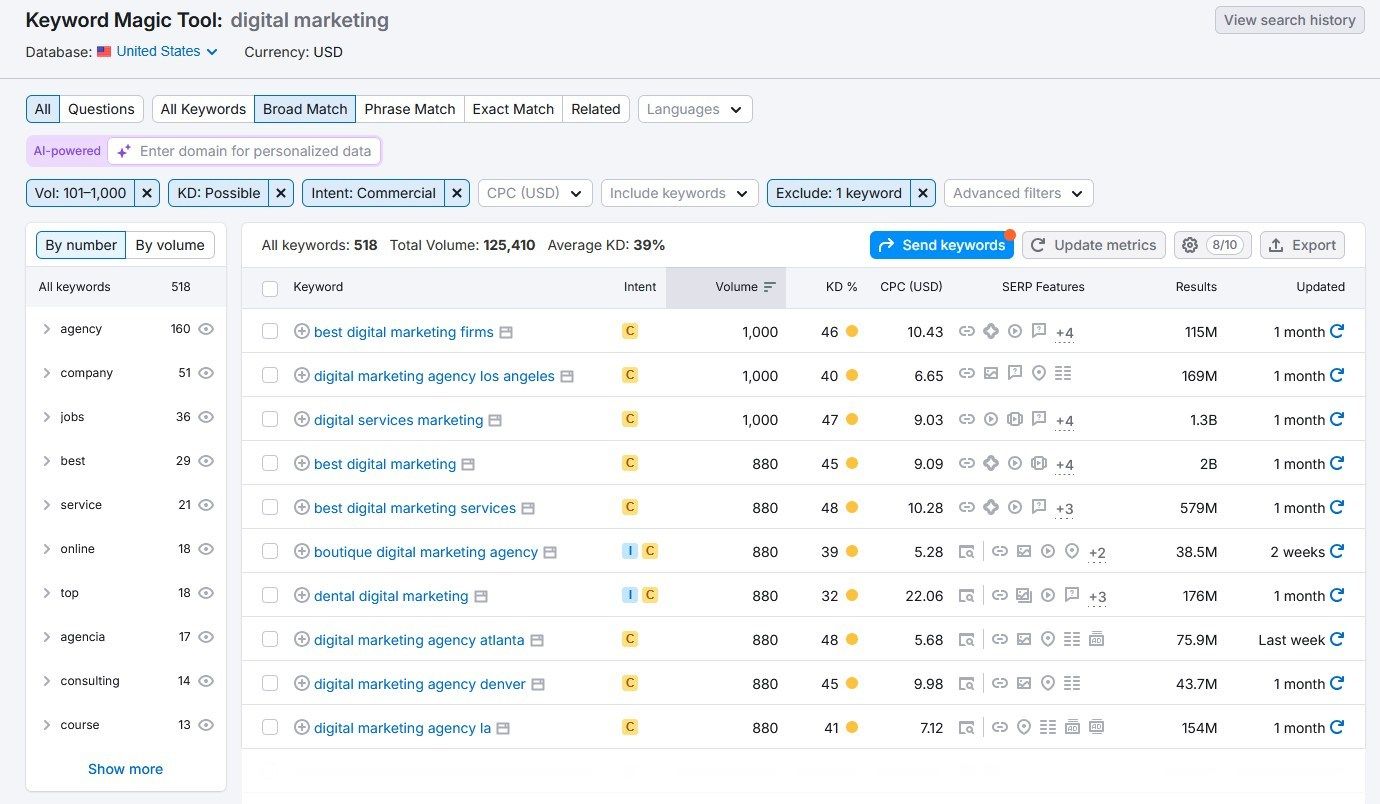
Keyword Magic Tool
This tool generates extensive keyword lists from Semrush’s database of 27.5 billion keywords. Enter a seed keyword and you get thousands of related terms with metrics like search volume, keyword difficulty, and search intent (i.e., the goal behind the user’s search).
You can use the filters at the top to narrow your keyword list down by these metrics, and even include or exclude specific keywords from the results. This is great for removing branded keywords, for example.
If you enter your domain, the tool also provides AI-powered Personal Keyword Difficulty (PKD) scores for each keyword. This tells you how difficult it would be for your specific domain to rank for each keyword, based on your site’s current authority.
Meanwhile, the Potential Traffic metric estimates how much traffic you could gain by ranking for specific keywords.
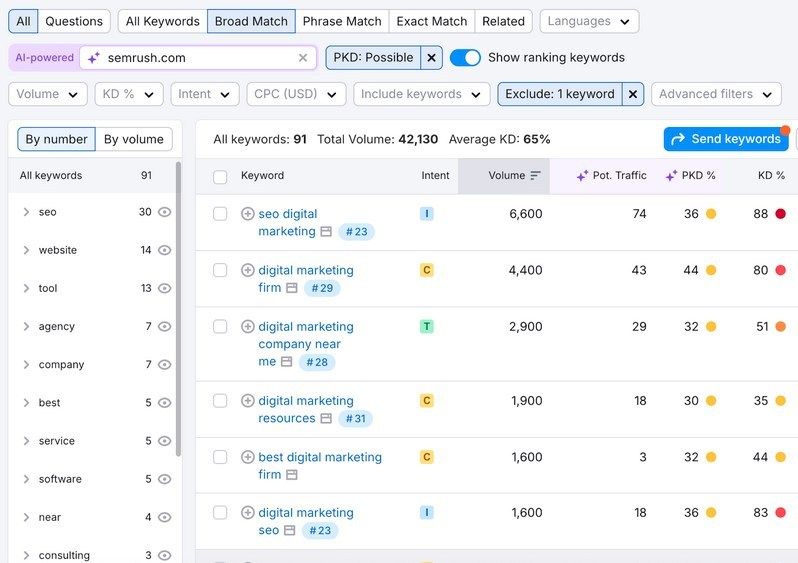
Keywords with high search volume and low keyword difficulty scores represent the best opportunities—topics with significant traffic potential that are easier to rank for.
Try the keyword magic tool
Keyword Gap
Keyword Gap shows you keyword rankings across your domain and up to four competitors.
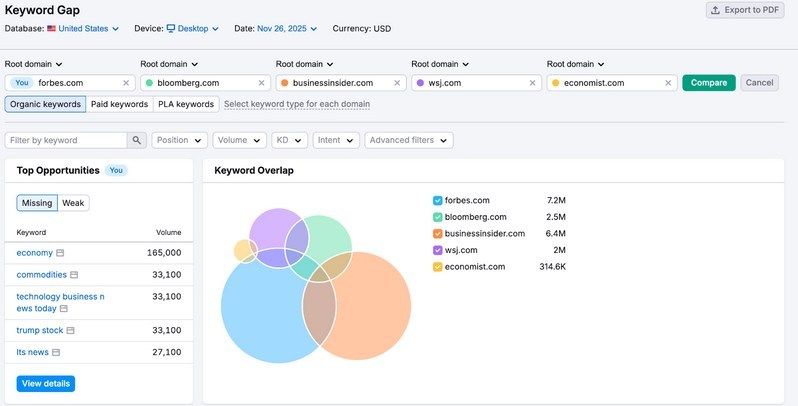
The tool shows you which keywords you all rank for, but more importantly, you can use it to see which keywords your rivals rank for that you don’t rank for.
Why is this useful?
Because if all your competitors rank for a keyword but you don’t, there’s a good chance that keyword is relevant to your business. You can then either optimize your existing content for that keyword, or create a new piece of content targeting it. By creating high-quality content, there’s a reasonable chance you’ll rank for that keyword too.
Find these keywords by navigating to the “Missing” tab.
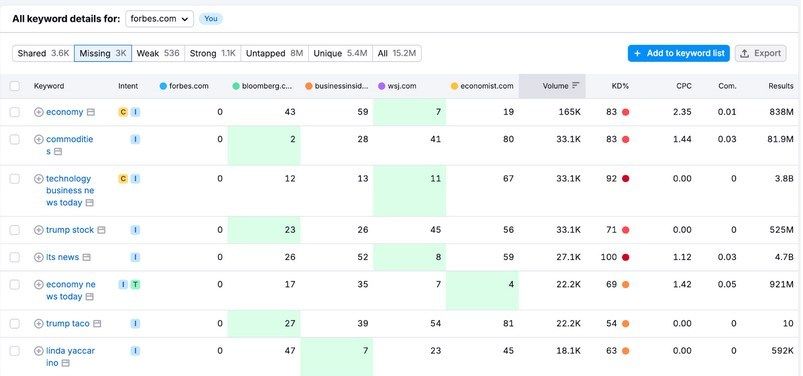
You can also filter by position to focus on keywords for which your competitors rank in the top 10 results. Or you can filter by keyword difficulty to target only keywords with low difficulty scores if your domain hasn’t built much authority yet.
Position Tracking
Position Tracking monitors your website’s search rankings daily for specific keywords across devices, locations, and search engines.
Note: You can also use it to track your visibility for AI prompts.
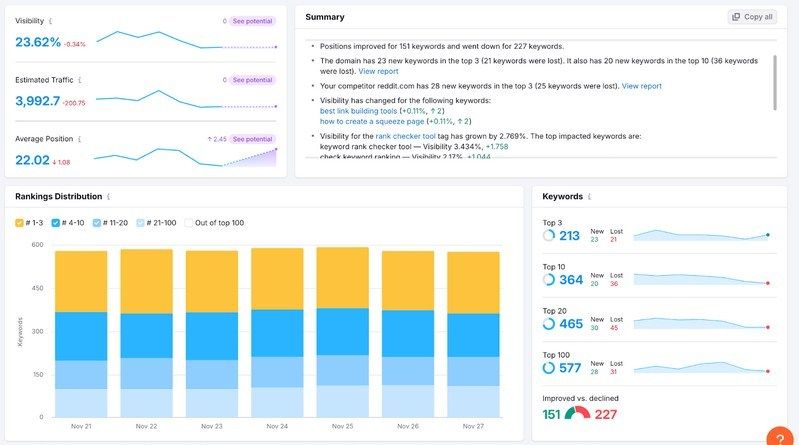
You simply enter the keywords you want to track, and the tool regularly updates your rankings for them. It even shows you where you rank compared to your rivals, so you can automatically keep tabs of your relative performance.
Track your positions with Semrush
Competitive Analysis
Beyond keyword research, Semrush One also comes with a couple of super useful competitive analysis tools.
Domain Overview
Domain Overview is a tool that shows any website’s organic traffic, paid traffic, backlinks, and AI visibility in one report. This provides a snapshot to assess your competitor’s strengths and to identify opportunities where you can beat them in organic search.

Domain Overview aggregates data from various Semrush tools, including:
- Organic Research: Provides keyword rankings, top competitors, SERP features, and non-branded topics driving traffic
- Advertising Research: Provides paid keywords, ad spend estimates, ad copies, and paid competitors
- Backlink Analytics: Provides referring domains, backlink types, and anchor text data
- AI Visibility: Provides AI mention and citation data
Each metric in Domain Overview links directly to its detailed report, letting you click through for deeper analysis.
Just note that you won’t be able to see the full advertising data reports without a separate Advertising Toolkit subscription. You will still see key data points in the Domain Overview interface though.
Organic Research
The Organic Research tool’s Overview report gives you an in-depth summary of your rival’s online presence, including:
- Estimated traffic
- Keywords
- Top position changes
- SERP features
- Top pages
- Top subdomains
- Main organic competitors
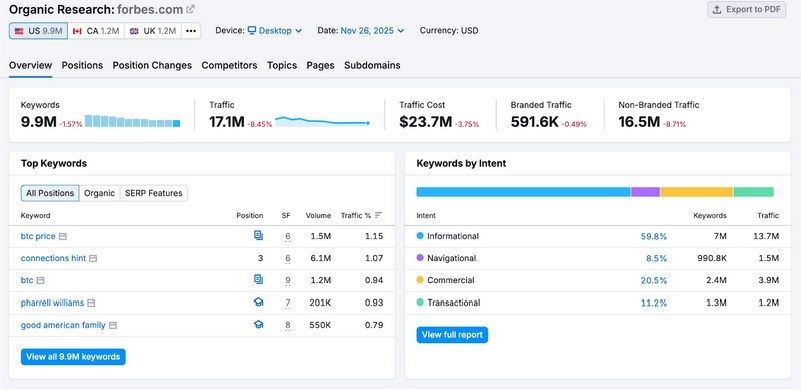
The Positions report shows all keywords a competitor ranks for in the top 100 search results. But you can use advanced filters to narrow your search.
For example, you can filter to only show keywords they rank for in the top 10, or exclude branded keywords that you’re unlikely to rank for.
Organic Research also reveals which keywords drive the most traffic to competitor sites, which pages perform best, and where you have opportunities to compete. This makes it a valuable competitor research tool you can use to understand where and why your competitors are outranking you.
Backlink Building
Building high-quality backlinks is a key way to improve your site’s authority and rank higher on Google. Semrush One comes with several tools that make it easier to find useful link building opportunities.
Try the Semrush backlink building tools
Backlink Analytics
Backlink Analytics lets you analyze any website’s backlink profile using Semrush’s huge backlink database of 43 trillion links from 390 million domains.
In the Overview tab, you’ll see key information about the domain you entered, including the number of unique websites linking to the target domain (referring domains) and the total number of backlinks the site has.

You’ll also get at-a-glance views of how the target website has lost or gained referring domains and backlinks over time. This can indicate whether they might have run backlink building campaigns.
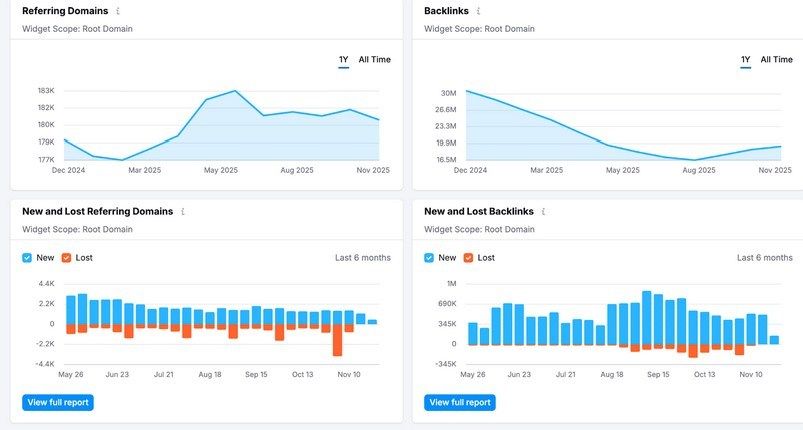
You can see a full list of all the backlinks pointing to a target website in the Backlinks tab. This tab includes preset filters to quickly view new backlinks, lost backlinks, follow vs. nofollow links, and backlinks by type (e.g., text or image).
This data isn’t just great for understanding your rival’s backlink profile. You can also dig into these backlinks as potential opportunities to get links to your own site. After all, if a website is happy to link to your competitor, they may also be willing to link to you.
Backlink Gap
Backlink Gap allows you to compare the backlink profiles of up to five competing websites at once. The tool helps you spot link building opportunities by comparing gaps across your site and your rivals.
The tool sorts the links into five categories:
- Best: Domains that point to all competitors, but not to you
- Weak: Domains that point to your website less than to competitors
- Strong: Domains that only point to your website
- Shared: Domains that point to all the websites in your list
- Unique: Domains that point to only one website from your list
For each tab, the tool provides Authority Score for each referring domain, helping you prioritize outreach based on link quality. You can also filter results by timeframe, link attributes, and domain characteristics to refine your prospect list.
But the “Best” tab is the most useful for spotting link building opportunities, since it shows you websites that are linking to all your rivals but not to you. These are websites that are likely to also be willing to link to your site.
Site Optimization
Semrush One also comes with two handy tools to help you optimize your site’s technical and on-page SEO.
Site Audit
Site Audit is a powerful SEO audit tool that provides over 140 on-page and technical SEO checks. These include everything from checking for duplicate content and detecting broken links to conducting a detailed review of your HTTPS setup, evaluating proper hreflang usage for international sites, and assessing overall crawlability and indexability.
This makes keeping tabs on critical parts of your website’s technical health much easier—particularly for those with limited technical SEO knowledge.
When Semrush finishes auditing your website, you get an overall Site Health score based on the number of total errors and warnings found on the pages the tool crawled.
Audit your website today
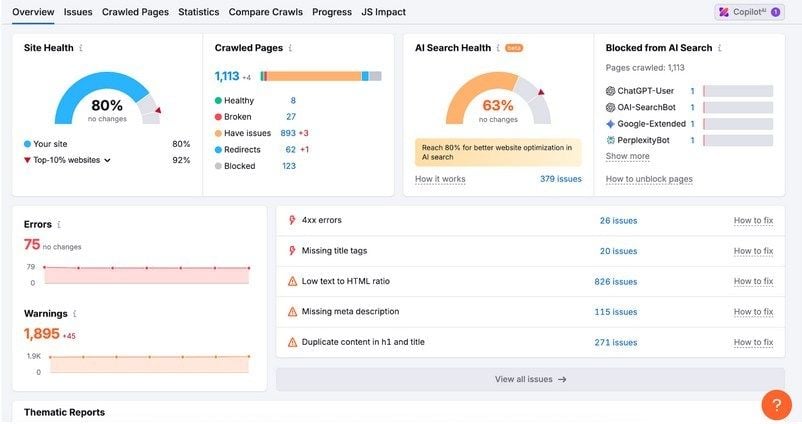
At the bottom of the overview tab, you’ll see a widget with different thematic reports. These cover:
- Robots.txt
- Crawlability
- HTTPS
- International SEO
- Core Web Vitals
- Site Performance
- Internal linking
- Markup
Clicking into any of these will give you a more detailed report. For example, here’s what the crawlability thematic report looks like:
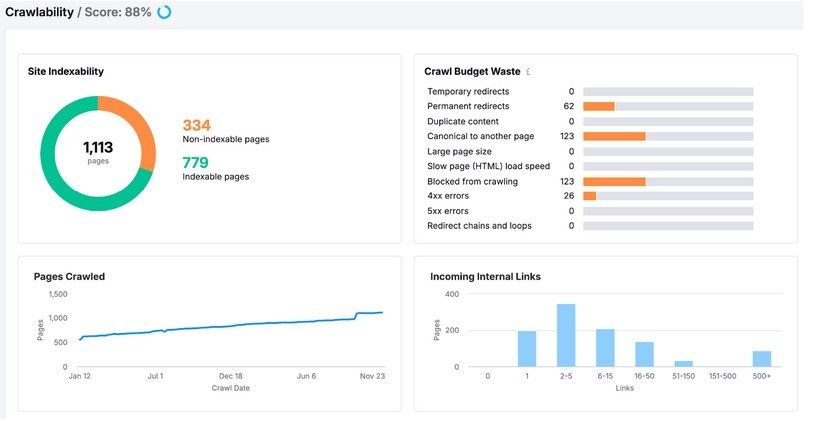
These detailed reports break down critical aspects of your site’s performance in more detail.
In this crawlability report, you can see a breakdown of how many pages on your site are indexed or non-indexable. In other words: which pages are not able to appear in Google search results.
You’ll also see charts of your crawl budget waste, which indicates reasons that might be reducing the efficiency of Google’s crawlers on your website. This can impact how many of your pages the search engine indexes, and how often it crawls your site.
To see all the errors and warnings about your site in one place, head to the “Issues” tab. Here, you’ll see a list of errors, warnings, and notices that you can filter by category. You can also search for specific issues too.
You can schedule Site Audit on a regular basis. This lets you run your technical SEO monitoring on autopilot, as the tool will flag issues to you that you can then fix before they start affecting your search performance.
On Page SEO Checker
The On Page SEO Checker provides actionable steps to improve your rankings on Google by comparing your pages with the top 10 organic competitors for each target keyword, taking data from Semrush and Google.
It analyzes the pages and then provides ideas in different categories, including strategic ideas, backlink opportunities, and ways you can improve your user experience. It then provides an estimate of the traffic gains you could make by implementing the ideas.
Clicking the “# ideas” button for any of the pages shows you a more detailed report with each idea for that page. This makes it easy to understand how you can improve your page’s search performance with better on-page SEO.
Content Optimization
Optimizing your content for your target keywords can help you rank higher in Google search results. But understanding which optimizations will have the biggest impact can be a challenge. Semrush One addresses this issue with three helpful content optimization tools.
SEO Writing Assistant
The SEO Writing Assistant analyzes your content in real time and provides recommendations to improve SEO performance, readability, originality, and tone of voice. The tool gives you recommendations as you write, and you can implement them right within the editor itself.
The tool analyzes critical areas of your content, including:
- Readability: Improving your readability provides a better experience for your users, which may make them more likely to spend longer reading your content (and potentially more likely to convert)
- SEO: You’ll get real-time optimization suggestions for keywords to include, issues with your links, and alt attribute suggestions for your images
- Originality: The tool can also assess whether your content is plagiarized, and show you which sections you may want to rewrite to ensure your content is original
- Tone of voice: The tool checks that you’re using a consistent tone of voice throughout your content and provides suggestions to improve your consistency
This makes it easy to create content with search engine optimization built into the writing process.
Topic Research
The Topic Research tool streamlines the content brainstorming process. Just enter a topic in the search bar and the tool generates cards of related subtopics and ideas to include in your content.
You can sort topic cards by volume, difficulty, or topic efficiency (essentially a combined measure of how easy a topic is to rank for and how competitive it is). This makes it easy to prioritize topics that you’re likely to rank for and that are likely to drive traffic to your site.
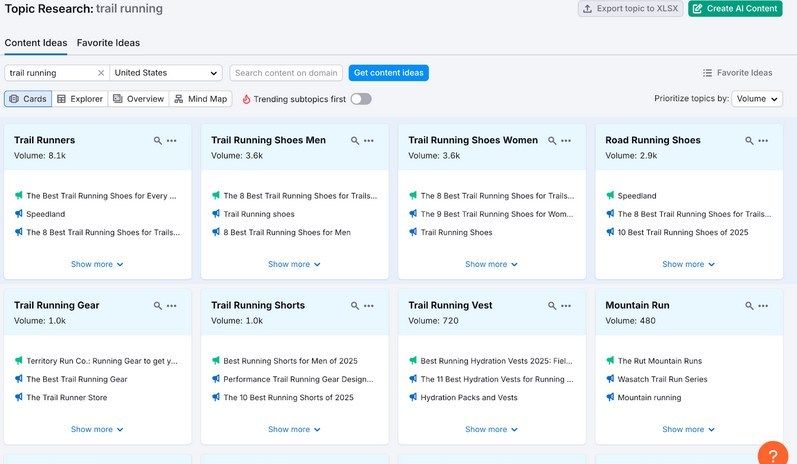
By clicking into each subtopic, you’ll see the top headlines and questions related to that topic.
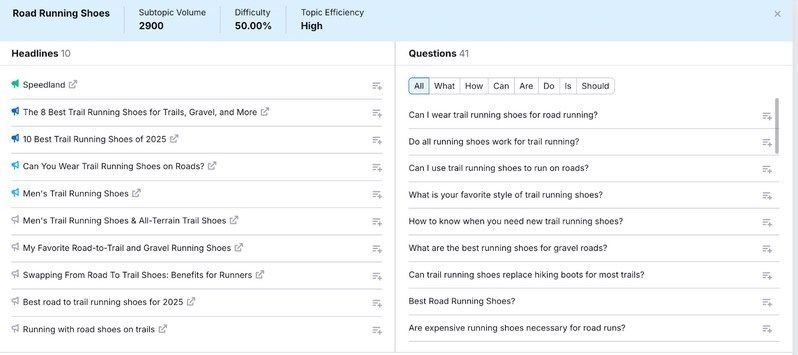
Within the cards, you can filter related questions by what, how, why, is, are, or other interrogative words depending on the question, letting you narrow down your list to only include a specific search intent. Targeting these questions in your content can improve your chances of ranking in Google and appearing in relevant AI responses.
Visit Semrush
SEO Content Template
The SEO Content Template tool provides a template of recommendations based on your target keyword.
Just enter a keyword or group of keywords.
Then, the tool analyzes the top 10 ranking pages and generates recommendations including text length, readability score, related keywords to include, and potential backlink targets.
You can then export the template as a file and share it with your writing team to improve your SEO from the start of the content creation process.
Semrush One AI SEO Tools
The second part of the Semrush One package is the AI Visibility Toolkit. This comes with several key tools that help you understand and improve your visibility in AI tools like ChatGPT, Google’s AI Mode, and Perplexity.
Visibility Overview
The Visibility Overview dashboard gives you a high-level snapshot of any website’s visibility across popular AI platforms.
You’ll see the site’s AI Visibility Score, which measures the brand’s presence in AI-generated answers compared to competitors. You’ll also see metrics like the size of the brand’s potential audience, the number of mentions that brand has, and how many of its pages are being cited in AI responses.
For this dashboard and all the others in the AI Visibility Toolkit, you can choose which platform you want to look at specifically—or you can measure visibility across all platforms at once.
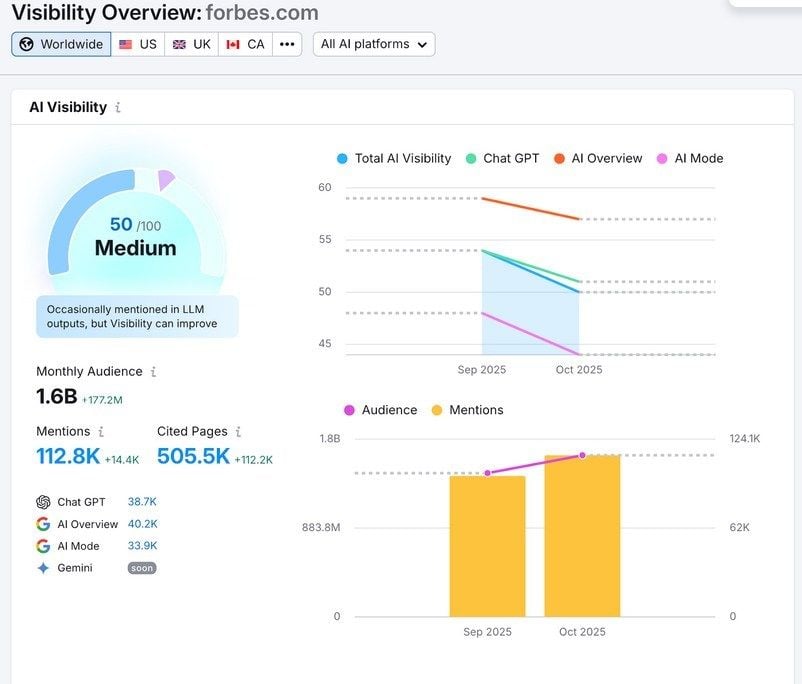
The tool also shows you which topics your brand currently performs well for and, critically, which topics you’re not showing up for.
To see these opportunities, scroll to “Topics & Sources” and click the “Topic Opportunities” tab. These are topics where you’re not currently appearing but your competitors are.
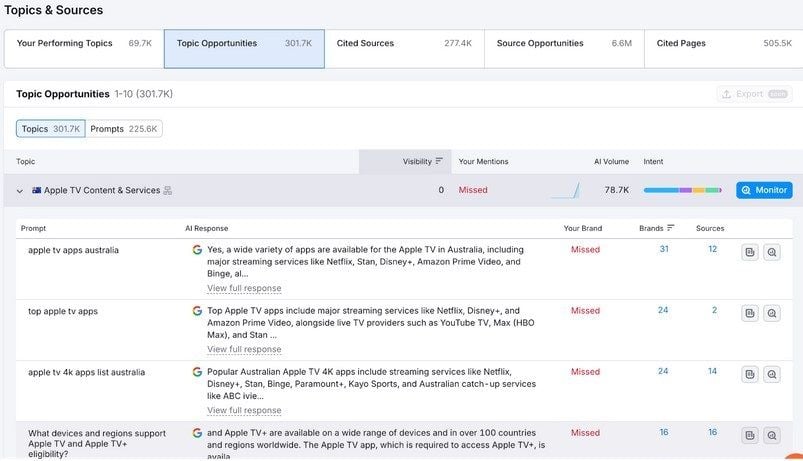
These are the topics you should create content on to improve your AI visibility.
Pro tip: You can click the “Monitor” button to track these prompts in the Position Tracking tool.
Competitor Research
With the Competitor Research dashboard, you can see how often you and your competitors are mentioned in AI systems like AI Overviews, Google AI Mode, and ChatGPT. You can also find out what customers are asking LLMs about your business.
An easy way to find gaps between your brand and your rivals is to go to the “Topics & Prompts” section and select the “Missing” tab. This will show you all the topics and prompts your rivals appear for that you don’t.
Spy on your competitors with Semrush
You can use the “AI Volume” column to prioritize the topics by the estimated number of search queries the topic gets in your chosen AI platform each month.
You can do the same thing with sources. This shows you all the websites that are currently citing your rivals but not you. These are websites you should try to get featured on to potentially improve your AI visibility.
Prompt Research
The Prompt Research dashboard helps you discover which topics and prompts are relevant to your business and which brands currently dominate responses for those queries.
For any topic area, you can see:
- How many people are prompting AI tools about that topic each month
- How many subtopics people are asking about
- How many individual prompts are being asked to AI tools
- The intent split across all of those prompts
- How many brands are mentioned for that topic
- How many unique domains are cited by the AI tools as sources
This means you can see not just what people are asking, but which brands LLMs trust as authoritative sources for different topics. You can use these insights to identify content gaps and find sources you might want to get mentions from.
Brand Performance
The Brand Performance dashboard provides a deeper dive into your AI visibility metrics. It moves beyond the overview to show exactly how your brand performs against competitors across key AI visibility metrics.
First, you’ll see a list of AI-generated insights that can help you improve your visibility and perception in AI tools. And on the right-hand side, you’ll see a chart showing your brand’s share of voice and sentiment score versus your rivals.
This is useful for getting a quick, digestible read on how AI tools portray your brand. Ideally, you want to have a large share of voice and a positive sentiment score.
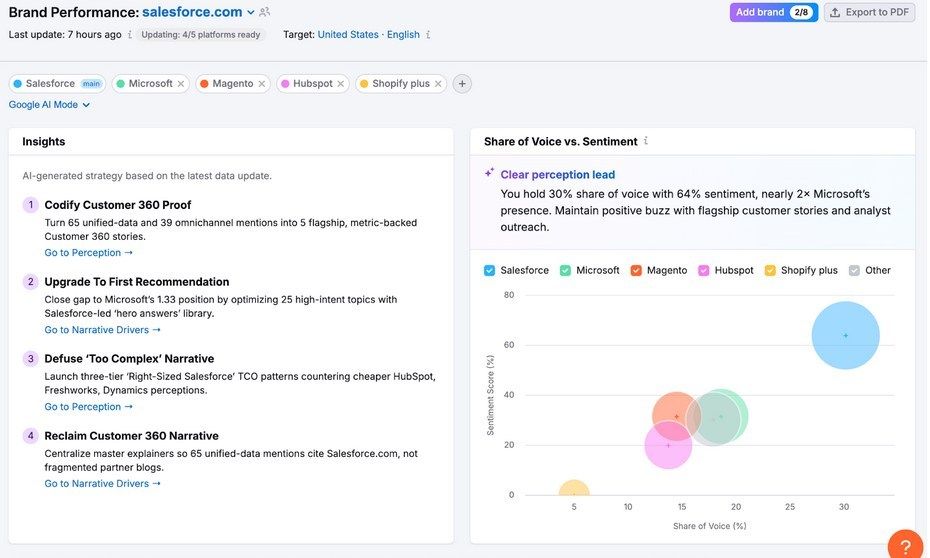
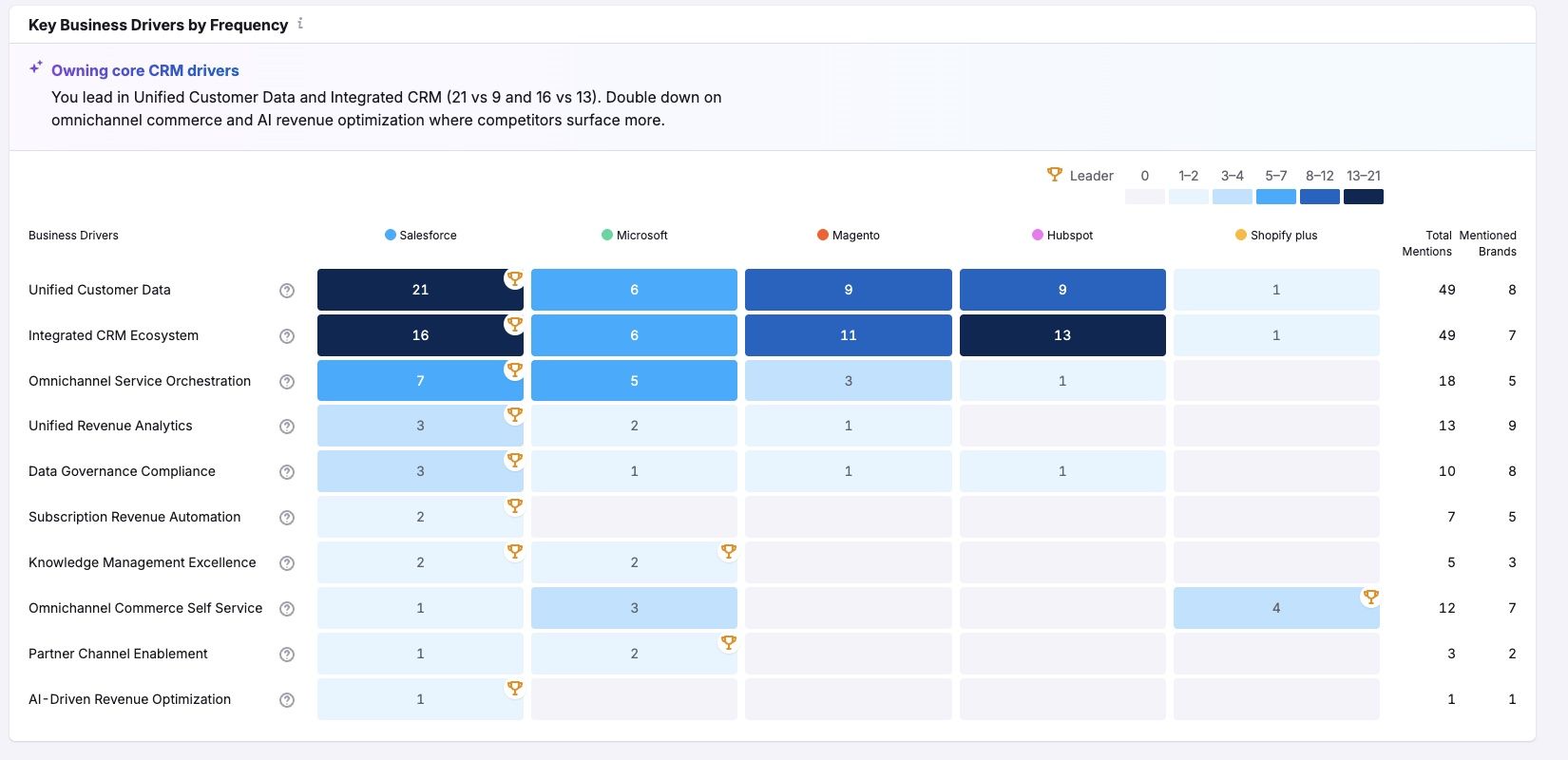
Further down, you’ll find the “Key Business Drivers” section. This part might look a little overwhelming at first, but here’s what it all means:
The items on the left (Business Drivers) are factors your target market considers when looking at brands like yours. For example, they might look for comprehensive rank tracking when picking a keyword tracking tool.
If your brand is mentioned by the AI tools in the context of this factor, you’ll see it reflected in the number in your brand’s column. The bigger the number and the darker the color, the better.
This implies your brand is mentioned often in the context of that factor. And you ideally want to appear in these contexts more often than your rivals. If you’re not, these are areas you may want to optimize your content and messaging for.
Perception
The Perception dashboard drills into the sentiment data to reveal why your brand receives the sentiment it does in AI responses. In other words: what’s affecting the way AI tools talk about your brand?
You’ll see a summary of insights and where you compare to your rivals on different platforms in terms of sentiment score.
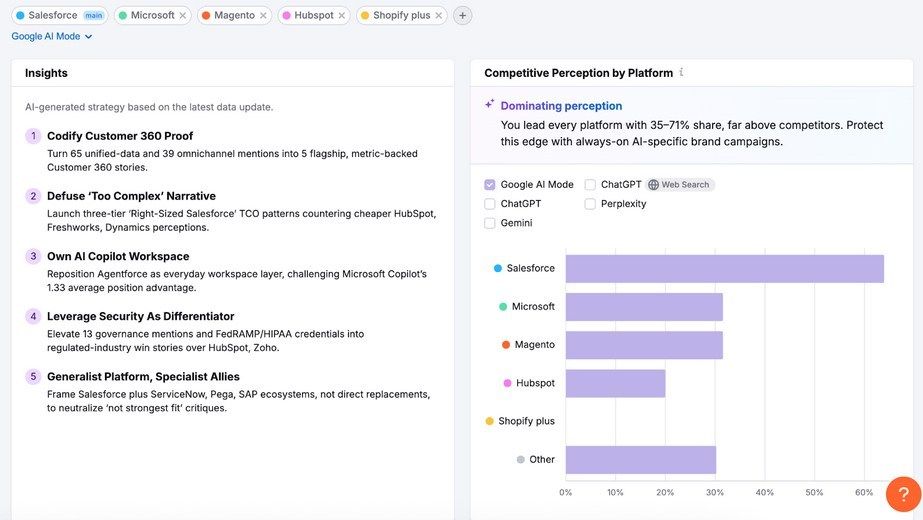
But below this data, you’ll see two columns:
- Brand Strength Factors: The factors that are positively affecting your sentiment in AI tools
- Areas for Improvement: The factors that are negatively impacting your sentiment
How should you use this data?
Essentially: keep doing what the brand strength factors say you’re doing well, and use the areas for improvement as guidance for things you could be doing better.
You can address some of these with content and awareness efforts. But others might require you to update or improve your products/services.
AI tools take into account more than just the content on one single page for their responses. So, having this data that can help you improve not just your content but also the tangible aspects of your brand is super valuable, and far beyond what any SEO tool can do on its own.
Try Semrush today
Narrative Drivers
The Narrative Drivers dashboard shows you the breakdown of questions and prompt types where your brand appears versus where it doesn’t, compared directly to competitors.
This tool is particularly useful because you can use the filters to only show prompts that you don’t appear for but your rivals do appear for, and how prominently. You can also see the full prompt each time. This means you can analyze the prompt to understand why your competitor was mentioned.
This is another valuable way to find opportunities to optimize your content for prompts your target audience is asking. There are two main reasons these prompts are worth targeting:
- Your opponents are already appearing for them, which means you will probably be able to as well (by creating high-quality content)
- Since they’re already showing up for these prompts, you’re missing important visibility opportunities
Optimizing your content for these prompts can therefore let you gain back more share of voice by showing up where your target customers are searching.
Questions
The Questions dashboard aggregates real user prompts and groups them by theme. This shows you exactly what people are asking LLMs about topics relevant to your business. And you can see the intent trends over time—an indication of how user search behaviors are changing.
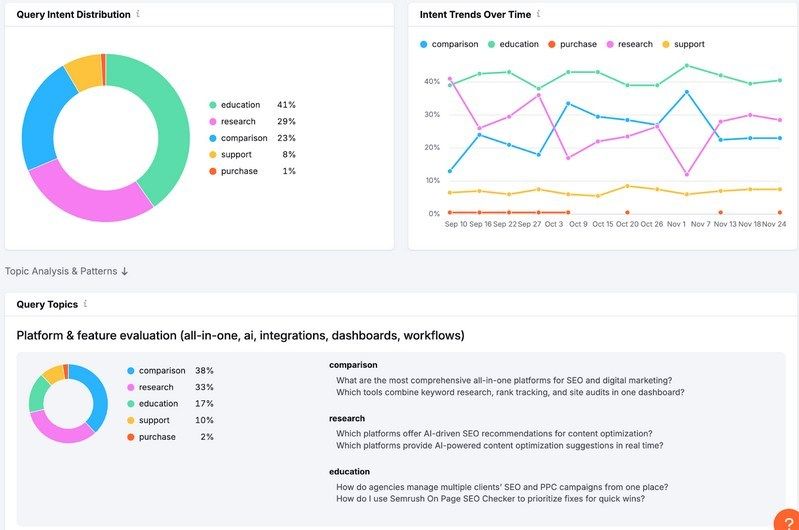
The grouped themes help you identify content gaps at scale. Instead of optimizing for individual prompts one by one, you can see that an entire category of questions about “[topic]” exists where your brand is missing, then create comprehensive content addressing that theme.
This transforms AI SEO from reactive (“target this one prompt”) to strategic (“establish authority in this question category”).
Semrush One Pricing: How Much Does It Cost?
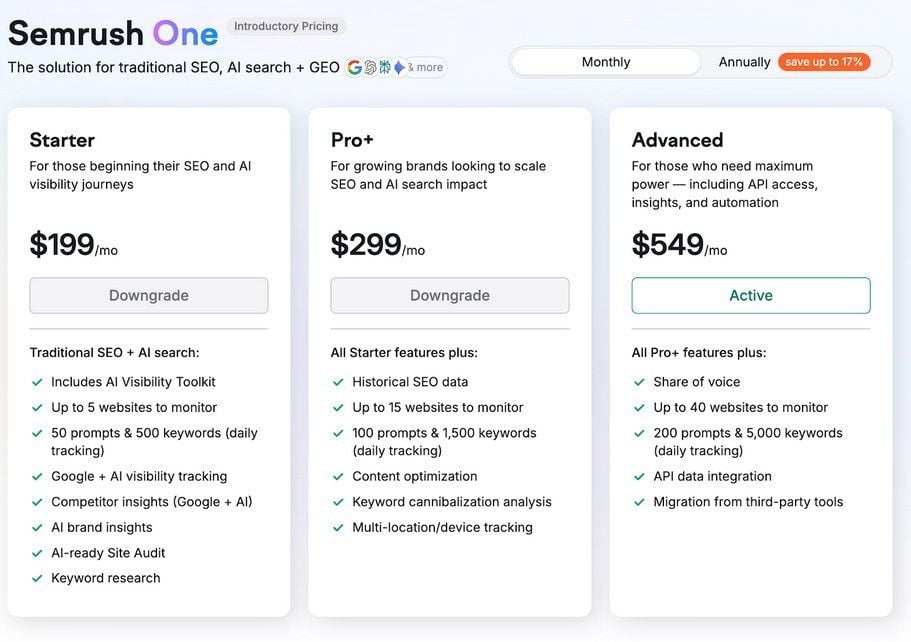
Semrush One offers three subscription tiers designed to scale with your business needs:
See all Semrush One plans
Starter Plan: $199/month
The Starter plan is ideal for those beginning their SEO and AI visibility journey.
It lets you track up to 5 websites and monitor 50 prompts and 500 keywords daily.
This tier works well for freelancers, startups, or small businesses just beginning to optimize for both traditional search and AI platforms.
Pro+ Plan: $299/month
The Pro+ plan is designed specifically for growing brands looking to scale their SEO and AI search impact, with all the Starter features plus higher limits, historical data, content optimization, keyword cannibalization analysis, and multi-location/device tracking.
With this plan, you can track up to 15 websites, monitor 100 prompts, and track up to 1,500 keywords.
Advanced Plan: $549/month
The Advanced plan is designed for larger agencies and organizations looking to scale their online visibility efforts. It offers API access, deeper insights, and automation.
It comes with all the Pro+ features, plus the ability to track up to 40 websites, monitor 200 prompts, and track 5,000 keywords. You also get share of voice tracking and API data integration.
Use Semrush One to Grow Your Search and AI Visibility
Semrush One is the ideal solution for any business looking to grow their visibility in both organic search and in AI search.
With tools covering all the most important aspects of SEO and AI SEO, there is a lot you can do with Semrush One. And you can try it today with a free 14-day trial.
Try Semrush One risk-free for 14 days



