
Have you ever clicked on a Google Search Result and then hit the back button just to see the box of other related search suggestions? That box is called the “People Also Search For” (PASF). It might look simple to you, but it’s a very powerful feature in SEO, because every SEO professional wants to know what users are searching for.
You likely track keywords, optimize titles, and conduct research on content. But what if I tell you that the most useful SEO data is not in your tools, but in what users do when they bounce back to Google? That’s where the People Also Ask For comes in.
PASF is a list of related queries that appears when someone clicks on a search result and then quickly returns to the SERP. It is basically Google’s way of asking, “Was that not what you needed? You might think that it sounds like another version of “People Also Ask,” and it doesn’t really matter for SEO or content planning.
The actual twist is that PASF is triggered by real-time user behavior, not just keyword relevance, and it’s not like People Also Ask. It’s a live signal of search dissatisfaction and the curiosity of the user. These are the two things that Google pays close attention to.
In this guide, we will break down how PASF works, why it matters for SEO, and how you can use it to optimize your content with evolving user intent. By the end of this guide, you will not see the PASF as a side note, but as a strategic SEO tool that you’ve been underestimating.
What Does “People Also Search For” Mean?
People Also Search For (PASF) is a Google SERP feature that shows related search queries after a user clicks on a result and then quickly returns to the search page. This action is called a bounce, and it tells Google that the original page may not have satisfied the user’s intent.
Under the listing that the user clicked, Google displays a small box labeled as “People Also Search For.” It will not be visible to you on the initial search results page, because it appears only after the bounce behavior. This box helps the user to find the relevant results.
This feature is available on both desktop and mobile, although it’s more commonly triggered on mobile devices due to the nature of quick browsing behavior.PASF is driven by user behavior that makes it more useful. It also offers valuable insights for SEOs and content creators.
If a user searches for “SEO audit checklist,” clicks on one of the results, and quickly realizes that it’s not what he was looking for, he returns to the SERP. In response to this bouncing behavior of the user, Google displays a “People Also Search For” box under the result the user clicked.
This box includes related suggestions such as “technical SEO checklist,” “on-page SEO guide,” or “SEO tools for audit.” These follow-up queries are not random; they are based on what other users commonly searched for after experiencing the same unsatisfying result. This makes PASF a direct reflection of real-world search behavior and user intent.
How It Differs from “People Also Ask”
While “People Also Search For” (PASF) and “People Also Ask” (PAA) may seem similar but they serve different roles. PAA appears during the initial searches and shows related questions in a dropdown format. On the other hand, PASF appears only after a user clicks a result and returns to the SERP.
PASF also offers keyword suggestions based on real user behavior. It helps to do refined searches, and it’s valuable for understanding the unmet user intent. While, the PAA focuses on questions because it is designed to provide quick and direct answers.
The Evolution of PASF on Google SERPs
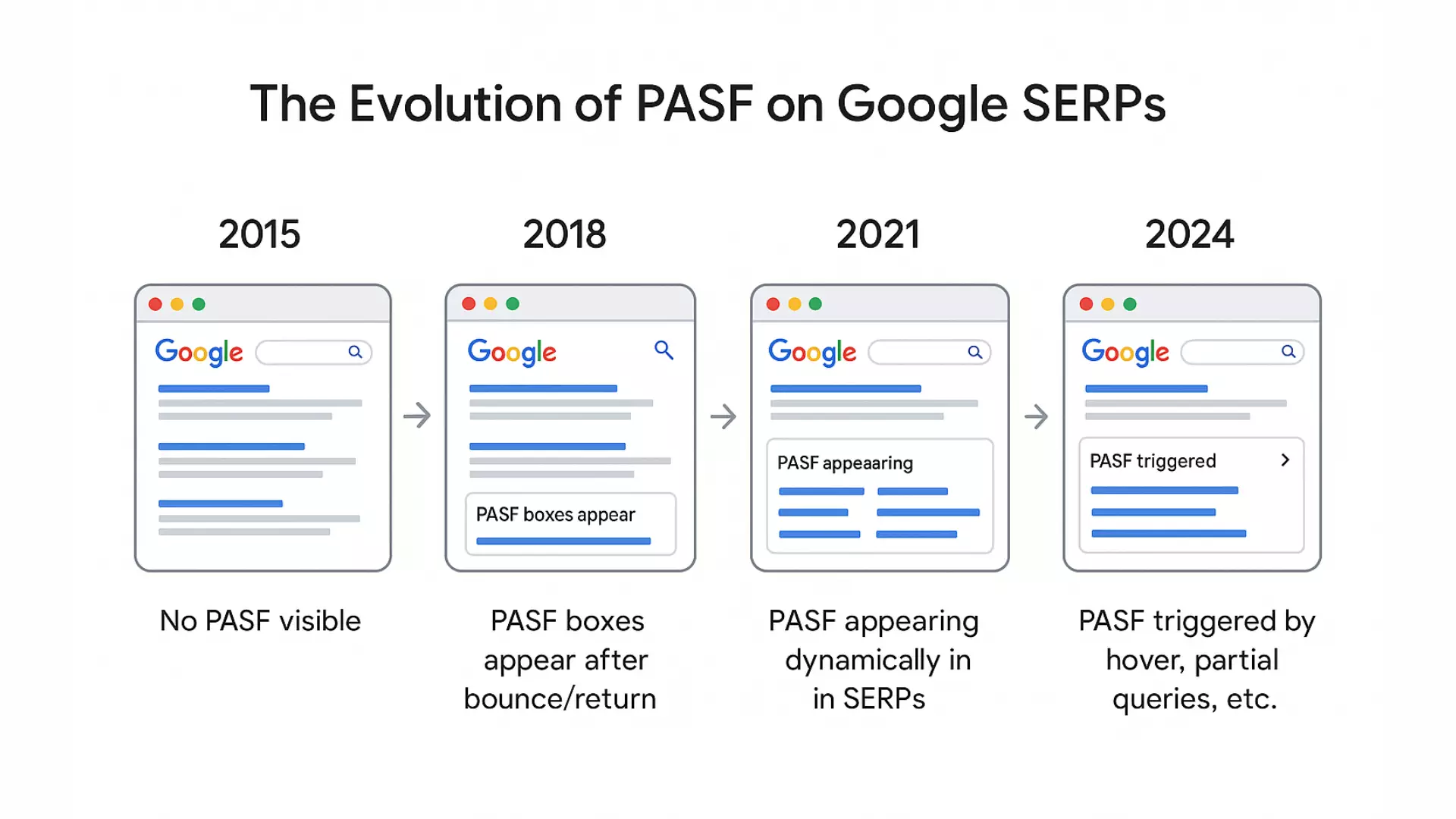
The feature of “People Also Search For” was not always a visible part of Google’s search results. The development of PASF reflects Google’s shift towards understanding real user behavior and delivering more refined suggestions.
Before 2018, Google did an experiment by displaying related search terms, but they were placed at the bottom of the page and were not clearly labeled as PASF. Those early efforts lacked behavioral triggers, and they were largely based on broad query associations.
Then in 2018, Google officially introduced the PASF box that we know and see today. Google marked bouncing behavior as a major shift and started using PASF to guide users towards better search satisfaction. From 2020 onward, PASF became more dynamic, thanks to the rise of AI technologies like RankBrain, BERT, and MUM. These systems helped Google to better understand natural language and user intent.
With the launch of Search Generative Experience (SGE), PASF became smarter because it uses generative AI for more personalized keyword suggestions. Now it’s extending beyond Google to platforms like YouTube, Google Discover, and autocomplete. Today, PASF is powered by machine learning. Understanding its evolution is key to using it effectively in 2025 and beyond.
Why “People Also Search For” Matters in SEO
For some people, PASF is a kind of curiosity, but actually, it’s a strategic SEO asset. It reveals what users are still looking for even after clicking a result, because it is activated by real-time user behavior. By targeting PASF keywords, you can align your content more closely with search intent and also improve your click-through rate (CTR).
PASF also helps users identify the group of related searches that users often explore together. You can make your content an extended resource that satisfies almost every user’s need by incorporating these clusters into it. This depth not only improves SEO relevance but keeps readers on your site longer.
For example, if your article is about “Business Names Ideas,” PASF may suggest you “Food Business Names” or “Ecommerce Business Names.” Covering these topics helps you build a topical authority and increase the chances that your content will rank for multiple related searches. It also boosts visibility and adds value.
Real-World SEO Benefits
Using PASF terms in your content brings real SEO benefits. Let’s take a look at some of them!
These small additions can boost the website’s relevance, improve your on-site navigation, and signal topical authority to Google.
How to Find “People Also Search For” Keywords
After understanding the actual power of PASF, the next step is learning how you can find these keywords. These keywords are generally activated by the user behavior, which means they only appear when a user clicks a result and then bounces back to the SERP. This is incredibly valuable for content strategy.
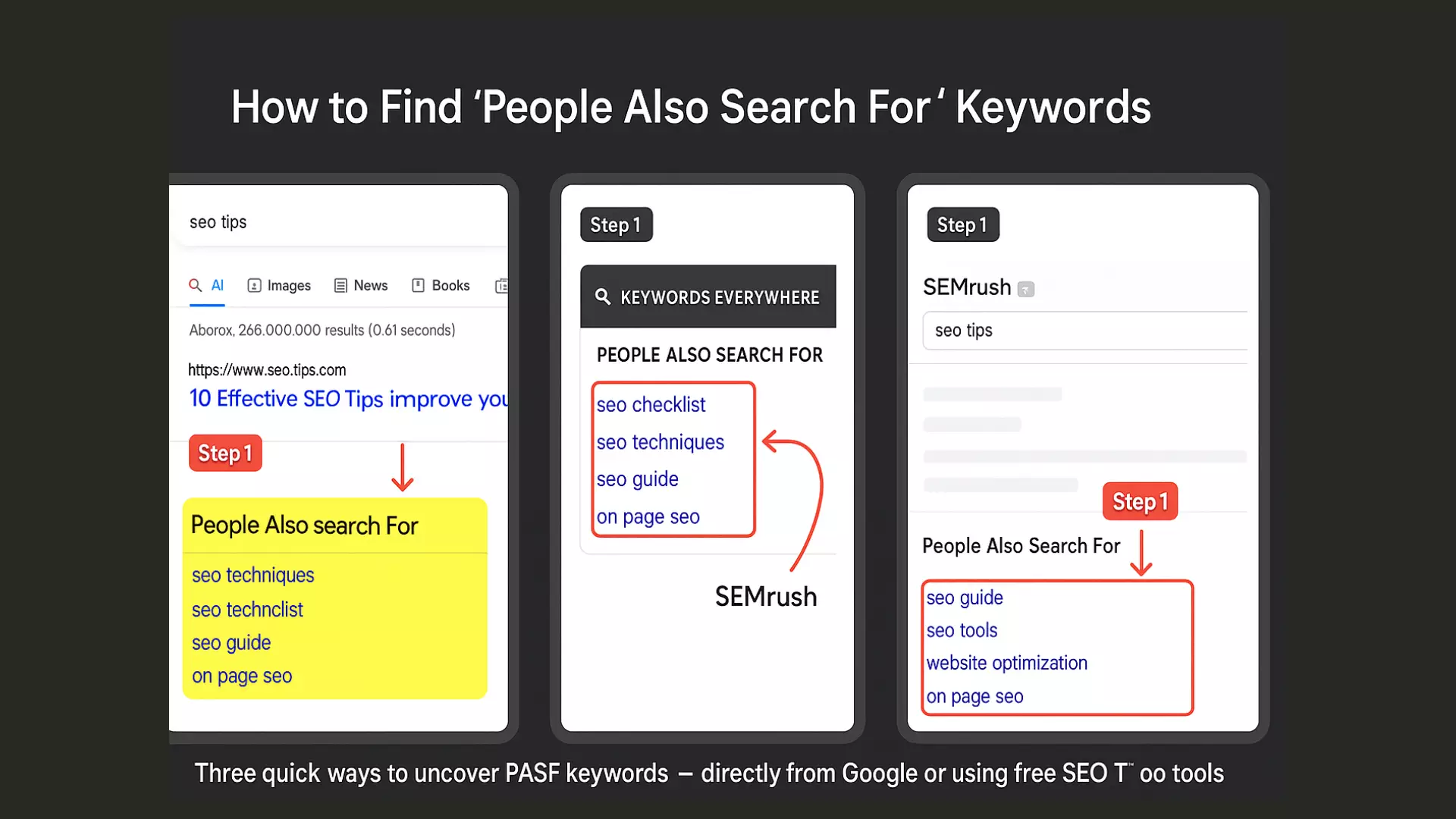
One of the easiest ways to uncover PASF keywords is by performing manual SERP tricks. In this trick, you type a query into Google, click a result, wait a few seconds, and then hit the back button. You will see a PASF box directly beneath the clicked listing. These keywords are based on real-user behavior, often less competitive, but perfect for deepening content coverage.
If you want to scale this process, then you can use different tools and extensions to automate the extraction of PASF data. It also helps you uncover the hidden content opportunities.
There are two main ways:
Manual Methods
You can uncover the PASF keywords manually with a simple SERP trick. Here are the steps:
A pro tip is, use Incognito Mode to avoid biased personalized results. This manual method is perfect for discovering real, behavior-driven keywords.
Tools & Extensions
You can speed up your People Also Search For (PASF) research process by using different tools or extensions because they extract keyword suggestions more efficiently. Here are some tools and extensions that you can use.
You can combine tools with manual methods for best results.
Using PASF to Strengthen Your Content Strategy
Using People Also Search For (PASF) keywords in your content can significantly enhance your search engine rankings, because it deepens the topical coverage and meets the user intent. It’s one of the key benefits is blog expansion, like People Also Search For Google (PASF) gives suggestions such as “email drip campaigns” or “best time to send emails,” which can be turned into separate blog posts that support your core topic.
You can form a semantic cluster because this structure boosts the topical authority and improves internal linking. You can also improve the existing articles by adding PASF terms as FAQs or new sections. These additions will naturally align your content with evolving search behavior and also increase engagement.
Beyond the content depth, People Also Searched For (PASF) keywords help to improve relevance signals because they show Google that your content satisfies the related user. And because PASF terms change over time, you need to regularly update them to keep your content fresh and optimized.
PASF in Content Clustering
People Also Search For keywords are very effective for building effective content clusters. You can start with a pillar page like “Digital Marketing Strategy,” then you can use PASF terms as cluster topics, such as:
You can link these cluster topics back to your pillar page because it improves site structure and boosts topical authority. People Also Search For (PASF) meaning also reflects the real user journey, so clustering content helps you rank higher in this regard.
PASF in Blog Intros & FAQs
As we discussed above that People Also Search For (PASF) keywords are very effective for content clusters. Exactly like that, these keywords also play a vital role in blog introductions and FAQ sections. To immediately connect with the search intent, you should start your blog post with a relatable statement. For example:
“Wondering how SEO tools compare to social media platforms? These are some common questions people also search for.”
In the FAQ section, you can directly turn PASF terms into question-based headings like:
Using PASF keywords in these sections increases relevance, boosts CTR, and gives your content better chances of appearing in featured snippets. This improves overall SEO value and improves user experience.
Optimizing for PASF: Best Practices
To get the most from PASF keywords, you need to apply smart and strategic optimization techniques. This approach ensures that PASF terms not only fit naturally into your content but also enhance its structure, boost relevance, and improve user engagement.
The given tried-and-true optimization techniques can help your content rank higher. Let’s take a look!
Add Contextual Relevance
Contextual relevance means aligning your content with what users are likely thinking or searching for next. By naturally weaving People Also Search For (PASF) keywords into your content flow, you can create a seamless reading experience that mirrors the user journey.
For example, if someone searches for “on-page SEO tips” and a PASF keyword is “technical SEO audit,” you can briefly mention or link to that topic within a relevant section. This not only strengthens semantic relevance but also improves internal linking. It makes your content feel more complete, and the important thing is both users and search engines highly value this depth in modern SEO.
Examples of PASF Optimization
For a better understanding of PASF optimization, just imagine that you’ve published a blog titled “Best Digital Marketing Tools. To optimize with PASF, you identify related terms like “SEO tools,” “content marketing platform,” and “email automation software.” Then you add a subheading for each term, create a comparison table, and internally link to deeper posts.
This strategy or structure will align your content with what users search for next. As a result, your article will not only rank for the main keyword but also for other PASF long-tail keywords. I also increase visibility and relevance.
PASF and Google’s AI Overview
As we all know that Google is shifting towards AI, and with this shift towards AI-driven search like the Search Generative Experience (SGE), search results are becoming more conversational. But PASF still plays a key role. Different AI models predict responses and rely on behavioral signals, and that’s the place where PASF shines. It reflects the real user intent, which AI can’t fully anticipate.
“People Also Search For” terms create semantic links between topics and help search engines understand how users naturally navigate the related queries. Structuring your content with PASF keywords, through subheadings, FAQs, or internal links, adds depth and improves your SEO ranking.
Nowadays, AI and traditional search are blending; in this way, PASF acts as a guide for what users want next. It aligns your content with both AI intent and PASF behavior, which gives you a clear SEO edge.
Conclusion
People Also Search For (PASF) is more than a minor Google feature. It’s a behavioral SEO signal that can truly reshape your content strategy. By understanding how and when PASF appears, you can unlock the most powerful insights into user intent, search patterns, and missed opportunities.
Whether you want to build content clusters, improve engagement, or increase visibility, PASF keywords help you align with what users truly want. When you use PASF terms strategically in intros, FAQs, and internal links, it not only improves topical authority but also supports AI-driven search evolution. In 2025 and beyond, mastering PASF can give your SEO efforts a competitive, future-proof edge.